WiFi jammers flood 2.4 GHz and 5 GHz bands with noise until cameras, doorbells, and smart devices simply drop offline. Here is how to spot jamming, confirm it with the right hardware, and harden your network before a break-in.
What Is WiFi Jamming and How Does a Jammer Work?
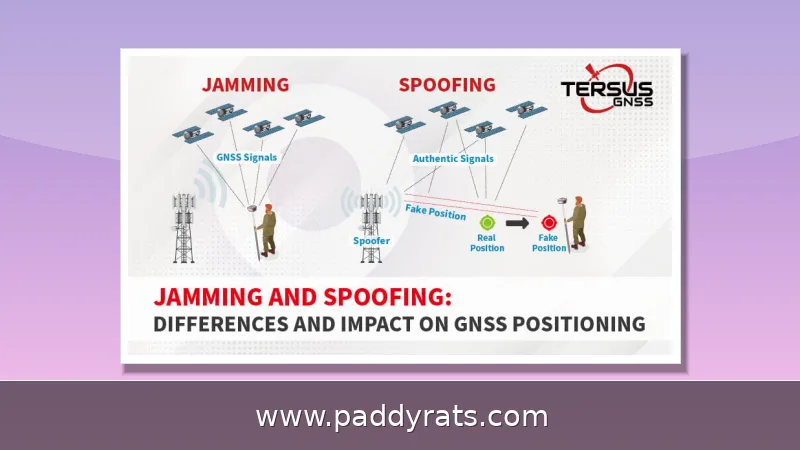
A WiFi jammer is really just a radio transmitter that blasts powerful RF signals across the same frequency bands your network uses, typically 2.4 GHz and 5 GHz. The idea is simple: flood the air with so much digital noise that the noise floor rises and your router and devices can no longer hear each other. And it doesn't degrade things gracefully, either—the connection just cuts out.
Cell jammers are basically the same idea, just aimed at cellular frequencies instead of Wi-Fi bands. They flood the frequencies your phone uses to reach the nearest tower, drowning that link in noise until it can't get through. Once the connection is overwhelmed, your phone can't send or receive data — and that means more than just a dropped stream. Emergency calls can fail, and public safety radio traffic can get blocked too, so the fallout goes well past a little buffering. One thing worth keeping in mind: jammers only take down wireless links. A wired Ethernet connection keeps right on working, which is part of why a landline or a hardwired alarm panel can still do its job when everything else goes quiet. And this isn't some fringe worry anymore. Since 2021, Customs and Border Protection (CBP) has seen signal jammer seizures jump by roughly 830%. Over the past year, Los Angeles leaders, law enforcement, and security experts have been warning about burglars using WiFi jammers to break into homes, DHS reported jamming devices in several Vermont bank robberies back in June, and California authorities recovered jamming equipment after an attempted jewelry store heist in La Verne.
The physics here doesn't leave much wiggle room, and that's actually good news if you're trying to catch a jammer. To work at all, a jammer has to be loud, wide, and running most of the time — three things that make it hard to hide. It has to out-shout your access point, pumping out enough raw power on the same bands your network uses, like 2.4 GHz and 5 GHz, to drown out legitimate traffic. And it can't pull that off on one narrow frequency; it has to spread that energy across a broad slice of spectrum to reliably knock devices offline. That wideband noise is the tell. Your router transmits in a tidy, structured way, while a jammer just floods the air with crude, constant energy — the kind of anomaly a spectrum analyzer or RF sensor can pull out of the background, often before you even notice your connection dropping.
Here's the thing about jammers that matters most if you own a home: they only disrupt wireless connections. That single limitation is exactly why they can be detected at all, and it's honestly the most useful diagnostic fact in this whole article. So think about what that really means in practice. If your Wi-Fi suddenly drops but the desktop PC plugged straight into the router with an Ethernet cable keeps loading pages without missing a beat, you're not looking at an internet outage, an ISP problem, or a dead router. You're looking at something that exists only in the air. A jammer floods the 2.4 GHz and 5 GHz bands with RF noise, and that noise can't travel down a cable. Which means the wired-versus-wireless split hands you a free, reliable test that takes seconds to run and costs you nothing. It also explains why so many security cameras and doorbells are the first things to go down: they're wireless. A wired or PoE camera, on the other hand, would most likely still be online, so you could check on your property even in the middle of an attack.
| Connection type | During a jamming attempt |
|---|---|
| Wired Ethernet | Keeps working normally |
| Wi-Fi (2.4 GHz / 5 GHz) | Drops, disconnects, or slows dramatically |
Talking about jamming comes with its own vocabulary, and it helps to know the lingo before you start hunting for clues. An RF jammer or signal jammer is the hardware itself, a device that floods a frequency band with radio energy. A deauth attack is a different beast: rather than drowning the signal in noise, it sends forged disconnection frames that knock your devices off the network. Wideband noise is the signature you'd look for when a jammer spreads interference across an entire band instead of a narrow slice. Then there's SNR, short for signal-to-noise ratio, which compares how strong your actual signal is against the background noise; when the noise climbs, SNR drops. Packet loss, latency, and bandwidth round out the list. Those three describe what you actually feel on your end: data that never arrives, delays that stretch into seconds, and throughput that shrinks to a trickle. Keep these terms handy, since each one will resurface later as a clue.
Warning Signs Your Network Is Being Jammed
The classic tip-off is a signal that drops or disappears entirely even when you're standing right next to the router. Think about how strange that is — two feet from the access point, your phone should have full bars, not be struggling to hold onto one. If you're seeing a single bar at that range, or the connection falls apart the moment you try to actually use it, something is almost certainly pumping extra energy into a band where it doesn't belong. That's the whole idea behind a WiFi jammer: it floods the 2.4 GHz or 5 GHz spectrum with strong RF noise until the legitimate traffic between your devices and the router gets drowned out. The result is a signal-to-noise ratio so bad that your phone, camera, or laptop just can't hear the network anymore, no matter how close it sits to the source. | What you observe | What it usually means | |---|---| | One bar at two feet from the router | Strong interference source nearby, such as a jammer | | Signal strength jumps around erratically | Competing RF energy on the same band | | Connection works on Ethernet but not WiFi | Wireless link is being overwhelmed, wired path is fine |
The second sign is a steady disconnect-and-reconnect loop. If a device keeps rejoining the network, dropping off, and then rejoining again every few minutes, it's usually dealing with interference — not just a router that finally gave out. The pattern itself is the giveaway. When a router dies, connections fail and stay failed until you power-cycle it. A jammer works differently: it dumps noise into the band in bursts, so your gear keeps grabbing for a signal that's solid one second and buried the next. Watch for whether the same handful of devices are cycling together, especially anything locked onto the 2.4 GHz band, and whether the dropouts come in short waves before everything looks normal again. If that loop repeats every few minutes while your wired connections never so much as flicker, that's a pretty strong hint that something is actively messing with your wireless link.
Then come the performance symptoms, and they usually show up as a package deal rather than one at a time. Your speeds tank, latency jumps, packet loss starts adding up, and the bandwidth you can actually use shrinks—sometimes all within seconds. The reason is fairly simple: a jammer floods the band with noise, so packets never make it to their destination and get resent or dropped entirely. That's why video stutters and buffers, video calls freeze mid-sentence or drop down to audio only, and cloud uploads stall halfway through without throwing any clear error. If you're seeing this cluster of problems on your wireless devices while a wired connection keeps humming along just fine, that's a pattern you really shouldn't ignore.
Timing tells you a lot here. If several devices drop off the network at the exact same moment, that's not what one faulty gadget looks like — a dying router or an old laptop gives out on its own schedule, not in perfect sync with everything else in the house. When the whole band goes down at once, an external source is the more likely culprit. The short bursts are just as telling: the signal cuts out, everything comes back a minute or two later, then it drops again. That on-and-off rhythm points to a jammer that someone switches on just long enough to do what they came for. Keep in mind that a jammer has to be loud, wide, and running most of the time to actually work, so a burglar usually leaves it on for only the few minutes it takes to slip past cameras and alarms — not all night.
You should also watch for routers and other connected devices that feel hotter than they should, along with wireless cameras that simply won't connect no matter what you try. That said, if your cameras are PoE, they'd most likely still be online, so you could pull up the feed and check on the property even while everything wireless is acting up.
When a cell jammer is at work, your phone usually gives it away in more or less the same fashion. You'll notice service drop on several devices at once, even in a place where reception is normally solid. And the signal bars won't stay put — they'll jump around erratically instead of holding steady.
How to Detect a WiFi Jammer: Apps, Sensors, SDR, and Spectrum Analyzers
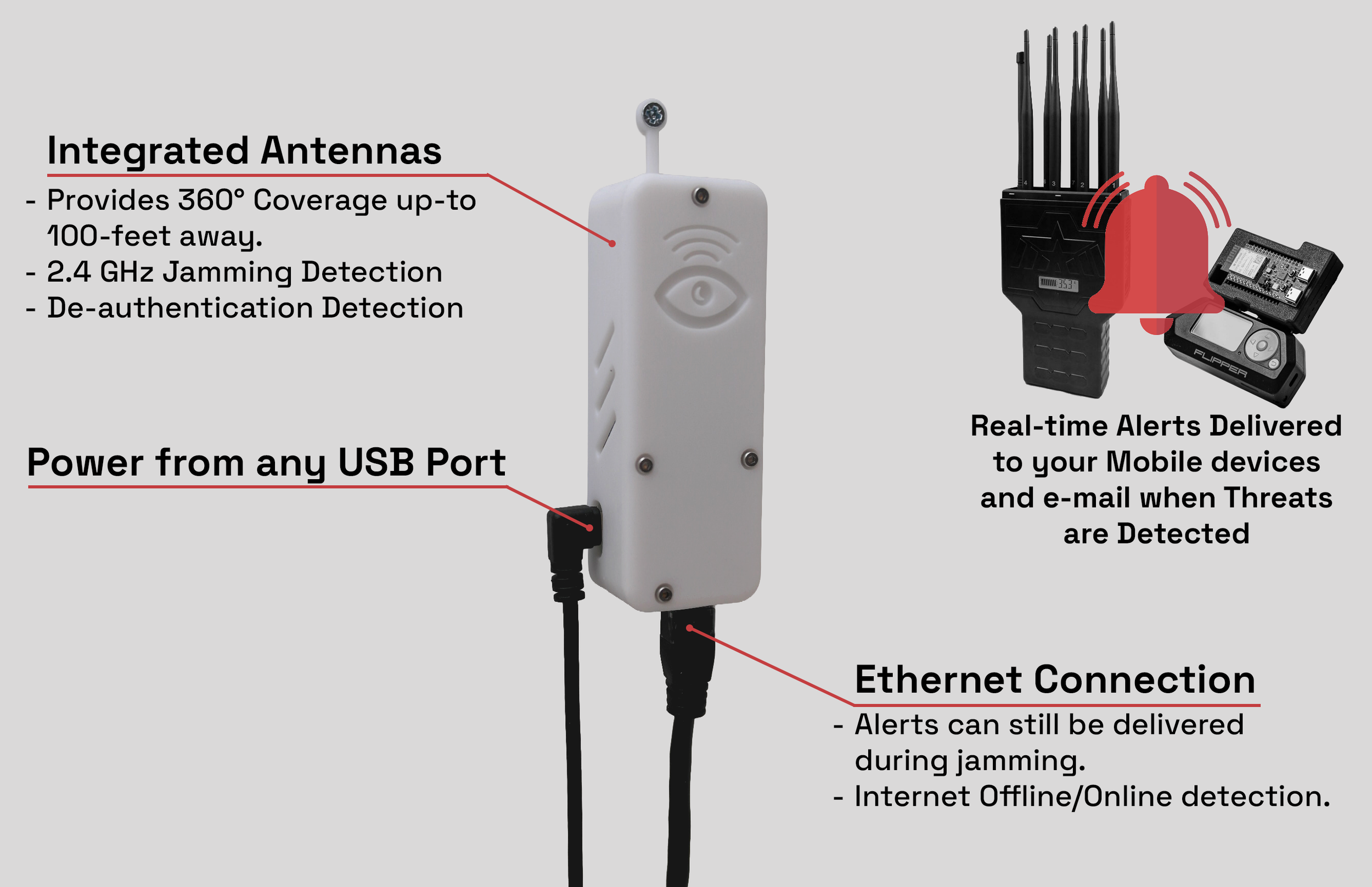
Dedicated detector hardware is the most reliable route. The Wi-Fi Jammer Detector by Eye LLC is a small, Ethernet-connected device that monitors Wi-Fi and RF signals in the air to detect nearby jammers. It must be wired to your main router or switch, not to a wireless node such as a wireless eero node.
That wiring requirement is not a suggestion. The detector needs a link that jamming cannot sever, because a wireless backhaul would go down at the exact moment you need the alert. The companion iOS app lives in Utilities, is free, weighs in at 30.6 MB, holds a 4.8 rating from 5 ratings, and carries a 4+ age rating.
What does the app actually do? It delivers jamming notifications, offline and online notifications, and sharing notifications, supports SSID selection for network-aware metrics, shows a 24-hour view, supports deauthentication attack detection, and handles BLE scanning with manual device pairing. The app alone will not detect jamming; the hardware does the sensing.
During an attempt, the device detects the event and notifies you, picking up both weak and strong jamming attempts with visual guides. I would rather get a noisy alert at 2 a.m. than learn about a break-in from a neighbor.
Beyond dedicated hardware, a spectrum analyzer or software-defined radio (SDR) can reveal wideband noise that ordinary WiFi tools miss. Some sensors switch a dry relay contact when they detect a 2.4 GHz jammer, which lets you trigger a siren, a light, or a recorder.
Any recorder with video loss detection helps, because a camera that stops recording while power is still present is telling you something. WiFi analyzer apps can flag interference and show sudden drops or odd patterns, and spectrum analyzers can help you find where the jammer is.
Logging matters as much as spotting. Monitor signal strength over time with an analyzer app or spectrum analyzer, and keep the data. Measuring SNR is a documented way to detect jammers in Wi-Fi networks, and HackRF One has been turned into a smart real-time RF jammer detector using machine learning for the 2.4 GHz Wi-Fi band.
The table below summarizes the main detection options and what each one is actually good for.
Which Devices Are Most Vulnerable to WiFi Jamming?
Anything that relies entirely on wireless connections is exposed, and the 2.4 GHz band is the softest target because it is crowded, long-range, and cheap to attack. If a device has no wired option, assume it can be silenced.
Wi-Fi routers sit at the center of the problem. They are the hub every other device depends on, so disrupting one router can take an entire household offline at once.
Wi-Fi security cameras are the most common target because they are the first line of defense. Video doorbells, outdoor cameras, and indoor cameras all typically run on 2.4 GHz, and a burglar who blinds them buys time.
Smart home devices are next: smart lights, speakers, plugs, and other IoT gadgets lean heavily on Wi-Fi and often lack advanced interference detection or any backup connection. When the band goes quiet, they just stop responding.
Smartphones and tablets lose Wi-Fi and may see increased battery drain as they hunt for a signal, but they can fall back to mobile data, which is why your phone sometimes keeps working while everything else dies.
Bluetooth devices such as wireless headphones, speakers, and wearables can be jammed by transmitters aimed at similar frequencies, so a broad attack can take those down alongside your network.
How to Prevent and Harden Against WiFi Jamming
Start with encryption and authentication. Use advanced protocols such as WPA3 and set strong, unique passwords for both your Wi-Fi network and every device app that controls it. Weak credentials invite protocol-level attacks that look like jamming.
Move what you can to 5 GHz. Most jammers target the 2.4 GHz band, so running 5 GHz with automatic band-switching makes devices meaningfully harder to jam. It is not immunity, but it raises the effort required.
Wire the critical pieces. Cameras and detectors that support Ethernet or PoE should use it, because a wired link keeps working while wireless fails. That single change turns a blind spot into a monitored one.
Use WiFi analyzer apps and spectrum analyzers to check interference and locate the jammer, and keep a log so you can show a pattern rather than a hunch.
Protect your network with strong measures, and accept the honest limit: no system is completely immune. The goal is to detect early, alert loudly, and keep enough wired infrastructure running that a jammer cannot quietly win.
Is WiFi Jamming Legal and Can a Jammer Be Traced?
Both cell and WiFi jammers are illegal to own and operate. According to the FCC, federal law prohibits the operation, marketing, or sale of any jamming equipment that interferes with authorized radio communications, including cellular, PCS, police radar, and GPS. There are no exemptions for use in a business, classroom, residence, or vehicle.
That legal reality has not stopped the trend. Since 2021, Customs and Border Protection (CBP) has seen a roughly 830% increase in signal jammer seizures, which tells you how quickly this equipment has spread.
The past year brought louder warnings. Los Angeles leaders, law enforcement, and security experts warned of an increase in burglars using WiFi jammers to break into homes. In June, the U.S. Department of Homeland Security (DHS) reported the use of jamming devices in several Vermont bank robberies, and in California, jamming devices were recovered in an attempted jewelry store robbery in La Verne.
Can a jammer be traced? A wideband transmitter is not invisible, and tools like spectrum analyzers and SDRs can help narrow down where the signal is coming from, especially when you log signal strength over time. That said, tracing is best left to law enforcement with proper direction-finding gear.
The practical takeaway is layered defense: detect the jamming, alert on it, keep wired devices alive, and report incidents. Jamming is a crime, and documented evidence makes it a prosecutable one.
Frequently Asked Questions
How do you know if someone is using a WiFi jammer?
Watch for sudden signal drops even near your router, repeated disconnections and reconnections, dramatically slower speeds, high latency, and packet loss. If multiple devices lose connection at once while wired Ethernet devices keep working normally, a jammer may be nearby.
Can you detect a WiFi jammer with an app alone?
No. The Wi-Fi Jammer Detector app requires the separate Ethernet-connected detector hardware, which must be wired to your main router or switch, not a wireless node. The app then delivers jamming and offline/online notifications and can share them with others.
What tools are used to detect WiFi jamming?
Detection can be done with a spectrum analyzer or software-defined radio (SDR) to spot wideband noise. Some setups use dedicated sensors that switch a dry relay contact when a 2.4GHz jammer is detected, and recorders with video loss detection can also flag jamming.
Are WiFi jammers legal?
No. According to the FCC, federal law prohibits the operation, marketing, or sale of any jamming equipment that interferes with authorized radio communications, including cellular, PCS, police radar, and GPS. There are no exemptions for use in a business, classroom, residence, or vehicle.