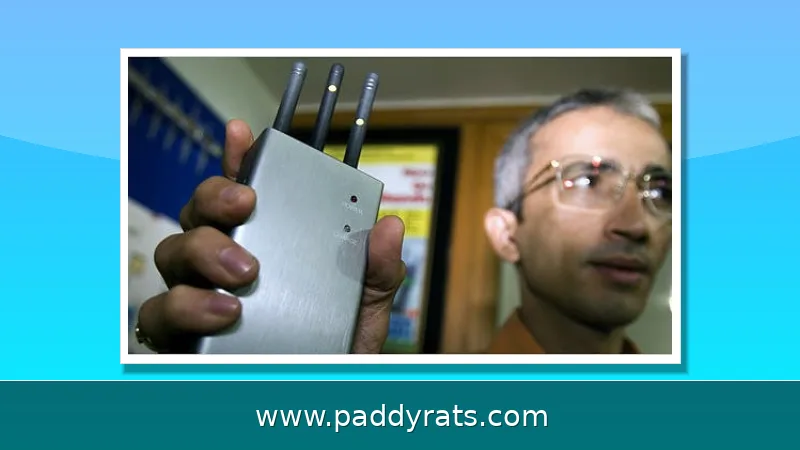
Signal jammers are showing up in burglaries, bank robberies, and everyday WiFi outages, so I walk through the real signs of jamming, the hardware and software that actually detects it, and what the law says you can do about it.
What Is a Signal Jammer and How Does It Work?
A signal jammer is basically a radio transmitter that floods whatever frequencies your phone, WiFi router, or GPS receiver relies on. It drowns out the legitimate traffic with noise until the connection just drops. Think of it as a denial-of-service attack, except it happens over the air instead of across a network. The most basic jammers only block a single narrow frequency band, and that alone is often enough to fool a device into thinking there's no tower or access point around.
Cell jammers work by severing the connection between your phone and the closest cell tower, while WiFi jammers flood the 2.4 GHz and 5 GHz bands that most home and business networks depend on. So the same device isn't just taking out phones and WiFi. It can mess with GPS, police radar, and even the sensors inside alarm systems — which is part of why jamming keeps turning up in burglary cases instead of just prank videos. Here's something that catches a lot of people off guard: jammers take out cell phone signal boosters too. A booster can only amplify a signal that's already there, so once someone jams the tower link, there's nothing left to boost. That's why a booster that was working perfectly yesterday can seem totally dead today.
Jammers don't reach very far. With low-power consumer devices, the affected zone is usually only about 30 square feet—think a small bedroom or a parked car. That one detail explains most of the practical advice you'll read here: if you walk a few rooms over, or just move closer to a window, and your signal comes back, chances are you're dealing with a local interference source, not a carrier outage taking down the whole neighborhood. It's also why jamming tends to go completely unnoticed by anyone outside the immediate target area. And don't get hung up on what it's called, because the terminology overlaps a lot. The same device gets labeled a signal jammer, cell jammer, mobile phone jammer, signal blocker, GPS jammer, text stopper, WiFi jammer, or RF jam—and in more technical write-ups, phrases like denial-of-service attack, RF jam, and deauth attack all describe the same basic behavior.
Common Signs of Cell and WiFi Jamming
What really gives it away isn't one symptom on its own, but a pattern. Say a few devices in the same spot all drop service at once, yet a phone across the street is still working fine. That points to localized interference, not a network issue. I also check whether multiple phones on different carriers are affected, since a carrier outage rarely takes everyone down at the same time.
If your WiFi suddenly starts acting up, don't just focus on the fact that it's broken — pay attention to *how* it's breaking. A jammer won't really slow your network down; it drowns it in noise. So look for things like signal strength that tanks or disappears the second you walk near the router, devices that keep dropping off the network and rejoining, random latency spikes, packet loss, and speeds that crawl even though nothing about your plan has changed. The real giveaway is what happens next: a wired Ethernet connection will typically keep working just fine while WiFi is being jammed, since jammers only mess with the wireless link between your devices and the router. That contrast — dead WiFi, perfectly healthy cable — is probably the most reliable test an ordinary person has, and it won't cost you a dime. It also lets you rule out more mundane problems, like a router on its way out, an overcrowded channel, or an ISP outage, before you jump to the conclusion that someone nearby is running a jammer.
These cases aren't hypothetical. Since 2021, U.S. Customs and Border Protection has reported about an 830% jump in signal jammer seizures, which tells you these devices have gone from exotic contraband to a fairly common tool in criminal cases. In Los Angeles, city officials, police, and security experts have spent the past year warning that burglars are using WiFi jammers to knock out home alarm systems and cameras before they break in. And it's not just a West Coast problem. In June, the Department of Homeland Security reported that jammers were used in several bank robberies in Vermont, and investigators also found jamming devices in an attempted jewelry store robbery in La Verne, California. Put it all together and you can see how fast jamming has shifted from a niche technical threat to something that shows up in armed robberies and home invasions.
Detection Tools: spectrum analyzers, SDR, and Dedicated Detectors
If you're serious about hunting down interference, a spectrum analyzer paired with a directional antenna is still the go-to setup. Instead of guessing whether something's off, you get to watch the RF landscape in real time—so once you know what a clean baseline looks like, a jammer's telltale noise or sudden spikes practically jump off the screen. The catch is that it demands two things: money and skill. These analyzers run the gamut from budget units to instruments that cost tens of thousands of dollars, and you won't find them at your local electronics store. Then there's the learning curve—reading a waterfall display, that scrolling graph of signal activity over time, takes practice. Beginners tend to mistake ordinary background noise for a threat, while someone with experience can spot a hidden jammer in seconds.
Software defined radio is a solid middle option if a cheap app feels too flimsy but you're not trying to build a full lab bench either. Most people start with an RTL-SDR USB stick, which runs about the price of a decent pair of headphones and lets you watch raw RF activity right on your laptop. From there, you're looking for the usual red flags: sudden noise floors, weird spikes, or signals popping up where nothing should be transmitting. HackRF One takes things further, and researchers have actually paired it with machine learning to catch jammers in real time. The concept isn't complicated — the system learns what a normal spectrum looks like at a given place and time, then flags any hidden noise that doesn't belong. And if you'd rather skip the laptop altogether, a portable receiver, an RF tracker, or a wideband field strength meter with an antenna can still give you a heads-up that a jammer is nearby. No full lab setup required.
Not everyone wants to sit there squinting at a waterfall display, trying to make sense of raw RF data. If that sounds like you, dedicated commercial detectors offer a much simpler pitch: the hardware does the watching, and you just get an alert when something seems off. Digitpol, a Dutch company, sells a static GSM Jammer Detector built for exactly this. It's a waterproof module meant to be mounted on a pole or wall, and it monitors 2G, 3G, 4G, and 5G cellular bands, plus GPS, GLONASS, GALILEO, Wi-Fi, and Bluetooth jamming. It can also pick up on IMSI catchers and rogue cell towers, and along the way it passively collects nearby Wi-Fi SSIDs, MAC addresses, and Bluetooth MAC metadata. The unit comes with an IoT data SIM and a year of connectivity. It runs on 5V, 12V, 110V, or 220V, has a 24-hour internal backup battery, and you can add an optional rechargeable battery that's good for a month of remote operation. Operating temperature range is -15°C to +55°C, there's a configurable siren output, and it feeds a cloud API with a 200ms real-time spectrum scope. Logs export as CSV or PDF, alerts can go out via SMS, email, API, or portal, and multiple modules can be linked into a mesh. There's a second option from Eye LLC: the Wi-Fi Jammer Detector, which pairs a small Ethernet-connected device with an iOS app. One important catch—it has to plug into your main router or a wired switch, not a wireless node like a wireless eero node, and the app by itself won't detect anything without the hardware. Once it's connected, it sends jamming notifications along with offline/online alerts, and you can share those notifications with others. Looking at its version history, Deauthentication Attack Detection Support was added in version 3.1 (June 24), and SSID selection for network-aware metrics came in version 3.3.3 (August 18). The table below breaks down what each of these two approaches actually covers, based on what the vendors specify.
| Feature | Digitpol GSM Jammer Detector | Wi-Fi Jammer Detector (Eye LLC) |
|---|---|---|
| Form factor | Waterproof static module for pole or wall mounting | Small Ethernet-connected device plus iOS app |
| What it detects | 2G/3G/4G/5G, GPS/GLONASS/GALILEO, Wi-Fi/Bluetooth jamming; IMSI catchers; rogue cellular towers | Wi-Fi and RF signal jamming, including deauthentication attacks |
| Passive data collection | Nearby Wi-Fi SSID, MAC, and metadata; Bluetooth MAC | Network-aware metrics with SSID selection |
| Connectivity | IoT data SIM with 1 year of data; cloud API | Wired Ethernet to main router or switch (not a wireless node) |
| Power | 5V, 12V, 110V, 220V; 24h internal backup battery; optional 1-month rechargeable battery | Not specified by vendor |
| Alerts | SMS, email, API, or portal; configurable siren output | App notifications for jamming and offline/online status; notification sharing |
| Operating temperature | -15°C to +55°C | Not specified by vendor |
| Notable extras | 200ms real-time spectrum scope; CSV/PDF log export; mesh support across modules | Deauthentication Attack Detection Support (v3.1, Jun 24); SSID selection (v3.3.3, Aug 18) |
| Feature | Digitpol static detector | Wi-Fi Jammer Detector |
|---|---|---|
| Bands covered | 2G/3G/4G/5G, GPS/GLONASS/GALILEO, Wi-Fi/Bluetooth | Wi-Fi and RF signals |
| Rogue tower / IMSI catcher detection | Yes | No |
| Installation | Waterproof module for pole or wall mounting | Wired to main router or switch, not a wireless node |
| Alerts | SMS, email, API, portal, configurable siren | App notifications, offline/online alerts, sharing |
| Power | 5V, 12V, 110V, 220V; 24h backup battery | Powered via Ethernet connection |
| Data output | Cloud API, 200ms spectrum scope, CSV and PDF logs | App-based jamming and status history |
The Digitpol module isn't just sitting there waiting for an active jamming signal — it also passively picks up nearby Wi-Fi SSIDs, MAC addresses, and metadata, plus Bluetooth MAC addresses, which together can give you a decent picture of what's operating in the area. It comes with an IoT data SIM and a full year of data, so you don't have to scramble to set up your own connectivity right out of the box. For spots where running power isn't realistic, an optional internal battery keeps it going for about a month of remote operation, and the unit is rated to handle working temperatures from -15°C to +55°C. If a single module can't cover the whole site, you can link several together into a mesh. On the software side, the Wi-Fi Jammer Detector app keeps getting updates: version 3.1 brought in Deauthentication Attack Detection Support, and version 3.3.3 added SSID selection for network-aware metrics.
How to Locate a Jammer by Triangulation
Finding the source is a direction-finding problem. Take a bearing with a directional antenna from one spot, then repeat from two more locations. Three bearings let you triangulate, and the intersection narrows the search area considerably. This is the same logic used in radio direction finding, just applied to an interfering signal instead of a transmitter you are trying to receive.
In practice I start by walking the perimeter of the affected space with a handheld receiver or an SDR setup, noting where the noise floor rises. Signal strength rises as you approach the source, so a wideband field strength meter with a simple antenna can be enough for a rough fix. Once you have a candidate area, a directional antenna sharpens the bearing and helps you distinguish a jammer from a legitimate but noisy device.
The 30-square-foot range figure matters here. If reception returns after you move a short distance, the source is close by. If it does not, you may be dealing with a wider-area jammer, a faulty device, or an ordinary network outage, and the triangulation approach will simply confirm that no localized source exists.
Consumer Apps vs. Hardware Detectors
Apps that claim to detect jammers are largely unproven, and most of them require a working signal to function at all, which is exactly what you lose during jamming. The Wi-Fi Jammer Detector app is a good example of the honest version of this category: it only works alongside the separate Ethernet-connected detector device. The app alone will not detect jamming, and anyone selling you a pure-software solution should be treated with skepticism.
Hardware detectors and SDR setups are more credible because they measure the physical layer directly. Even so, no consumer-grade tool gives you the certainty of military-level equipment. Without advanced technology of that class, it is virtually impossible for the average person to definitively confirm a cell phone jammer, which is why documenting symptoms and involving authorities is often the more productive path.
One useful free test sits between the two categories: check whether wired Ethernet devices keep working while wireless devices fail. If the wired link is fine and everything wireless dies at once, you have strong evidence of RF interference. Signal boosters and amplifiers do not stop jammers, so buying one will not solve the problem, and any jammer is also a booster jammer.
Legal and Regulatory Considerations
Jammers are illegal to own and operate in the United States and much of the world. The FCC cites serious risks to public safety communications and 9-1-1 calls, plus interference with law enforcement communications. The Communications Act of 1934 outlaws interference with authorized radio broadcasts, and there are no exemptions for businesses, classrooms, residences, or vehicles. Marketing or selling jamming equipment is prohibited as well.
Enforcement authority is layered. Local law enforcement agencies lack independent authority to use jamming equipment, while federal agencies may be authorized in some instances. If you suspect illegal jamming, the practical route is to contact law enforcement or file a complaint with the FCC. The FCC's Jammer Enforcement page and its interference complaint path, filed under Phone Issues, Interference, then Signal Jammers, are the official channels.
The industry response is partial. Alarm panels may sound a local alarm if an RF jam is detected, but that does not change the signal sent to the monitoring center, so a monitoring station may never learn that the panel was attacked. No statistics comparing alarm intrusion attack types were cited, which makes it hard to quantify how often this happens in practice.
How Do I Check if Someone Put a Signal Jammer in My House?
Start with the wired-versus-wireless test. If your Ethernet-connected devices work normally while phones and WiFi devices fail in the same room, the problem is almost certainly RF interference rather than an internet outage. Then check whether multiple phones on different carriers are affected at the same time, and whether reception returns when you move a short distance away.
If those checks point to jamming, document the times, affected devices, and behavior with photos or screen recordings. Then contact law enforcement and consider filing an FCC complaint. Do not buy a jammer to fight a jammer, and do not rely on a phone app alone, because apps claiming jammer detection are largely unproven and need a working signal to operate.
For schools and businesses, the same logic applies. A school using a cell network jammer would produce simultaneous failures across many phones on different carriers in one building, while wired connections stay up. At a local business where WiFi and cell service are being jammed, ask whether the outage is confined to a small area, since jamming range is usually no more than about 30 square feet.
What Equipment and Steps Should You Use First?
The practical order of operations is simple. Begin with an RTL-SDR USB stick and monitor RF activity for unusual noise or spikes. If you need bearings, add a spectrum analyzer with a directional antenna and take readings from three locations to triangulate. A portable receiver, RF tracker, or wideband field strength meter can substitute when you only need a rough indication.
Then confirm the pattern: check whether multiple devices or phones are affected in an area that normally has good reception, and confirm that wired Ethernet devices still work while wireless devices fail. If illegal activity is suspected, contact law enforcement or file an FCC complaint rather than attempting to interfere with the jammer yourself.
For reference, this topic also appears in gaming: GTA Online includes 50 Signal Jammers as collectibles, where each destroyed jammer gives GTA$2,000 and 1,000 RP, and collecting all 50 adds a GTA$50,000 bonus for a total of GTA$150,000 and 50,000 RP, plus Avi Schwartzman as a hacker with a 10% cut and 3 minutes 30 seconds in the vault. That is unrelated to real-world enforcement, but it explains why search results for jammer detection sometimes surface game guides.
What Is the Industry Doing About Signal Jamming?
Detection is moving toward continuous monitoring rather than one-off scans. Dedicated detectors like the Digitpol module collect Wi-Fi SSID, MAC, and Bluetooth metadata passively and push alerts by SMS, email, API, or portal, with a cloud API delivering a 200ms real-time spectrum scope and logs exportable as CSV and PDF. Multiple modules can be meshed to cover a larger property.
On the consumer side, the Wi-Fi Jammer Detector device monitors Wi-Fi and RF signals and must connect to the main router or a wired switch, not a wireless node such as a wireless eero node. Its app provides jamming notifications, offline and online notifications, and notification sharing. Version history includes Deauthentication Attack Detection Support in version 3.1 and SSID selection for network-aware metrics in version 3.3.3.
Alarm systems remain the weak link. Panels may sound a local alarm when an RF jam is detected, but the signal sent to the monitoring center does not change, so the central station may not know an attack occurred. No statistics comparing alarm intrusion attack types were cited, which leaves a real gap between what the hardware can sense and what responders actually learn.
Frequently Asked Questions
How do I know if someone is using a WiFi jammer?
Watch for WiFi signal strength dropping or disappearing near your router, devices repeatedly disconnecting and reconnecting, high latency and packet loss, and slower speeds. Wired Ethernet connections keep working normally because jammers only affect wireless links. If several devices on different networks fail at once while wired devices stay online, that pattern points to jamming rather than a normal outage.
Can a phone app detect a signal jammer?
Apps claiming to detect jammers are largely unproven and require a working signal to function. The Wi-Fi Jammer Detector app only works with a separate Ethernet-connected detector device; the app alone will not detect jamming. Treat any pure-software jammer detector as unverified, and rely on hardware or SDR measurements instead.
What equipment is used to locate a jammer?
A spectrum analyzer with a directional antenna is the standard approach, and taking bearings from three points allows triangulation. A portable receiver, RF tracker, or wideband field strength meter connected to an antenna can also indicate a nearby jammer. For a low-cost start, an RTL-SDR USB stick lets you monitor RF activity for unusual noise or spikes.
Are signal jammers legal?
No. In the United States, federal law prohibits operating, marketing, or selling jamming equipment that interferes with authorized radio communications, including cellular, PCS, police radar, and GPS. There are no exemptions for businesses, classrooms, residences, or vehicles. The FCC cites serious risks to public safety communications and 9-1-1 calls, and violations can be reported through its complaint process.