Signal jammers knock out cell and WiFi service by flooding the same frequencies your phone uses, and seizures of these devices have surged in the U.S. Here is how to read the warning signs and which tools can actually confirm jamming.
What Is a Signal Jammer and How Does It Work?
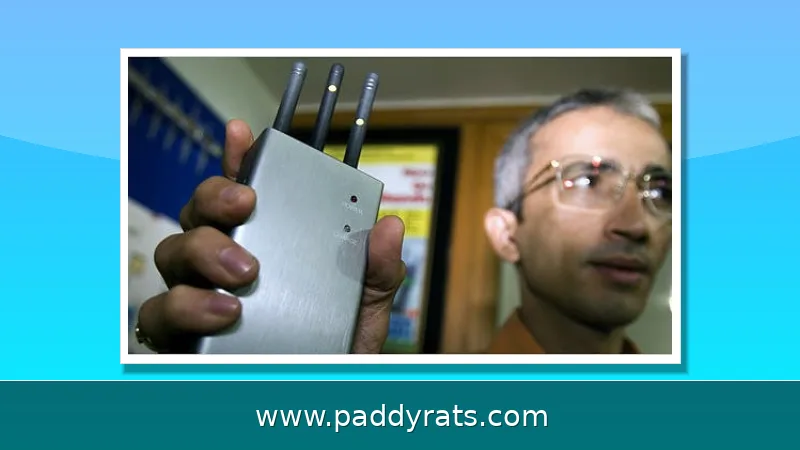
A signal jammer is really just a radio transmitter built to do one thing: drown out the frequencies your phone relies on. It blasts RF energy across the same bands cellular service uses, essentially creating what engineers call a denial-of-service attack. Your phone then picks up two signals on the same frequency, latches onto the stronger one, and the weaker (legitimate) signal gets canceled out—so your service drops completely. And because the interference hits the downlink signal coming from the tower, you'll typically see zero bars rather than a weak-but-usable connection.
The terminology in this space is a mess, so it's worth sorting out the synonyms before you buy any gear or file a complaint: cell jammer, mobile phone jammer, signal blocker, GPS jammer, text stopper, WiFi jammer, GSM jammer, IMSI catcher, rogue base station. They're related, sure, but they don't all mean the same thing. A GSM jammer, for example, targets older cellular bands, whereas an IMSI catcher poses as a legitimate tower so it can intercept your traffic rather than just cut it off. Most of the jammers sold illegally to ordinary consumers are low-power units with a tiny footprint—Wilson Amplifiers puts the range at roughly 30 square feet max. That's partly why they turn up in cramped spots, like a single room or one car, instead of blanketing a whole building. WiFi jammers are a different animal altogether, since they go after the 2.4 GHz and 5 GHz bands that routers and Bluetooth devices rely on. Bottom line: if you suspect a jammer, the exact term you use can point you toward the right detection tool and the right place to file a complaint.
Enforcement has been tightening fast, and the numbers make that pretty clear. According to a Post Alarm report from September 23, 2025, U.S. Customs and Border Protection has recorded about an 830% increase in signal jammer seizures since 2021. That’s not a small bump — it shows these devices have moved well beyond being some niche gadget. They’re now a genuine problem at the border and beyond. And the criminal cases aren’t just theoretical. In June, the Department of Homeland Security reported that jamming devices were used in a series of bank robberies in Vermont, and in California, jamming equipment was found after an attempted jewelry store robbery in La Verne. In other words, criminals are increasingly getting their hands on tools that can cut off phones, disable GPS, and take down alarm systems before they strike. And if you get caught, it’s not a minor penalty. Cellbusters notes that FCC fines for using a jammer can reach $11,000 — and that’s before your equipment gets seized or criminal charges come into play, which can include prison time. So yes, the tech may be easy to buy online, but the legal and financial consequences are anything but cheap.
Common Signs Your Phone Is Being Jammed
The first real clue usually isn't one phone acting up — it's several devices losing service in the same place at the same time. Picture this: your phone, your partner's phone, and a coworker's phone all flip to "No Service" in a spot where you normally get four or five bars, and it stays that way for minutes instead of recovering after a few seconds. That's not how a normal network hiccup behaves. It's the kind of pattern that pushes jamming near the top of the list, since a jammer blasts the downlink frequencies your phone listens on and essentially drowns out the tower. A single device can drop hints on its own too: bars bouncing around unpredictably, calls failing the moment you hit dial, texts stuck on "Sending," mobile data crawling or cutting out altogether. Any one of those alone is easy to shrug off. But several of them at once, on multiple phones in the same location, is a whole different story.
| Sign | What it looks like | Why jamming fits |
|---|---|---|
| Loss of service across multiple devices | Several phones drop to "No Service" in a normally strong area | One jammer affects every device on the same frequencies |
| Erratic signal bars | Bars swing up and down with no movement | Interference competes with the tower's downlink signal |
| Failed calls and stuck texts | Calls end immediately; messages sit in "Sending" | The connection can't complete while the signal is blocked |
| Data slowdown or blackout | Web pages stall; streaming stops entirely | Mobile data rides the same jammed frequencies |
WiFi jamming doesn't look like cell jamming at all, and once you know the pattern, it's not hard to spot. You won't lose bars, because there are no bars to lose — instead you get terrible signal quality, constant disconnects, high latency, packet loss, and bandwidth that crawls. Sometimes it happens while you're sitting a few feet from the router. That's the tell: when a jammer is flooding the 2.4 GHz or 5 GHz band your network lives on, your distance from the access point stops mattering. A simple, reliable way to check is to plug a laptop straight into the router with an Ethernet cable. If the wired connection runs fine while every wireless device in the room is choking, the problem is somewhere in the RF path, not with your ISP or your modem. That said, a bad WiFi connection doesn't automatically mean someone is jamming you. Faulty hardware, walls and other obstructions, network maintenance, or just other legal devices on the same frequencies can all produce the same symptoms, so treat this as a strong clue rather than proof.
Before you jump to the conclusion that someone's deliberately jamming you, rule out the ordinary stuff first. A phone that's dying, a router on its last legs, new obstacles like metal shelving or a thick concrete wall, routine carrier maintenance, or even legal devices broadcasting on the same frequencies can all create symptoms that look a lot like jamming. That distinction matters, because jamming is rare—dead batteries, overloaded networks, and cheap hardware are not. The detection apps you'll find on the App Store or Google Play are usually another dead end: their accuracy is mostly unproven, and more importantly, they need a working signal to do anything at all. So they're basically useless in the exact situation where you'd want one—when your signal has already dropped. Bottom line: don't let a confident-looking readout talk you into a diagnosis it can't actually back up.
How to Detect a Signal Jammer on a Phone: Tools and Methods
Real detection doesn't come from some app on your phone. It comes from professional RF instrumentation that actually listens to the air. I've watched technicians run through this kind of checklist, and the pattern never changes: the methods that hold up are the ones that measure the radio environment directly instead of guessing based on how your handset acts. Your phone can only tell you something's wrong—it can't tell you why. Take a spectrum analyzer. It sweeps the frequencies your carrier uses and shows interference as visible spikes or a raised noise floor. Problem is, it's not a consumer product, and reading one takes real skill. There are cheaper routes, though. A wideband field strength meter hooked up to an antenna can flag unusual energy, and a Software Defined Radio—the RTL-SDR USB stick is the go-to budget pick—lets you scan the bands yourself. Then there's the high end: a HackRF One can be turned into a smart spectrum analyzer that uses machine learning to learn what normal RF looks like and then flag hidden noise. The trade-off is obvious. The deeper you go, the more you need to understand what you're looking at.
| Tool | What It Does | Skill Level |
|---|---|---|
| Spectrum analyzer | Analyzes frequencies and reveals interference signatures | Professional |
| Wideband field strength meter | Measures signal power when connected to an antenna | Intermediate |
| Software Defined Radio (RTL-SDR) | Affordable USB stick for scanning and recording RF | Intermediate |
| HackRF One | Can run as a smart spectrum analyzer with machine learning | Advanced |
| Digitpol GSM Jammer Detector | Wall or pole-mounted module with cloud alerts | Installer |
A spectrum analyzer is still the gold standard for one simple reason: it shows you the actual RF landscape around you, which means it can expose interference that a phone will never report on its own. Your phone only knows it lost service — it has no way to tell you why, or what else is happening on that frequency. A spectrum analyzer fills in that picture, though it comes with real trade-offs. It isn't a consumer product, and reading a waterfall display takes practice — you need to recognize what normal traffic looks like before you can spot something that shouldn't be there. If that's more machine than you need, a wideband field strength meter paired with a directional antenna is the next step down in both cost and complexity. It won't give you a detailed picture of the spectrum, but it can still help you localize a source: point the antenna around and watch the reading climb as you walk toward the jammer.
| Tool | What it does | Skill level | Cost / availability |
|---|---|---|---|
| Spectrum analyzer | Displays the full RF landscape and reveals interference a phone cannot report | High — interpreting a waterfall display takes practice | Not a consumer product |
| Wideband field strength meter + directional antenna | Measures signal strength; can localize a source by watching readings rise as you approach | Moderate | Lower cost and complexity than a spectrum analyzer |
If you're a hobbyist, a Software Defined Radio is probably where you'll start. The RTL-SDR USB stick is a cheap, popular pick for scanning—TikTok creator @littlehakr shows it off—and it works with free software on a laptop. People who are more advanced have rigged a HackRF One into a smart spectrum analyzer that uses machine learning to learn what normal RF looks like at a given spot, then flags any hidden noise; you can find walkthroughs on YouTube. These setups pay off if you're patient, but they do demand some real technical know-how.
What Commercial Jammer Detectors Actually Offer?
If you'd rather not babysit a handheld tool, dedicated detector hardware can run in the background for you. Take the Digitpol GSM Jammer Detector: it's a wall- or pole-mounted module built to keep watch for 2G, 3G, 4G, and 5G jamming, GPS, GLONASS, and GALILEO interference, Wi-Fi and Bluetooth jamming, IMSI catchers, and rogue base stations — basically the whole family of threats a commercial site might face. When it catches something, it reports to a cloud platform and fires off SMS, email, and API alerts, so your security team hears about it right away instead of discovering it after the fact. An internal 24-hour backup battery keeps it running through power interruptions, and it's rated for working temperatures from -15°C to +55°C, so it holds up in everything from a cold storage room to a sun-baked rooftop enclosure. For commercial buildings, banks, and other sites where even a short outage carries a real cost, that combination of always-on monitoring and remote alerting is what makes it worth the investment.
On the consumer side, the Wi-Fi Jammer Detector app from Eye LLC is rated 4.8 out of 5 from 5 ratings on the Apple App Store, but read the fine print: it requires a separate detector device connected to your main router by wired connection. The app itself detects jamming and deauthentication attacks and sends push notifications and email alerts, but the app alone will not detect jamming. You are buying a hardware sensor with a phone-based dashboard, not a magical scanner.
There is also an older Android option, Jammer Detector on Google Play, last updated May 7, 2018. It claims to detect jamming devices in foreground and background modes and to give a visual or sound message. Given its age and the general limits of phone-only detection, treat it as a curiosity rather than a security tool. Wilson Amplifiers notes that without advanced, military-level technology, it is virtually impossible for the average consumer to definitively detect a cell phone jammer with an app alone.
WiFi Jammer vs Cell Phone Jammer: Key Differences
Cell jammers and WiFi jammers attack different layers of your connectivity, and the symptoms diverge in ways that help you diagnose which one you are facing. A cellular jammer targets licensed mobile bands and produces dropped calls, failed texts, and missing signal bars. A WiFi jammer targets the unlicensed 2.4 GHz and 5 GHz bands, so your phone still shows strong cellular service while every wireless device on the network stumbles.
| Factor | Cell Phone Jammer | WiFi Jammer |
|---|---|---|
| Target bands | Cellular, PCS, GPS | 2.4 GHz and 5 GHz |
| Primary symptom | No signal bars, dropped calls | Disconnects, high latency |
| Wired workaround | None | Ethernet still works |
| Typical range | Up to about 30 sq ft | Room-scale coverage |
The wired workaround is the single most useful diagnostic split. If your laptop on Ethernet is fine while every phone and tablet on WiFi is failing, you are almost certainly looking at RF interference in the wireless bands rather than a problem with your carrier or modem. Conversely, if the wired connection is also dead, the issue is upstream and has nothing to do with jamming.
Neither device type is legal to operate in the United States. The FCC prohibits operating, marketing, or selling jamming equipment that interferes with authorized radio communications, including cellular, PCS, police radar, and GPS. There are no exemptions for businesses, classrooms, residences, or vehicles. Local law enforcement lacks independent authority to authorize jamming, though federal agencies may be authorized in limited cases. Cell phone detectors, by contrast, are legal to own and use.
What to Do If You Suspect Jamming
If the evidence points to deliberate interference, document what you are seeing before you act. Note the times, the locations, which devices lost service, and whether wired connections kept working. That log is what turns a suspicion into something a carrier or investigator can actually work with. Then contact law enforcement or file a complaint with the FCC through its jammer enforcement process.
Call your wireless provider as well. Carriers can check whether an outage or tower issue explains the symptoms, and they have engineering teams that can look at the RF environment around a specific address. If you are in a fixed location and can relocate, moving even a short distance sometimes restores service, since many jammers have a very small footprint.
For the technically inclined, switching frequency can help depending on how sophisticated the jammer is. A device that only blocks one band may leave others usable, and forcing your phone onto WiFi calling over a wired-backed network can route around a cellular jammer entirely. None of this is a permanent fix, but it can keep you connected while the authorities investigate. If the situation involves threats to people or property, treat it as a safety matter first and a technical puzzle second.
Is It Legal to Use a Signal Jammer in the U.S.?
No. Federal law prohibits operating, marketing, or selling jamming equipment that interferes with authorized radio communications, and the FCC enforces that prohibition against both sellers and users. The banned categories explicitly include cellular, PCS, police radar, and GPS. There are no carve-outs for businesses trying to keep employees off their phones, classrooms, residences, or vehicles, no matter how reasonable the motivation may sound.
The penalties are not trivial. FCC fines for jammer use can reach up to $11,000, and that figure comes alongside equipment seizure and criminal sanctions that can include imprisonment, according to Cellbusters. Imported devices are also subject to seizure at the border, which is part of why CBP has reported such a sharp rise in confiscations since 2021.
One nuance worth knowing: local law enforcement does not have independent authority to permit jamming, though federal agencies may be authorized in limited cases. Meanwhile, cell phone detectors are legal in the United States, so owning equipment that identifies interference is fine even though owning equipment that creates it is not. If you believe someone is jamming you, the correct path is a report to law enforcement or the FCC, not a countermeasure of your own.
Frequently Asked Questions
What are the first signs that a signal jammer is affecting my phone?
The most common symptom is dropped service, especially when multiple phones lose reception in an area that normally has good coverage. You may also see signal bars fluctuate erratically, calls fail, texts refuse to send, and data slow down or stop. On WiFi, watch for disconnections, high latency, and packet loss while wired Ethernet keeps working.
Can a phone app detect a cell phone jammer?
Apps exist that claim to detect jammers, but they are largely unproven and require a working signal to function. Wilson Amplifiers notes that without advanced, military-level technology, it is virtually impossible for the average consumer to definitively detect a cell phone jammer with an app alone. Treat app-based detection as a hint, not proof.
What equipment can actually detect a signal jammer?
A spectrum analyzer is the standard tool: it analyzes frequencies and reveals interference. A wideband field strength meter connected to an antenna can also help, and an RTL-SDR USB stick offers an affordable entry point for hobbyists. These are not consumer products and require specialized knowledge to interpret results correctly.
Is it legal to use a signal jammer?
No. In the United States, federal law prohibits operating, marketing, or selling jamming equipment that interferes with authorized radio communications, including cellular, PCS, police radar, and GPS. There are no exemptions for businesses, classrooms, residences, or vehicles. Fines can reach up to $11,000, plus equipment seizure and possible imprisonment.