Signal jammer deployment works best as a long-term RF security engineering task, not a plug-in purchase. This guide covers site assessment, frequency bands, power, antenna placement, fixed vs portable choices, maintenance, and the legal limits you must respect.
What Is a Signal Jammer and How Does It Work?
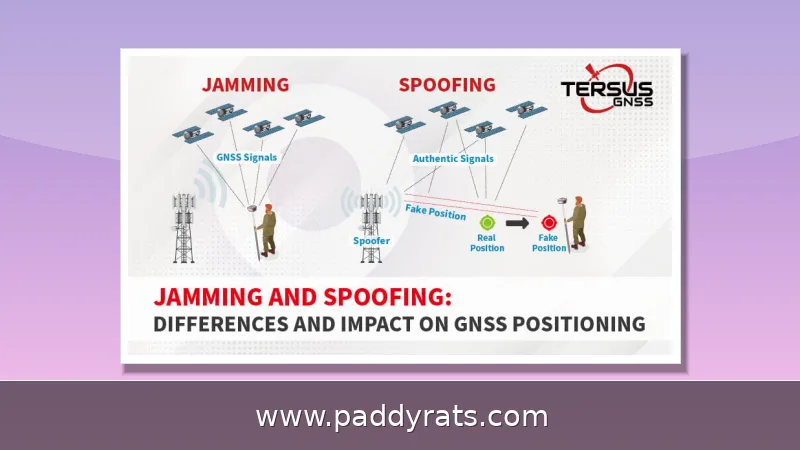
A signal jammer is basically an RF transmitter that floods the same frequency bands your target devices depend on, drowning out whatever they're trying to hear from cell towers, WiFi access points, or GPS satellites. That's really all there is to it — the receiver gets hit with so much noise on its own channel that the legitimate transmission just disappears into the static. Which is exactly why, before you ever start comparing products or requesting quotes, you need to understand this as a physics and engineering problem first.
In real-world deployments, you'll mostly be working with a handful of well-known frequency bands. For cellular, that usually means 700MHz, 800MHz, 900MHz, 1800MHz, 1900MHz, and 2100MHz. GPS sits near the 1575MHz band, and WiFi operates at 2.4GHz and 5GHz. Wide-band or "full spectrum" jammers can take out several of these at once. Some of the more advanced units go a step further with protocol jamming, which targets control channels directly instead of just flooding the airwaves with noise.
In my experience, the jamming method you pick really shapes what you can pull off on site. Constant jamming transmits nonstop, blanketing the target band without any gaps — it works, but it's easy to detect and drains power fast. Reactive jamming does the opposite: it stays silent until it picks up a legitimate signal, then fires only at that moment. That makes it harder to locate and counter, and it keeps the overall footprint smaller. Deceptive jamming takes things a step further by mimicking real traffic to confuse devices instead of just drowning them out. Every approach comes with its own footprint, power draw, and detection risk, so the right choice should come from your threat model — not from a spec sheet.
| Jamming Method | How It Works | Footprint & Power Draw | Detection Risk |
|---|---|---|---|
| Constant jamming | Transmits continuously across the target band | Largest footprint; highest power draw | Easy to detect |
| Reactive jamming | Activates only when it detects a legitimate signal | Smaller footprint; lower power draw | Harder to find and counter |
| Deceptive jamming | Mimics real traffic to confuse devices | Varies with implementation | Harder to distinguish from legitimate signals |
Market context helps explain why deployment discipline matters in the first place. Dataintelo valued the signal jammer market at $2.8 billion in 2025 and projected it would reach $5.6 billion by 2034, growing at an 8.1% CAGR. Fortune Business Insights landed on a similar growth rate but a different starting point: $4.98 billion in 2026 climbing to $9.27 billion by 2034. Technavio, for its part, reported a 5.66% CAGR between 2023 and 2028. Reanin offered a much more conservative figure, putting the market at USD 913.05 million in 2025 and expecting it to rise toward USD 1209.32 million. And the broader anti-jamming market tells its own story — Fortune Business Insights valued it at USD 5.43 billion in 2025, with projections reaching USD 12.97 billion by 2034. Different analysts, different numbers, but the direction is the same: this space is expanding fast, and that growth raises the stakes for getting deployment right.
Portable vs Fixed Deployment: Which Fits Your Use Case?
Portable and fixed jammers really do solve different problems, and honestly, mixing them up is one of the most common mistakes I run into. Portable handheld units—battery-powered, cordless—are all about mobility and getting set up fast, but you're working with short range and limited runtime. Stationary systems are a different story: they push higher power output, cover much larger areas, and they're permanently installed at places like government buildings, airports, and prisons, where continuous coverage is the whole point.
When you're dealing with a long-term installation—a prison, a courthouse, or an airport perimeter, say—fixed outdoor units mounted on walls, poles, towers, or the exterior of a building give you signal control that's more stable and much easier to maintain than anything you'd set up and tear down every day. The logic here is pretty straightforward: once the installation points, power supply, network connection, and equipment configuration are locked in, the system just runs, and you can service it on a predictable schedule for years. Portable gear can't compete on that front, since it needs charging, repositioning, and re-verification every single time you use it. That said, portables aren't obsolete. They're still a handy supplement—plugging small coverage gaps, supporting inspections, or giving you a fast response when a situation shifts in ways a fixed plan didn't account for. In reality, plenty of security teams run both: fixed units cover the routine, day-in and day-out work, while handheld or battery-powered jammers sit on standby for the exceptions.
Here's a quick comparison of the two categories, covering the factors that tend to matter most when people are deciding what to buy.
Key Factors Before Deployment: Frequency Bands, Power, and Coverage
Before you order a single piece of hardware, figure out which areas actually need signal control and which frequency bands you need to manage. That means a site assessment and risk analysis should come first—not last, the way it often does. A jammer that blocks everything, everywhere, is rarely what you want, and it usually creates collateral problems you'll spend months untangling. Treat this stage like writing a scope of work: target bands, coverage boundaries, how much leakage outside the perimeter is acceptable, and which devices have to keep working no matter what. Get that scope in writing and signed off by everyone with a stake in the deployment, because it becomes the benchmark you'll measure installation and performance against later.
Coverage isn't a simple radius, and treating it like one is where most deployments go wrong. RF signals don't travel in clean circles — they bend, bounce, weaken, and sometimes slip through gaps you never accounted for. Thick walls, reinforced concrete, metal fences, building corners, watchtowers, trees, slopes, and even the strength of nearby base station signals all shape how far your jamming actually reaches. Plan purely by estimating distance, and you'll likely end up with uneven coverage or blind spots that leave openings exactly where you can't afford them. A unit that seems overpowered in an open yard can feel underwhelming behind a reinforced wall, and the reverse happens too. That's why field measurement beats brochure math every time — walk the site, test with real equipment, and verify coverage where it matters, not just on paper.
| Factor | Effect on Signal Propagation |
|---|---|
| Thick walls / reinforced concrete | Weakens or blocks RF penetration, creating shadow zones |
| Metal fences | Reflects and scatters signals, causing unpredictable coverage |
| Building corners / watchtowers | Creates angular shadowing and dead spots behind structures |
| Trees / slopes | Absorbs or redirects signal, especially at higher frequencies |
| Surrounding base station strength | Stronger ambient signals require more jamming power to overcome |
Power should always be dialed down to the minimum needed for the job, and that principle matters more than most buyers expect. Jammers don't necessarily transmit blindly all the time; reactive designs in particular stay quiet until they detect a legitimate signal worth disrupting, which cuts down on both stray interference and the odds of being detected. Running more power than required doesn't just waste energy—it widens your RF footprint and makes the deployment easier to spot. Anti-jammer device specs also show just how compact modern RF hardware has become: Safran cites a unit that draws less than 0.75W, carries an IP67 rating for dust and water resistance, operates from -40C to +85C, and weighs only 150g. That mix of low draw and rugged build is a handy benchmark when you're comparing hardware for a fixed or portable deployment.
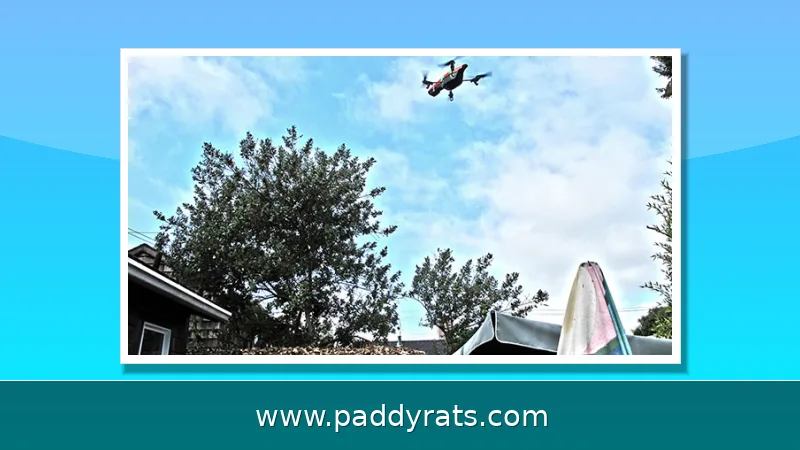
Drone jammer guns operate on a different principle than fixed or portable units aimed at phones and WiFi. Their frequencies are generally assigned at 2.4GHz or 5.8GHz — public frequencies that are not assigned to manned aircraft, public broadcasts, or cell phone signals, which keeps the disruption focused on the drone's command and navigation links. Instead of broadcasting in all directions, a drone jammer gun projects a cone of roughly 15 to 30 degrees, and heavy-duty models can reach almost a mile. That narrow cone is a feature, not a limitation: it concentrates energy on a single target and limits how much of the surrounding spectrum you disturb, which matters in crowded RF environments where collateral interference could affect other equipment. In practice, this makes the gun a surgical tool for point defense — you aim, you engage, and the drone's link breaks, prompting it to enter failsafe, hover, or return to launch.
Site Assessment, Antenna Direction, and Installation Height
Installing jammers near the center of coverage areas, away from obstructions, maximizes disruption capability. That single rule prevents more failures than any other. If you mount a unit on the far edge of a yard and aim inward, you spend power fighting distance and shadows instead of controlling the space you actually care about.
For fixed outdoor deployment, I work through a checklist every time: target frequency bands, coverage boundaries, blind spots, antenna direction, installation height, heat dissipation, weather resistance, remote control, and multi-unit coordination. Outdoor installation covers perimeter areas, yards, open spaces, and building exteriors. Fixed units can go on walls, poles, towers, or building exteriors, but each mounting point changes the radiation pattern and the maintenance access.
Antenna direction and height tend to get far less attention than they deserve, even though they often decide whether a deployment works or quietly fails. Raising an antenna will clear ground clutter and improve line of sight, which sounds like an easy win. But height cuts both ways: push the antenna up too far and the energy sails over the very area you meant to cover, or spills into neighboring streets, homes, and businesses that have nothing to do with your project. That spillover is not just a performance problem; it is exactly the kind of interference that draws complaints and regulatory scrutiny. In perimeter projects, a practical compromise I have seen work well is to angle directional antennas inward, toward the center of the coverage zone, and keep them below the height where they would blanket unrelated streets. Think of it like aiming a spotlight rather than flipping a ceiling light: the goal is to concentrate RF energy where it is needed, not to flood everything nearby. This approach also pairs naturally with what a proper site assessment reveals, since thick walls, reinforced concrete, metal fences, building corners, watchtowers, trees, and nearby base station signal strength all shape how the signal actually travels. Estimating coverage by distance alone is a common shortcut, and it is usually the reason coverage ends up uneven, with weak patches or outright blind spots. Walking the site, checking the target bands, and adjusting tilt and height before final mounting will save far more time than troubleshooting after the hardware is bolted in place.
Heat and weather are the quiet killers of outdoor RF hardware. A sealed enclosure that cannot shed heat will derate or fail in summer, and a unit that is not properly rated will corrode in coastal or rainy environments. Confirm the IP rating, the operating temperature range, and the ventilation design before you commit to a permanent mount.
Multi-Unit Coordination and Avoiding Blind Spots
One unit rarely covers a complex site cleanly, and that is exactly why multi-unit coordination matters. Think of it as stitching together overlapping coverage zones: each jammer's footprint should bleed into the next one's, with synchronized band assignments so the units are working on the same frequencies instead of fighting each other. Placement should be deliberate, too. If a building casts an RF shadow, the answer is to position a second unit so that shadow gets covered rather than left as a dead zone. The goal cuts both ways: close the gaps, but don't push signal past the site boundary, since out-of-area interference is where compliance problems usually begin.
Blind spots come from geometry, not from weak hardware. Building corners, metal fences, watchtowers, trees, and slopes all create shadows that no amount of extra power fixes efficiently. Adding power to a single unit often just increases leakage outside the perimeter while the shadow remains. A second, correctly placed unit is usually the cheaper and cleaner answer.
Coordination also means deciding which bands each unit handles. A site may need cellular control in one zone and WiFi or drone-band coverage in another, and running every band on every unit wastes power and expands your interference footprint. Documenting the band-to-zone map makes troubleshooting, maintenance, and audits far easier later.
If your site sits near public roads, homes, or active base stations, plan the boundaries before installation, not after a complaint. India's CABSEC Jammer Guidelines 2023 reflect this principle directly: while deploying jammers, it must be ensured that jammers do not interfere with the existing mobile communication network outside examination areas.
Maintenance, Weather Resistance, and Remote Control
Maintenance is where most deployments quietly degrade. Batteries should be charged on a regular schedule, portable units stored in dry, cool environments, and antennas and components inspected for corrosion, water ingress, and loose connectors. Follow manufacturer guidance rather than improvising, because RF hardware tolerances are tighter than they look.
Remote control and monitoring turn maintenance from a guessing game into a routine. Fixed systems that report status, temperature, and power draw let a small team manage multiple sites without driving to each one. When a unit drops offline or a band fails, the alert should arrive before an operator notices the gap in coverage.
Weather resistance is a specification you verify, not assume. IP ratings, operating temperature ranges, and enclosure materials determine whether a unit survives a decade outdoors or a single storm season. The Safran anti-jammer example, rated IP67 and operating from -40C to +85C, shows the kind of envelope professional outdoor hardware is expected to meet.
Budget planning should include this lifecycle cost. Example product pricing gives a sense of the hardware range: the 4G Phone Jammer JM021 covering mobile phone, WiFi, GPS, and LoJack at $520.00; the Built-in Directional Antennas Drone UAV Signal Jammer JM004 at $2,399.99; the Handheld WiFi Bluetooth Signal Jammer 2.4/5.2/5.8GHz JM012 at $569.99; and the Handheld Mobile Phone Jammer with 16 antennas and 25-meter range, JM018, at $699.00.
Countermeasures and Anti-Jamming: What Happens When You Are the Target
Deployment planning should include what happens when jamming hits your own operations. The practical countermeasures are simple: switch communications devices or bands, using a different band on radios, a cellular call or text, or disconnecting Bluetooth. Move 10 to 20 feet in any direction to see if coverage improves; if you are inside, try moving outside, and vice versa. Elevation helps, so go high when you can.
Physical shielding works because jamming is still a signal. Going around a corner or behind a vehicle can block or weaken it. I have watched a single concrete wall turn an unusable link into a workable one, which is why line-of-sight thinking belongs in both deployment and response planning.
On the defensive side, a Controlled Reception Pattern Antenna, or CRPA, uses multiple antenna elements as a jam-resistant design. An anti-jammer device detects the bad noise, works out where it is coming from, and suppresses its effect so the receiver can keep using the legitimate signal. These systems are the reason GNSS-dependent operations increasingly treat anti-jamming as a baseline requirement.
There is a strategic lesson here for anyone deploying jammers. Using the minimum power needed, and letting reactive designs stay silent when they do not hear a target, reduces both your interference footprint and your detectability. Security Systems News reported that signal jammers undermine 25% of commercial and public safety tracking systems in major US and EU markets, costing an estimated $2.5 billion annually in false dispatches, lost assets, and operational failures. Tualcom also noted a 150% spike in search queries for cheap anti jammer solutions since October 2025.
Risks and Compliance: What You Must Confirm Before You Deploy
In many jurisdictions, unauthorized use of equipment designed to jam radio communications, including anti-drone jammers, is strictly illegal and can lead to severe legal penalties. This is not a gray area to test casually. Users bear sole responsibility for ensuring deployments comply with all applicable laws and regulations in their region, and that responsibility cannot be outsourced to a vendor.
FCC jammer enforcement gives a useful diagnostic frame. Symptoms include the inability to transmit or receive cellular or other wireless service in areas known to have good radio or cellular coverage. If your site shows that pattern, treat it as a compliance signal, not just a technical annoyance.
Regulatory guidance in some markets goes further and writes interference limits into the approval itself. India's CABSEC Jammer Guidelines 2023 require that jammers not interfere with existing mobile communication networks outside examination areas, which is essentially a mandate for boundary planning, power discipline, and post-install verification.
My working rule is simple: document the legal basis, the authorized operator, the approved bands, and the geographic boundary before the first unit is mounted. Then verify coverage after installation and keep the records. A deployment that cannot be explained to a regulator is a deployment that should not have been built.
Frequently Asked Questions
What are the best practices for deploying a signal jammer?
Start with a site assessment and risk analysis, then define which areas and frequency bands need control. Choose fixed or portable units accordingly, install near the center of coverage areas away from obstructions, plan antenna direction and height, and coordinate multiple units to avoid blind spots and out-of-area interference.
Should I choose a portable or fixed signal jammer?
Portable models are ideal for mobility and quick deployment, while fixed systems provide continuous coverage. For long-term projects such as correctional facilities, fixed outdoor units installed on walls, poles, towers, or building exteriors offer more stable and maintainable signal control than temporary devices.
How does a signal jammer actually work?
A jammer transmits RF noise on the same frequencies the target devices use, such as cellular bands, GPS 1575MHz, and WiFi 2.4GHz or 5GHz. This noise overpowers the original signal from towers or satellites, creating interference that prevents devices from sending or receiving transmissions.
Are signal jammers legal to deploy?
In many jurisdictions the unauthorized use of equipment designed to jam radio communications, including anti-drone jammers, is strictly illegal and can lead to severe legal penalties. Users bear sole responsibility for ensuring deployments comply with all applicable laws and regulations in their region.