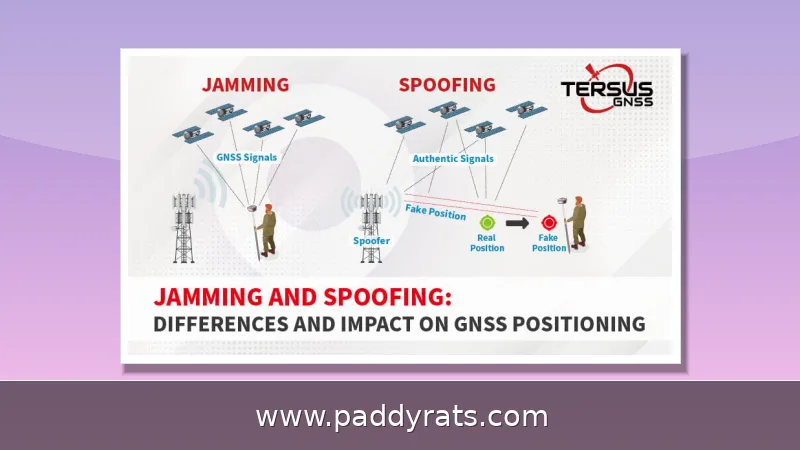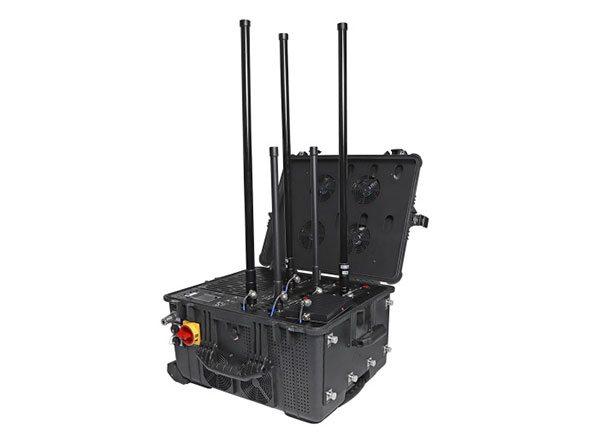
A practical, first-person guide to comparing multi-band signal jammers by frequency coverage, real power per MHz, form factor, range and legal risk. I break down what the specs actually mean, what typical units cost, and why total watts rarely tell the whole story.
What Is a Multi-Band Signal Jammer and How Does It Work?
A multi-band signal jammer works by blasting RF noise on the same channels your target devices depend on, drowning out the weaker signals coming from cell towers and satellites. It's not hacking into a phone or anything like that. It just raises the noise floor high enough that the downlink becomes unusable. That's really all there is to it, and it's why a single jammer can knock out 2G, 3G, 4G, 5G, Wi-Fi and GPS at the same time without ever touching the handset itself.
You can think of it as a denial-of-service attack, except it happens at the RF layer. The jammer isn't hacking or decoding anything—it just floods the airwaves so the original signal can't be heard. More advanced units take things a step further with protocol-aware jamming, which goes after the control channels a device depends on to manage a call or connection rather than blanketing the entire band. Others rely on DRFM, repeater, or sweep techniques to keep working against signals that try to shift around. Ultimately, it all comes down to how the energy gets spent. Barrage jamming blocks many frequencies at once, but it divides its power among all of them, so each individual frequency comes out weaker. Spot jamming does the opposite, concentrating energy on one narrow slice, which typically lets it reach farther.
If you start comparing spec sheets, you'll notice the same set of cellular bands keeps coming up: 700MHz, 800MHz, 900MHz, 1800MHz, 1900MHz, and 2100MHz. These frequencies handle everything from legacy 2G voice calls to modern 4G LTE and 5G data, which is precisely why they form the backbone of most multi-band designs. GPS is a different story—its L1 signal sits way up at 1575MHz, so a jammer that only covers cellular frequencies won't affect navigation at all. Wi-Fi requires coverage on two fronts, 2.4GHz and 5GHz, while Bluetooth is squeezed into the same crowded 2.402–2.480 GHz ISM band right alongside Wi-Fi. That proximity makes it easy to block one and unintentionally interfere with the other. This overlap explains why buyers tend to count bands the way they'd count tools in a toolbox: the more protocols you want to silence, the more bands—and the more money—you're looking at. And that demand is reflected in the sales figures. Industry research cited by market analysts values the global signal jammer market at USD 913.05 million in 2025, with multi-band units leading the pack at roughly a 32.0% share and an 8.3% CAGR. Simply put, the multi-band segment isn't just the biggest slice of the pie—it's also growing faster than the market around it.
Here's the thing I always tell buyers: separate the hype from the physics. A jammer doesn't need impressive numbers on paper—it needs enough energy per megahertz on the specific band you actually care about. Take a 100W unit spread across 700MHz: that works out to just 0.14W/MHz. Run that same 100W over 100MHz, and you get 1W/MHz. That one calculation right there explains most of the confusing range claims you'll run into on vendor pages.
Single-Band vs Multi-Band Jammers: Which Should You Choose?
A single-band jammer does one thing and does it well: it floods a single frequency range with RF noise—say, GSM 900MHz or 4G LTE 1800–2600MHz—and drowns out the weaker signals that cell towers are sending across that slice of spectrum. Since it only has to power one set of amplifiers and antennas, the hardware stays pretty simple. These units tend to run cooler, pull less power, and cost noticeably less than multi-band models. The catch is scope. Step outside that one range and the thing is basically dead weight. So if your needs are narrow and controlled—blocking a single protocol in one room, or a small holding area where nothing else matters—a single-band unit is often the smarter, more efficient pick. You spend less, waste less energy, and sidestep the over-blocking headaches that wider coverage tends to bring.
A multi-band jammer blocks several frequencies at once, typically covering 2G, 3G, 4G, and 5G cellular signals, Wi-Fi at 2.4GHz, and GPS at 1.575GHz, all from a single unit. The appeal is obvious: you get broader coverage without juggling a bunch of separate devices. But the trade-offs are just as real. Every band you add means another internal module, which drives up both cost and heat, and it also raises the odds you'll knock out signals you never meant to touch, including 9-1-1 emergency calls. A jammer that quietly takes down Wi-Fi alongside the phone network you're actually targeting can cause problems well beyond what you had in mind. And honestly, the antenna count on a spec sheet matters far less than whether the bands genuinely match up with the networks you need to deal with. A six-antenna unit aimed at the wrong frequencies is worth less than a three-antenna unit that covers exactly what you're after.
Below is a table that breaks down the trade-offs I keep running into when I line up different configurations against each other.
| Type | Typical Bands | Best For | Main Drawback |
|---|---|---|---|
| Single-band | GSM 900MHz or LTE 1800-2600MHz | One known protocol | Limited scope |
| Multi-band | 2G/3G/4G/5G, Wi-Fi, GPS | Mixed environments | Over-blocking risk |
| Portable handheld | Varies, often 4-8 bands | Field use under 10m | Short runtime |
| Fixed installation | Varies, often 6+ bands | Facilities, 30m+ | Professional setup |
Directional versus omnidirectional design is another thing that changes your results in ways most buyers don't notice until they've actually tested a unit in the field. A directional antenna concentrates its energy into a narrow beam, so you get better precision and less collateral disruption — the office next door, the apartment upstairs, or GPS receivers outside your target zone are less likely to get caught in the blast. The trade-off? You have to aim it. Anything that moves out of that beam, like someone walking across the room with a phone in hand, might slip out of coverage for a moment. Omnidirectional units do the opposite: they radiate evenly in every direction, which makes setup simple. You just set one down and don't worry about pointing it anywhere. But that convenience has a cost. A good chunk of your output power is radiating toward places you don't care about, so the effective range toward any one target usually ends up shorter than what a directional model of the same wattage can manage. Then there's the antenna question. Internal-antenna models are compact and discreet, which is why they work well for portable and handheld use. External-antenna units give you more interfaces and, generally speaking, a wider blocking range — but they're bulkier and harder to conceal. In the end, it usually comes down to one question: are you trying to cover a defined area, or a defined target?
Frequency Bands to Check Before Buying
Most jammers on the commercial market cover the basics: GSM cellular, Wi-Fi, and GPS. Step up to a multi-band unit, though, and that list usually grows to include 2G, 3G, 4G, and 5G cellular bands, Wi-Fi at both 2.4 GHz and 5 GHz, and GPS L1/L2. Sounds like an easy upgrade, right? More bands, more coverage. But it doesn't work that way. Every band you add pulls from the same power budget, so a wider spread typically means less punch on each individual frequency. You also run a higher risk of over-blocking—knocking out signals you never intended to touch, like a neighbor's Wi-Fi or a GPS receiver you actually rely on. The smarter approach is to pin down which networks you genuinely need to block, then choose a device that covers that list and nothing more. Spending big on a 16-antenna monster to solve a single-band problem is usually a waste of money, and it can drag in a whole set of complications you never signed up for.
Once you look past the mainstream cellular, Wi-Fi, and GPS bands, there's a second tier of frequencies that only matters to certain buyers. These are the optional and specialty bands, and they tend to show up in vendor catalogs once you move past entry-level single-band units. The most common ones are 315MHz, 433MHz, and 868MHz, which carry signals from garage door openers, wireless remotes, key fobs, and low-power sensors. LoJack, the stolen-vehicle recovery system, sits at 173MHz — a frequency that mostly concerns fleet operators and security teams worried about tracking devices. Satellite communication gets its own SAT block around 1520–1670MHz, close enough to GPS that some models advertise both. Drone-oriented jammers work a little differently: they add 900MHz, 2.4GHz, and 5.8GHz alongside GPS L1, since those are the control and navigation links most consumer UAVs actually depend on. If your threat model doesn't include any of these devices, paying for extra bands mostly just adds cost, size, and regulatory exposure with no real benefit.
| Specialty Band | Typical Devices | Who Usually Needs It |
|---|---|---|
| 315MHz / 433MHz / 868MHz | Remote controls, key fobs, wireless sensors | Buyers securing facilities with legacy RF remotes or sensor networks |
| 173MHz (LoJack) | Stolen-vehicle recovery transmitters | Fleet operators, security teams concerned with covert trackers |
| 1520–1670MHz (SAT) | Satellite communication terminals | Users needing coverage near GPS L1 for satcom-linked devices |
| 900MHz / 2.4GHz / 5.8GHz + GPS L1 | Consumer drone control and navigation links | Anti-drone buyers targeting UAV command channels |
Modern wireless devices don't sit still on a single frequency. Frequency hopping spread spectrum (FHSS) makes a transmitter jump rapidly between channels, direct-sequence spread spectrum (DSSS) smears a signal across a wider band, and many proprietary protocols add their own tricks on top. All three make life harder for a jammer, because a static unit that parks its noise on one channel simply can't follow the target as it moves. That gap shows up in the numbers: static jammers disrupt only about 68% of Bluetooth 5.0+ transmissions using adaptive frequency hopping, while AI-driven adaptive systems that track and react to those hops are cited at up to 92% effectiveness. This is also why a narrowly targeted jammer often beats a high-power wideband unit. Blanketing a huge swath of spectrum spreads your wattage thin, so the noise per MHz drops; concentrating that same power into the exact band you need raises energy density, and energy density beats raw wattage every time.
One more factor: jammers interfere with cell phone signal boosters, and boosters cannot stop jammers. If your building relies on a booster for coverage, adding a jammer nearby will simply defeat both systems. Plan the RF environment as a whole rather than buying components in isolation.
Power Output, Average Power per MHz and Real Range
Effective range depends on output power, operating frequency, antenna gain, target signal strength, obstacles and installation quality. Vendors love to quote headline distances, but real-world performance is usually lower. Portable handheld units typically cover under 10 meters, fixed installations can reach 30+ meters, and high-power drone jammers are cited up to 5 kilometers.
The calculation that matters is average power per MHz, which equals total power divided by bandwidth. A 100W jammer covering 2400-2500MHz delivers 1W/MHz, while 100W spread over 2000-2700MHz delivers only 0.14W/MHz. Concentrated energy in a narrow band usually produces a longer effective jamming range, which is why module choice matters as much as the total watt figure.
Modules commonly offer 50W (47dBm) or 100W (50dBm) per band. Drone jammer total power is cited as high as 190W with jamming distance up to 5 kilometers. In active conflict zones in 2024, roughly 73% of FPV drones were disrupted via electronic warfare including jamming, according to cited reporting, a reminder that these are serious RF tools rather than consumer gadgets.
A 2023 report by Tech Insights cited demand for jammers up over 40%, and about 65% of buyers regret not researching details beforehand. About 70% of users say they prefer jammers for privacy concerns. Those numbers match what I hear from readers: most disappointment comes from mismatched bands and inflated range expectations, not from defective hardware.
Portable, Desktop and Fixed Installation Form Factors
Portable handheld jammers run on battery or USB and typically cover under 10 meters with shorter operating time. They are convenient for temporary use, but runtime and heat are real constraints. Jammer Master portable jammers average about 1.5 kg, which is light enough to carry but still noticeable over a full day.
Desktop units sit between handheld and fixed gear. The JammerMFG DJ-065 desktop 6-band blocker is listed at $369.91 (down from $669.91), with a 10-40 meter range, 3.0 kg weight, 305*140*51mm dimensions, AC100-240V or 12V car charger input, a 1-year warranty and no time limit on working hours. Versions include US GSM 3G 4G WiFi at 15.0W total, EU at 14.5W, VHF UHF at 18.0W, GPS L1-L5 at 9.0W and low frequency at 18.0W.
Fixed installations are permanently mounted in offices, prisons or military sites, reach up to 30+ meters and require professional setup. High-power multi-band units may run on ~230VAC or ~110VAC with external high-gain omnidirectional antennas across 6 bands, and an active range around 500 meters. These are infrastructure projects, not plug-and-play purchases.
Drone-specific form factors deserve their own category. Examples include the PDJ-4075 backpack with 5 bands and a 1000 m range, the EOTXWRJ02 covering 900MHz/2.4G/5.8G/GPS L1 at 1000-1500 m with IP65 rating, DedroneDefender at 7.5 pounds and 22 inches with cloud-enabled narrowband operation, SkyfendHunter AFA100 at 400MHz-6GHz with a 3000 m range and 3.5-inch touchscreen, Phantom EAGLE 108 up to 4 km, the rifle-style DroneGun Tactical with two-hand operation, DJM-022 up to 2 km, and the NTA-016 with 360-degree omnidirectional coverage.
Antennas, Cooling and Power Supply Considerations
Antenna gain is the quiet multiplier in every range claim. External high-gain omnidirectional antennas widen coverage but also make the installation more visible and more complex. Internal-antenna units are compact and discreet, yet they generally trade range for portability. Directional antennas are the better pick when you need precision and want to limit collateral disruption.
Cooling and duty cycle matter more than most buyers expect. Desktop and fixed units often advertise unlimited working hours, but sustained operation still generates heat that shortens component life. Portable units with smaller heatsinks should be run in bursts. If a vendor does not publish a duty cycle, treat that as a warning sign rather than a feature.
Power supply design affects both stability and portability. Options range from AC100-240V for desktop use to 12V car chargers for mobile deployment, up to ~230VAC or ~110VAC for high-power fixed racks. Matching the supply to the environment avoids the brownouts and thermal shutdowns that ruin field operations.
Price examples from the market give a useful reference band. Portable 8-antenna JM017 is listed at $899.00, CDMA WiFi JM031 at $1,050.00, handheld UAV/drone JM011 at $1,058.99, handheld GPS at $777.89, 4G JM021 at $520.00, drone JM004 at $2,399.99, WiFi 2.4/5.2/5.8GHz JM012 at $569.99 and the 16-antenna mobile JM018 at $699.00. Prices shift, so verify current listings before budgeting.
Are Signal Jammers Legal to Buy and Use?
In the United States, the FCC states that federal law prohibits operating, marketing or selling any jamming equipment that interferes with authorized radio communications, including cellular, PCS, police radar and GPS. There are no exemptions for business, classroom, residence or vehicle use. The Communications Act of 1934 outlaws interference with authorized radio broadcasts.
Penalties are not theoretical. Fines cited exceed $100,000, with criminal prosecution risk in the US, UK, Canada, India and most of the EU. Local law enforcement lacks independent authority to use jamming equipment, while federal agencies may be authorized in some cases. Since 2021, U.S. Customs and Border Protection reported roughly an 830% increase in signal jammer seizures, which tells you how aggressively imports are screened.
Jammers also interfere with GPS, Wi-Fi and police radar, and they block 9-1-1 emergency calls. That last point is the one that changes minds in my conversations with facility managers. Legality varies by country, so verify local regulations before purchasing; authorized government and security users are the main exceptions. Nothing in this article is legal advice.
Market projections should be read with the same caution. Growth in this sector is attributed mainly to anti-drone and government-grade electronic warfare rather than personal use, with the global market projected to reach USD 8.7-9.3 billion by 2034-2035 at an 8.1-8.7% CAGR. Other estimates range from USD 2.37 billion in 2026 to USD 3.36 billion by 2030 at 9.1% CAGR, and from USD 2.8 billion in 2025 to USD 5.6 billion by 2034 at 8.1% CAGR. The spread itself is a warning about treating any single figure as gospel.
How Should You Evaluate a Multi-Band Jammer Before Buying?
Start with the band list, not the wattage. Write down the exact networks and devices you need to address, then confirm the unit covers those frequencies with enough power per MHz. If a vendor only publishes total watts, ask for the per-band power and bandwidth before you commit. That one question filters out most unsuitable products.
Next, match the form factor to the environment. Handheld units under 10 meters suit short field tasks, desktop models in the 10-40 meter class fit controlled rooms, and fixed installations reaching 30+ meters belong in professionally planned facilities. Drone-oriented systems with 1000 m to 5 km ranges are a different product category with different legal exposure.
Finally, price the whole deployment, not just the box. Antennas, mounting, power supply, cooling and professional installation can exceed the unit cost. Given that about 65% of buyers regret not researching details beforehand, a few hours of spec comparison before purchase is the cheapest insurance available. Confirm local law first, and treat any vendor promising unlimited range or zero legal risk as a red flag.
Frequently Asked Questions
What frequency bands should a multi-band signal jammer cover?
Most commercial jammers cover GSM, Wi-Fi and GPS frequencies, while multi-band models commonly add 2G, 3G, 4G, 5G, Wi-Fi 2.4/5 GHz and GPS L1/L2. Match the bands to the networks you actually need to block, since wider coverage spreads power and can raise over-blocking risk.
Are signal jammers legal to buy and use?
In the United States, federal law prohibits operating, marketing or selling jamming equipment that interferes with authorized radio communications, with no exemptions for business, classroom, residence or vehicle use. Legality varies by country, so verify local regulations before purchasing; authorized government and security users are the main exceptions.
How far can a multi-band signal jammer reach?
Range depends on output power, frequency, antenna gain, target signal strength and obstacles. Portable handheld units typically cover under 10 meters, fixed installations can reach 30+ meters, and high-power drone jammers are cited up to 5 kilometers. Real-world performance is usually lower than headline figures.
Why does total power not equal jamming performance?
Average power per MHz matters more than total watts. A 100W jammer covering 100MHz delivers 1W/MHz, while 100W spread over 700MHz delivers only 0.14W/MHz. Concentrated energy in a narrow band usually produces a longer effective jamming range, which is why per-band specs matter more than a single wattage number.