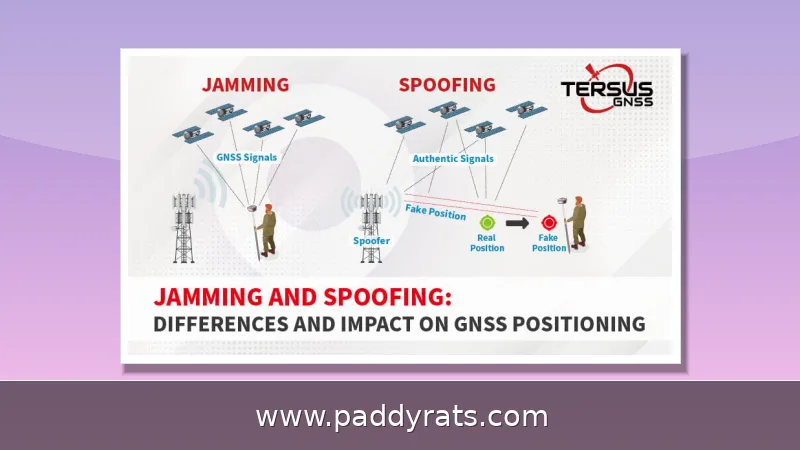
Signal jammers flood the airwaves with noise so your phone, Wi-Fi, GPS or alarm gear can't hear the real signal. You can sometimes work around one by moving, shielding, cutting power or switching bands, but there is no magic app that defeats it.
What Is a Signal Jammer and How Does It Work?
A signal jammer is basically a radio transmitter that's tuned to the same frequencies your devices depend on, and its whole purpose is to overpower them. It floods the downlink bands that cell phones use, or the 2.4 GHz and 5 GHz bands that Wi-Fi runs on, with meaningless noise. As a result, the receiving device can't tell the real signal apart from the interference. And since the jamming targets the downlink, your phone usually ends up showing zero bars instead of just a weak signal.
This problem is only getting bigger. Since 2021, U.S. Customs and Border Protection has seen signal jammer seizures jump by about 830%, and over the past year, Los Angeles officials, law enforcement, and security experts have all warned about a rise in burglars using Wi-Fi jammers to break into homes. Back in June, the Department of Homeland Security reported that jamming devices were used in a string of bank robberies in Vermont, and similar gear turned up in an attempted jewelry store heist in La Verne, California.
How much ground a jammer actually covers depends a lot on the hardware. Wilson Amplifiers says typical jamming range tops out at around 30 square feet, but Jammer Master lists models with an action radius stretching from 10 meters all the way to several hundred meters. The names can get confusing when you're looking for help, too: signal jammer, cell phone jammer, mobile phone jammer, signal blocker, GPS jammer, Wi-Fi jammer, drone jammer, and text stopper all refer to overlapping tools. And in academic circles, researchers also study reactive jammers along with NOMA, PD-NOMA, URLLC, and SIC.
How to Bypass a Signal Jammer: Practical Methods
So, can you actually get around a cell phone jammer? Honestly, the answer is "partly" — and any real fix involves physical or electrical workarounds, not software tricks. The approaches outlined below come from Jammer Master and reflect what tends to hold up in real-world situations.
| Method | How it works | Realistic limits |
|---|---|---|
| Leave the coverage area | Move to another room or out into the street | Only helps if the jammer's radius is small |
| Create a radio shadow | Put a large metal object between you and the jammer | Directional and partial; you must know where it sits |
| Cut the power | Shut off electricity to the room housing the jammer | Fails if it has a battery or backup supply |
| Switch standards | Try GPS, 3G, 4G, Wi-Fi, mobile data or messengers | Cheap jammers often block only voice |
The simplest and most dependable way out is to just walk beyond the jammer's reach. RF power fades as you move farther away, and obstacles between you and the transmitter weaken it even more. Putting a big metal object in the way — a filing cabinet, a steel door, the body of a car — can create a radio shadow that gives you back just enough signal to make a call or send a text. That said, this trick is directional, so it only works if you have a rough sense of where the jammer is actually located.
Cutting the power only works if the jammer is plugged into the mains. A lot of them have internal batteries or a backup supply, and in that case flipping the breaker does nothing for you. The better move is to switch communication standards. Cheap mobile phone jammers often block voice calls and nothing else, which leaves GPS, 3G, 4G, Wi-Fi, mobile internet, and instant messengers wide open. Try each one instead of assuming it'll work.
How to Prevent WiFi Jamming at Home or Work
Prevention beats reaction, and most of the hardening steps here come from Reolink's guidance on Wi-Fi jammer protection. Start with your network security settings: turn on encryption and authentication, ideally WPA3, and enable Protected Management Frames (PMF) so wireless management frames can't be forged or tampered with. That said, not every device supports PMF, so it's worth checking your router and client hardware before you count on it.
Basic security hygiene still matters here. Change the default admin username and password, and turn off any features you're not actually using, like Wi-Fi Protected Setup (WPS) or remote management. MAC filtering works kind of like a digital guest list, though it's not foolproof, since MAC addresses can be spoofed. Switching your devices over to 5 GHz helps as well, because most consumer jammers go after the 2.4 GHz band.
People tend to overlook how much physical setup matters. Put the router somewhere near the middle of your home, and keep it away from thick walls, metal objects, mirrors, and big appliances. Directional or adaptive antennas are also worth considering, since they focus the signal and shrink the area a jammer can mess with. If you run more than one access point or router, you can just switch to another one when one gets hit. Wired Ethernet is even better, because jamming doesn't touch it at all. And honestly, an anti-Wi-Fi jammer device that picks up on jammers and warns you isn't a bad extra to have.
The list of vulnerable devices is longer than most people realize. It includes Wi-Fi routers, smart home gadgets like smart lights and speakers, Wi-Fi-enabled security cameras, and battery-powered cameras that operate on 2.4 GHz and 5 GHz, such as the Reolink Altas PT Ultra. If any of these are part of your home security setup, jamming isn't just a nuisance, it's a real threat.
How to Tell If a Cell or WiFi Jammer Is Active
Detection signs differ by technology. With a Wi-Fi jammer, you see bad signal quality and disconnections near the router, repeated reconnects, high latency, packet loss and reduced bandwidth — while wired Ethernet devices keep working normally, because jammers only affect wireless links. That contrast between wired and wireless is one of the clearest clues you will get.
For a cell phone jammer, look for loss of service on multiple devices in an area that normally has good reception, along with erratic signal fluctuations. Wilson Amplifiers notes that the most common symptom is simply dropped service, and that apps claiming to detect jammers are largely unproven and still need a working signal to function. Without military-level technology, it is virtually impossible for the average consumer to definitively detect a jammer.
Cellbusters points out that spectrum analyzers can detect jammers by analyzing frequencies, but they are not commonly available and require specialized knowledge to interpret. In practice, most people confirm jamming by elimination: multiple devices, multiple carriers, one location, and a wired device that still works fine.
Do Signal Boosters or Anti-Jamming Devices Help?
A signal jammer will interfere with a cell phone signal booster, and the reason is mechanical rather than mysterious. Boosters amplify an existing signal; if a jammer blocks that signal, the booster has nothing to amplify. Any signal jammer is effectively also a signal booster jammer, so cell signal amplifiers are not an effective defense against jamming.
| Tool | What it does | Against a jammer |
|---|---|---|
| Cell signal booster | Amplifies an existing weak signal | Ineffective — nothing to amplify |
| Anti-Wi-Fi jammer detector | Alerts you to interference | Useful for awareness, not recovery |
| Spectrum analyzer | Analyzes frequencies to spot jamming | Effective but expensive and specialized |
| Wired Ethernet | Carries data over cable | Unaffected by RF jamming |
What genuinely helps is redundancy rather than amplification: wired connections, multiple access points, alternate communication standards and awareness tools that tell you something is wrong. Treat boosters as coverage extenders for weak-but-present signal, not as countermeasures against an active jammer.
Legal Risks and FCC Enforcement
The legal picture in the United States is unusually clear. The FCC states that federal law prohibits the operation, marketing or sale of any jamming equipment that interferes with authorized radio communications, including cellular and Personal Communication Services (PCS), police radar and GPS. There are no exemptions for use within a business, classroom, residence or vehicle.
Penalties for jammer use or marketing can include fines of up to $11,000, seizure of equipment and criminal sanctions including imprisonment. The Communications Act of 1934 outlaws interference with authorized radio broadcasts, which is the older statutory backbone behind modern enforcement. Local law enforcement agencies do not have independent authority to use jamming equipment, though federal agencies may be authorized in some instances.
Cellbusters notes that many countries, including the United States, prohibit cell phone jammers in practically every use case, covering sale, distribution and marketing. State lawmakers have called to legalize jamming in correctional facilities, where cell phone signal detectors are legal and common. Brazil, New Zealand and Sweden have considered exceptions for correctional facilities, and in the United Kingdom law enforcement, intelligence agencies and jails have employed signal jammers since 2012 under strict regulation.
The practical takeaway for consumers and businesses is simple: buying, selling or switching on a jammer is a federal offense in the U.S., and the defenses you can legally deploy are limited to hardening your own network and switching to wired or alternate-band connections.
What Should You Do If You Suspect Jamming Right Now?
Work through a short checklist rather than guessing. First, test a wired connection or a device on a different network to confirm the problem is wireless-specific. Second, move away from the affected area and see whether service returns, which tells you whether you are inside a jammer's footprint. Third, try alternate standards — mobile data, GPS, messengers — since cheaper jammers often block voice only.
If the disruption is tied to a burglary, a threatening situation or a pattern of repeated outages, contact law enforcement and your carrier rather than attempting counter-jamming yourself. Document the times, the affected devices and the behavior you observed; that record is far more useful to investigators than any consumer detection app.
Finally, treat jamming as a resilience problem. Build in wired fallbacks, keep a second carrier or access point available, and assume that any single wireless link can be taken down. That posture protects you whether the interference comes from a criminal, a malfunctioning device or deliberate disruption.
Frequently Asked Questions
Can you actually bypass a signal jammer?
Partially. You can move out of the jammer's coverage area, create a radio shadow behind a large metal object, cut its power, or switch to another communication standard such as GPS, 3G, 4G, Wi-Fi or messengers that cheaper jammers do not block. There is no app that overrides a jammer.
How do I know if a WiFi jammer is being used?
Signs include a sharp drop or loss of Wi-Fi strength near the router, repeated disconnects and reconnects, high latency, packet loss and reduced bandwidth. Wired Ethernet devices keep working normally, because jammers only affect wireless links.
Does a signal booster stop a jammer?
No. Signal boosters amplify an existing signal, so if a jammer blocks that signal the booster has nothing to amplify. Any signal jammer is effectively also a signal booster jammer, and amplifiers are not an effective defense against jamming.
Is it legal to use or own a signal jammer?
No. In the United States the FCC prohibits operating, marketing or selling jamming equipment that interferes with authorized radio communications, with no exemptions for businesses, classrooms, residences or vehicles. Penalties can include fines up to $11,000, equipment seizure and imprisonment.