Jammers knock out cell and Wi-Fi service by flooding the same radio frequencies your devices rely on, and their range is usually short. Here are the signs, the tools, and the legal steps that actually work.
What Is a Signal Jammer and How Does It Work?
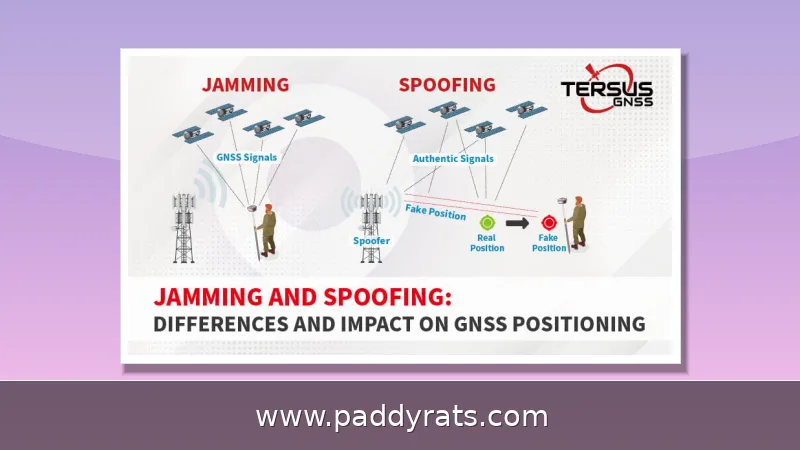
A signal jammer is really just a transmitter that intentionally drowns out authorized radio communications on the same frequencies your phone, router, or GPS receiver depends on. You can think of it as a denial-of-service attack delivered over the air—any device within range simply stops working. Cheaper, less sophisticated jammers block only one frequency, which can trick a handset into believing no network exists at all. Wi-Fi jammers work differently: they push powerful RF energy across the same bands local networks use, typically 2.4 GHz and 5 GHz. For a jammer to actually do its job, it has to be loud, wide, and running most of the time—and that's precisely why it leaves traces you can look for.
This isn't some far-fetched scenario, either. Since 2021, U.S. Customs and Border Protection has recorded an roughly 830% increase in signal jammer seizures—a number that says a lot about how quickly these devices have shifted from niche gadgets to tools in criminals' hands. Over the past year, Los Angeles officials, law enforcement, and security experts have all sounded the alarm about burglars using Wi-Fi jammers to knock out home security cameras before breaking in. And it's not just a California issue. In June, the Department of Homeland Security reported that jamming devices showed up in a series of Vermont bank robberies, and authorities in La Verne, California, recovered jamming equipment after an attempted jewelry store robbery. Once you start digging into news coverage or browsing product listings, you'll notice there's no shortage of names for these things—cell jammers, mobile phone jammers, signal blockers, GPS jammers, text stoppers, Wi-Fi jammers. Different labels, sure, but they all point to the same basic tool: something that floods the airwaves and cuts off the wireless signals around it.
One thing worth keeping in mind for everything that follows: a jammer's reach is typically only about 30 square feet. That's a small radius, which means the source is almost certainly nearby—and it also means that simply stepping away from the affected spot will often bring your signal back. Keep that picture in your head, because it turns a frustrating mystery into something much more manageable: a hunt for a small device sitting somewhere close.
Signs Someone Is Using a Wi-Fi Jammer
The first sign is usually a mix of lousy signal quality and nonstop disconnections. Your Wi-Fi bars drop or vanish completely even when you're sitting a foot away from the router, and your devices get trapped in that endless loop of dropping the connection and grabbing it again. Then it snowballs: latency climbs, packets go missing, and your usable bandwidth shrinks, so pages stall halfway through loading and video calls turn into frozen faces and that terrible robotic voice. What separates jamming from a routine outage, though, is whatever still works. If the computers, TVs, and gaming consoles plugged in with Ethernet are humming along just fine while every wireless device in the same room is fighting for its life, that's a solid clue. Jammers only knock out wireless links, so when your wired gear keeps working without a hiccup, the problem is probably something interfering with the airwaves rather than your internet provider.
Here's a quick test you can run before you even think about calling your provider: check whether your wired devices are still working. It sounds almost too simple, but there's a good reason it works. A Wi-Fi jammer floods the same radio bands your network uses, so it disrupts the over-the-air link between your devices and the router. What it can't touch is the data traveling through a physical Ethernet cable. So if a desktop that's plugged straight into the router keeps browsing like nothing happened, while every phone, laptop, and smart TV in the same room drops offline at the exact same moment, that's a pretty clear sign of an RF problem — interference in the air — rather than something wrong with your internet service. On the other hand, if the wired machine is also struggling or completely dead, the culprit is much more likely your ISP, a failing router, or scheduled maintenance in your area. Basically, treat that wired device as your control: as long as it stays healthy, the problem is almost certainly wireless interference.
It also helps to think like a burglar. Someone targeting a home camera system isn't trying to take down every network on the block — they just want the wireless cameras and doorbell units offline while the wired alarm panel keeps running, untouched and none the wiser. So if your Wi-Fi suddenly goes dark in one spot at a strange hour, it's worth a closer look, especially when it happens right before something else goes wrong. Jot down when it happened and which devices dropped offline. Down the road, that kind of log can carry real weight, whether you file a complaint with the FCC or sit down with local law enforcement to walk them through what you noticed.
Signs Someone Is Using a Cell Phone Jammer
When a cell jammer is in play, the telltale sign is losing service on several devices at once in a place where you'd normally have no trouble getting a signal. Your bars start bouncing around unpredictably—full strength one moment, gone the next—and it's affecting phones of different makes on different carriers simultaneously. Your other wireless devices tend to suffer as well: Wi-Fi routers and Bluetooth connections become unreliable or cut out completely. Some jammers emit a faint high-pitched whine or buzz, but don't treat that as hard evidence of anything, because it's not dependable. A noise like that on its own shouldn't be what you base your conclusion on.
More often than not, the giveaway is a suspicious device itself. Look for a boxy, unauthorized gadget with an antenna, plugged into an outlet somewhere like a hallway, a closet, a car, or an empty unit. And because jammers only cover so much ground, one tucked away in the apartment next door or sitting in a parked car could wipe out your service in the living room without anyone ever stepping inside your place.
It's worth keeping RF jamming and tamper signals on a security panel separate, because people mix them up constantly. Most RF noise turns out to be nothing more than a malfunction or something in the surrounding environment — a component going bad, interference from nearby electronics, that sort of thing. A tamper alert is a different animal: it reliably means someone is physically messing with the panel. When the two get lumped together, ordinary equipment failures end up getting blamed on jammers, and that mistake can send you chasing a threat that was never actually there.
It's also worth being upfront about the limits here. For the average person, definitively detecting a cell phone jammer is basically impossible without highly advanced, military-level technology. That might sound like a letdown, but it's just how these devices work: a jammer is itself a powerful signal transmitter, so running out to buy a signal booster or amplifier won't do you any good — those tools don't stop jammers. Context matters too. You'd never see a cell jammer fly at an airport, since carriers usually run in-building systems there that would be affected right away, and that kind of disruption gets noticed fast. In other words, the places where jamming is hardest to spot tend to be the places where nobody is watching the spectrum.
How to Detect a Jammer with a Spectrum Analyzer or SDR
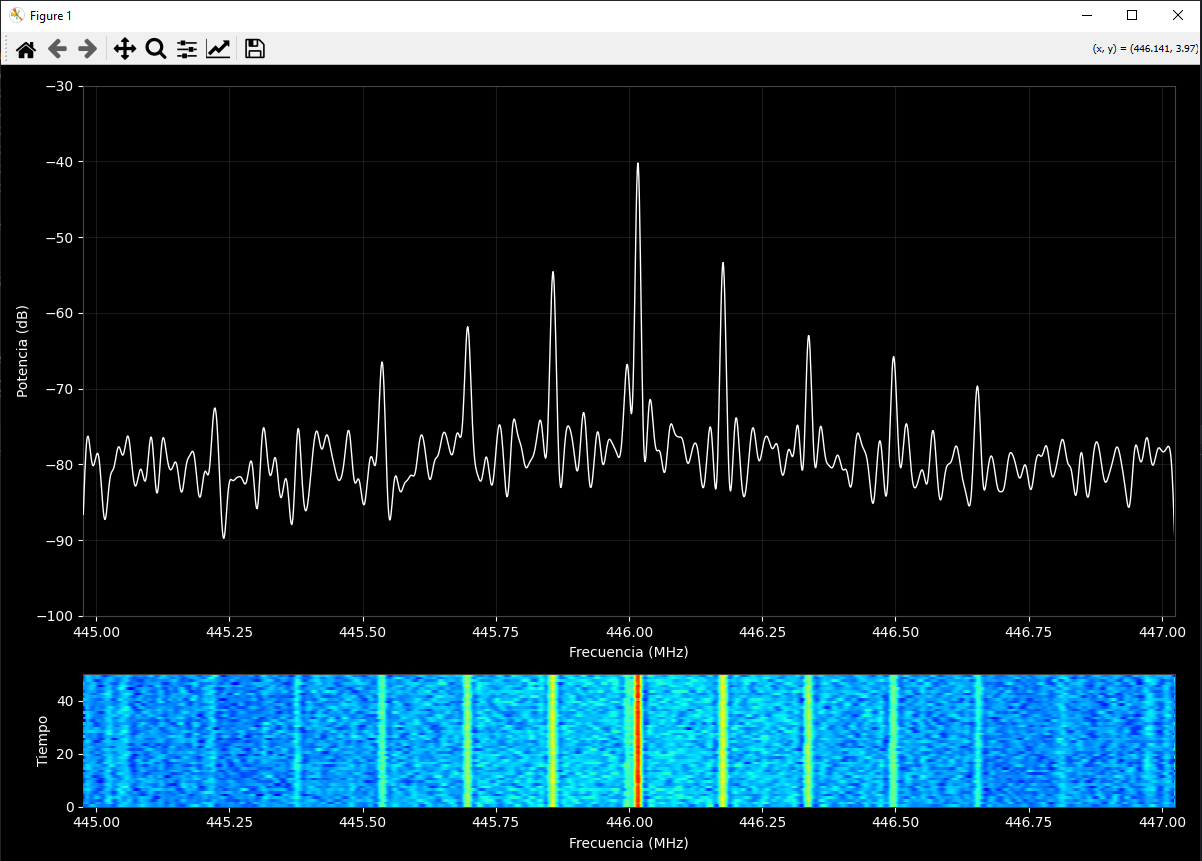
A spectrum analyzer is the most direct tool you can reach for. It turns the airwaves into a visual picture, and when a jammer is running, it usually shows up as a bright, steady beacon stretched across the band—easy to spot against the normal dips and spikes of everyday traffic. Hook the analyzer up to a directional antenna and you can literally walk the signal down to its source, watching the reading climb as you get closer, sort of like a game of hot and cold. The catch is that you have to search the right band and channels for your network, because a beacon you never tune to is a beacon you never see. These instruments aren't consumer products, either, so just reading the display is a skill in itself. Experienced users learn to tell a jammer's signature apart from ordinary interference, while beginners can easily misread what they're looking at.
If you want to get into jammer detection without spending much, software defined radio is the cheapest way in. An RTL-SDR USB stick runs about $20, and once you pair it with free software, you can watch the RF spectrum on your laptop and look for suspicious noise bumps sitting on Wi-Fi and cellular frequencies — the kind of flat, raised "floor" that shouldn't be there. For hobbyists who want more, the HackRF One can be turned into a smart spectrum analyzer that first learns what a normal RF environment looks like in your area, then flags hidden noise in real time; some builders have even added machine-learning models to that setup, and you can find YouTube walkthroughs demonstrating the whole process. There's a lower-tech option too: a wideband field strength meter hooked to an antenna and driven around in a car can hint that a jammer is operating nearby, since the readings will spike as you approach the source.
| Tool | Typical Cost | What It Shows | Skill Level |
|---|---|---|---|
| RTL-SDR USB stick | About $20 | Noise bumps at Wi-Fi and cell frequencies | Beginner |
| HackRF One with ML software | Several hundred dollars | Real-time RF anomaly detection | Advanced |
| Spectrum analyzer with directional antenna | Professional-grade pricing | Jamming signal as a bright beacon plus direction | Expert |
| Field strength meter in a vehicle | Varies | Relative signal strength over an area | Intermediate |
| Wi-Fi Jammer Detector hardware plus app | Hardware purchase required | Weak and strong jamming, deauthentication attacks | Beginner |
Read the table as a ladder rather than a menu. Start with the inexpensive SDR to confirm that something unusual is happening, then escalate to directional hunting only if the evidence holds up. Buying an analyzer you cannot interpret produces expensive confusion, not proof.
WiFi Jammer Detector Apps and Hardware
The Wi-Fi Jammer Detector by Eye LLC, available on the App Store, works alongside a purchased detector from wifijammerdetector.com. The hardware must be wired to your main router or switch rather than a wireless node, because a device sitting on the wireless side would be blinded by the same jamming it is supposed to catch. Once installed, it alerts remotely by push notification and email, and it detects both weak and strong jamming as well as deauthentication attacks, the technique attackers use to knock clients off a network.
Apps that claim to detect jammers on a phone alone are largely unproven. They require a working signal to function, which is precisely what disappears during an attack, and they cannot see RF energy outside the phone's own radio. Treat them as novelty tools rather than evidence.
If you run a small business or a home office, the wired sensor approach is the most defensible option, because it produces a timestamped record you can hand to law enforcement. Wilson Amplifiers has published a plain-language blog explaining how jammers and boosters differ, which is a reasonable starting point if you want background before buying hardware.
Why Jammers Are Illegal and How to Report One
Both cell and Wi-Fi jammers are illegal to own and operate in the United States. The Federal Communications Commission states that federal law prohibits the operation, marketing, or sale of any jamming equipment that interferes with authorized radio communications, including cellular and PCS service, police radar, and GPS. There are no exemptions for businesses, classrooms, residences, or vehicles. The Communications Act of 1934 outlaws interference with authorized radio broadcasts, and even local law enforcement agencies lack independent authority to deploy jamming equipment, though federal agencies may be authorized in specific instances.
To report suspected jamming, contact local law enforcement or file a complaint with the FCC. On the FCC website, select Interference in the Phone Issues box and then choose Signal Jammers. Include dates, times, affected devices, and any photos of suspicious equipment, since those details determine whether an investigation moves forward.
What should you actually do in the moment? Relocate first, because moving away may restore reception given the short range. Tech-savvy users can sometimes switch the frequency their phone operates on, depending on how sophisticated the jammer is. If it is safe, physically locate the device, which usually resembles a walkie-talkie, a cell phone, or a wireless router, and disable it, then report what you found.
How Do You Know If Someone Is Using a Signal Jammer?
Put the pieces together and the pattern is hard to miss: several phones losing service at once in a location with normally strong coverage, erratic jumps between full bars and nothing, unstable Wi-Fi and Bluetooth, and a strange box with an antenna nearby. Because range is short, the source is close, so a slow walk around the property with an SDR or a phone in hand often narrows the search quickly. Document everything as you go, and remember that a single dropped call proves nothing while a repeatable, multi-device pattern at the same spot is meaningful evidence.
Frequently Asked Questions
How do you know if someone is using a signal jammer?
Common signs include a sudden loss of signal bars on multiple phones in the same area, rapid fluctuations between full and no bars, and unstable Wi-Fi or Bluetooth. A faint buzzing noise and an unidentified box-like device with an antenna nearby can also indicate a jammer, though neither is conclusive on its own.
Can a spectrum analyzer detect a cell phone jammer?
Yes. A radio frequency spectrum analyzer can show a jamming signal like a bright beacon, and a directional antenna helps you locate it. You must search the correct band and channels for your network. These are not consumer products and require skill to interpret correctly.
Does a signal jammer affect wired connections?
No. Jammers only affect wireless devices. Any computer, TV, or gaming system connected directly to the router with an Ethernet cable keeps working normally, which is the fastest way to distinguish jamming from an ordinary network outage or router failure.
Are cell and Wi-Fi jammers legal?
No. Both are illegal to own and operate. The FCC states federal law prohibits the operation, marketing, or sale of any jamming equipment that interferes with authorized radio communications, with no exemptions for businesses, classrooms, residences, or vehicles. Report suspected use to law enforcement or the FCC.