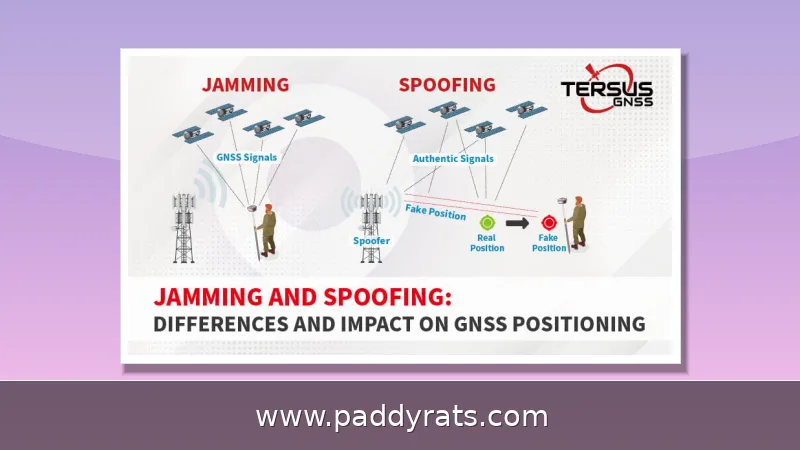
Signal jammers flood the same radio frequencies your Wi-Fi, phone, and GPS rely on, and seizures of the equipment have soared since 2021. Here is how to spot jamming, harden your network, and report it the right way.
What Is Signal Jamming and How Does It Work?
A signal jammer is basically a radio transmitter that floods the exact frequencies your devices rely on with high-power RF noise. The legit signal gets buried, and your receiver just picks up garbled nonsense instead of actual data. That's why "denial-of-service attack" is such a fitting label—nothing gets hacked, the connection is simply smothered. Jammers show up in a lot of forms, too: cell jammers, mobile phone jammers, GPS jammers, Wi-Fi jammers, signal blockers, and even so-called text stoppers.
The techniques themselves depend on what the jammer is trying to accomplish. Noise jamming just floods a frequency with raw power. Deceptive jamming sends out misleading signals instead. Barrage jamming goes after a wide range of frequencies all at once, while spot jamming zeroes in on just one. Sweep jamming moves its power across frequencies over time, and DRFM jamming is a bit different—it alters and re-transmits radar energy to create false targets. As for consumer devices, they usually don't reach much beyond about 30 square feet, whereas wideband full-spectrum units can block several bands at the same time.
How effective a jammer is comes down to three things: transmit power, how many bands it covers, and the type of antenna it uses. More power usually means more range, and a wideband unit that hits several frequencies at once will cause far more widespread disruption than a single-band device. Antenna design matters too, because it determines how that power gets directed and spread around. Protocol jamming works differently. Rather than drowning out the payload, it goes after the control channels that devices depend on to stay connected — which can knock phones or Wi-Fi gear off a network even when the raw signal still looks completely normal. That subtlety is a big part of why jamming is so hard to catch. And since jammers are cheap to buy online and easy to stash in a backpack or a car, they end up in homes, stores, prisons, and even in the hands of bank robbery crews.
This isn't just a theoretical problem anymore. Since 2021, Customs and Border Protection (CBP) has recorded roughly an 830% jump in signal jammer seizures, and ISCO International puts the increase in jamming equipment seizures at nine-fold between 2021 and 2025. The impact on the ground is real, too: in a DHS survey of 4,933 first responders, 9% said frequency interference affects their communication to a great extent, while 22% said it does so to some extent. On top of that, 31% of first responders reported being affected by interference in the SAFECOM Nationwide Survey.
Which Devices and Bands Are Most Vulnerable to Jammers?
Not every wireless link is equally easy to take down, so it's worth figuring out where your exposure actually is. Day-to-day cell traffic hops across a bunch of bands — 700MHz, 800MHz, 900MHz, 1800MHz, 1900MHz, and 2100MHz — which explains why a jammer that only covers one or two of them might not kill your call outright. Instead, your phone just grabs onto whatever weaker signal it can find. GPS and other GNSS signals are far more delicate. They broadcast on L1, L2, and L5, with the civilian L1 signal sitting near 1575MHz, and since those signals reach us from satellites at very low power, they're much easier to drown out than a cell tower a few blocks away. Wi-Fi lives on 2.4GHz and 5GHz, and Bluetooth crowds into the same 2.4GHz space, so one 2.4GHz jammer can knock out your headphones, smart gadgets, and Wi-Fi all at once — which is part of why 5GHz is the harder target. Alarm systems are a case of their own. A lot of them depend on cellular or proprietary RF links to report break-ins, and that reliance makes them a favorite for criminals: take the panel offline and a burglar may buy himself the few minutes he needs before anyone shows up.
The practical takeaway here is pretty simple: older, narrower bands are much easier to overwhelm, while wider and higher bands put up more of a fight. The table below breaks down where jamming pressure tends to hit hardest and what usually keeps working through it.
| Technology | Common Bands | Jam Vulnerability | What Still Works |
|---|---|---|---|
| Cellular voice and data | 700–2100MHz | High; single-band jammers are cheap | Wired VoIP, landlines |
| Wi-Fi | 2.4GHz and 5GHz | 2.4GHz high, 5GHz harder | Wired Ethernet |
| GPS/GNSS | L1, L2, L5 (1575MHz) | Very high; weak signals from orbit | INS, visual odometry, altimeters |
| Bluetooth | 2.4GHz | High; shares Wi-Fi band | Wired peripherals |
| Alarm systems | Cellular or proprietary RF | High if cellular-only | Wired phone line, local sirens |
When you sit down to figure out your defenses, two comparisons matter more than the rest. First, 5GHz is tougher to jam than 2.4GHz. The higher band gives you more channels and a wider swath of spectrum, so a jammer has to work a lot harder to cover all of it at once. That makes switching your devices over to 5GHz a real defensive move, not just a placebo. Second, wired Ethernet keeps working during Wi-Fi jamming, since the interference only takes out the wireless link. Anything you can plug in becomes a lifeline once the airwaves go bad. What doesn't work, though, is a signal booster. A booster only amplifies a signal that's already there, so if a jammer is drowning that signal in noise, there's nothing left to amplify. In that sense, any signal jammer is also, by definition, a signal booster jammer.
How to Detect a Cell or Wi-Fi Jammer
Detection is less about fancy hardware and more about noticing patterns. Start by watching for sudden signal drops when you're near your router, repeated disconnections, unusually high latency, packet loss, or reduced bandwidth. One sign that stands out is when several devices fail at the exact same moment — normal network glitches rarely knock everything offline at once. Wired Ethernet devices keep working during a wireless jamming attack because jammers only disrupt the radio link, so if a laptop on a cable stays online while every phone in the room drops, that's a strong clue something is interfering with your Wi-Fi signal. Routers or devices overheating unexpectedly can also point to jamming, though it's worth remembering that ordinary network problems, like a failing router or an overloaded channel, can produce symptoms that look almost identical. That overlap is exactly why detection takes patience: confirm the pattern across multiple devices and connections before assuming a jammer is the culprit.
When you're trying to figure out whether a cell jammer is at work, don't rely on any single clue—look for a cluster of symptoms instead. Maybe calls keep dropping at the same intersection every day, or your phone shows full bars but won't actually connect. Texts that pile up and then all arrive at once are another giveaway. Those patterns point to interference, not a dying battery or a carrier that's letting you down. And since jamming is tough to catch in the act, keep a log of when and where things fail. A documented pattern will get law enforcement much further than one isolated complaint.
On the network side, watch your signal readings for weird frequency levels or noise ratios, and let intrusion detection systems flag anything suspicious. Free tools like Wi-Fi analyzers come in handy here, because they'll show noise floors spiking across every channel at once—something a normal, crowded neighborhood just doesn't do. Think about it: in a typical apartment building, a channel or two might get busy during peak hours, but the rest stay pretty clean. So when every channel falls apart at the same time and your wired connection is still humming along, that pattern says deliberate RF interference, not ordinary congestion. It's like the difference between a busy highway and someone dropping a roadblock across all lanes at once. If you run into this kind of blanket disruption, take it as a strong hint that a jammer may be nearby, and follow the detection and reporting steps in the sections below.
Before you start pointing fingers, a quick word of caution: jammer symptoms look a lot like ordinary outages, so don't jump to conclusions. A router firmware bug, a power supply on its way out, or even a neighbor's new access point can all mimic jamming closely enough to fool you. That's why one bad afternoon of dropped calls doesn't prove anything by itself. Before you accuse anyone, confirm the problem using a second location, a second device, and a wired test. If the pattern keeps repeating at the same times and places, that's your cue to escalate to a formal report, with your logs attached.
How to Avoid Signal Jammer Interference: Practical Defenses
You can't block a jammer head-on, but you can make your setup much harder to take down. Start with WPA3 encryption and strong, unique passwords, so that even if a link gets disrupted, nobody can simply walk into your network. Then move your devices to the 5GHz band, since most consumer jammers go after 2.4GHz, and turn on automatic band-switching so your gear can hop to a cleaner channel on its own. Keep wired Ethernet as a backup for anything critical—desktop computers, point-of-sale terminals, and security cameras are good examples, because a cable keeps working even when the airwaves around it are jammed. None of this defeats a jammer outright, but together these steps shrink the window an attacker has and keep your most important systems online.
For critical communications, it's wise to plan for graceful degradation rather than assume your signal will always hold. If you notice trouble — calls failing, Wi-Fi crawling, bars dropping — switch to a different device or band right away, and move away from the jamming range whenever you can. Consumer jammers tend to have a short reach, often limited to roughly 30 square feet, so shifting a router, a phone, or even yourself a few rooms over can bring service back. That said, don't rely on a single wireless path for anything urgent. Keep a charged power bank on hand, and have a landline or satellite option as a backup, so that a 9-1-1 call never hinges on one connection that a jammer could cut.
| Backup Option | Why It Helps | Practical Note |
|---|---|---|
| Different device or band | A jammer may target only one frequency | Switch as soon as trouble appears |
| Relocation | Consumer jammer range is often about 30 square feet | Moving a few rooms away can restore service |
| Charged power bank | Keeps your fallback device powered | Store it where you can reach it fast |
| Landline or satellite | Provides a path that doesn't depend on cellular or Wi-Fi | Essential so a 9-1-1 call never relies on one wireless link |
Specialist anti-jammer devices can detect and block interference attempts, but no solution is completely foolproof. Treat them as one layer, not a shield. For businesses, the strongest posture combines physical security, wired fallbacks, redundant carriers, and staff training on what to do when signals vanish. Post Alarm Systems and similar security vendors recommend testing alarm panels over both cellular and wired paths so a single jammed band does not silently disarm your monitoring.
The table below is a quick reference for matching the problem to the most practical response.
| Problem | First Response | Backup Layer |
|---|---|---|
| Wi-Fi drops on all devices | Move to 5GHz, check wired link | Ethernet for critical devices |
| Cellular calls fail at one spot | Relocate, switch carrier band | Wired VoIP or landline |
| GPS loses lock | Switch to multi-frequency receiver | INS, altimeter, map reading |
| Alarm panel offline | Verify wired phone path | Local sirens, manual patrol |
Anti-Jamming Technologies: Spread Spectrum, CRPAs and Sensor Fusion
On the engineering side, anti-jamming is an arms race with several proven tools. Wideband spread spectrum modulation spreads a signal across many frequencies so a narrow jammer cannot cover it all. Directional antennas and controlled reception pattern antennas (CRPAs) steer nulls toward the jammer, effectively turning down the noise coming from that direction while keeping the satellite or tower signal. Adaptive filtering algorithms then adjust in real time as the interference shifts.
For positioning, dual or multi-frequency GNSS receivers switch to unaffected bands when one is jammed, since GNSS broadcasts on L1, L2, and L5. When all satellite bands are contested, an inertial navigation system (INS) can bridge GNSS gaps for minutes or hours, and it pairs well with visual odometry, barometric altimeters, or terrain contour matching. This sensor-fusion approach is standard in aviation, maritime, and autonomous vehicle design precisely because no single sensor survives every attack.
The trade-offs are worth understanding. Barrage jamming disrupts many channels but spreads its power, making it weaker per frequency, while spot jamming is focused but ineffective against frequency-agile radar. That is why military and industrial systems combine spread spectrum, null-steering antennas, and multi-sensor fusion rather than relying on any one technique. For homes and small businesses, the same logic applies at a lower cost: redundancy beats raw power.
No anti-jamming solution is 100% foolproof, and vendors who promise otherwise are overselling. The realistic goal is to keep critical functions running long enough to notice the attack, switch modes, and get help. Budget accordingly, and test your fallbacks before you need them.
Legal and Regulatory Rules Around Jammers
In the United States, jammers are illegal to own and operate. The FCC states that federal law prohibits operating, marketing, or selling any jamming equipment that interferes with authorized radio communications, including cellular, PCS, police radar, and GPS. There are no exemptions for businesses, classrooms, residences, or vehicles, and even local law enforcement lacks independent authority to use jammers. The Communications Act of 1934 outlaws interference with authorized radio broadcasts, and the FCC's Jammer Enforcement page remains the authoritative reference.
The stakes go beyond paperwork. Jammers can block 9-1-1 and emergency calls, interfere with law enforcement communications, and disrupt public safety for whole neighborhoods. A $2.5 million crime spree in California involved more than a dozen bank heists tied to a gang, and ten individuals were charged by the FBI. In June, DHS reported jamming devices used in several Vermont bank robberies, and jamming devices were recovered in an attempted jewelry store robbery in La Verne, California.
Enforcement is real but uneven, because jamming is hard to catch in the act. If you suspect jamming, report it to law enforcement or file an FCC complaint with dates, times, locations, and device logs. Do not buy a jammer to fight a jammer; that turns you into the violator. Canada allowed a pilot project for jammers in federal prisons in March 2025, which shows how narrow the exceptions are even for governments.
Globally, the picture is similar: most countries restrict jamming equipment, and cross-border sellers increasingly face seizure at import. The practical rule for readers is simple. Defend, document, and report, and leave the transmitting to no one.
Frequently Asked Questions
How can I tell if a signal jammer is causing my connection problems?
Look for sudden signal drops near your router, repeated disconnections, high latency, packet loss, reduced bandwidth, or multiple devices failing at once. Wired Ethernet devices keep working because jammers only affect wireless links. Routers or devices overheating unexpectedly can also be a sign, though normal network faults cause similar symptoms.
What can I do to avoid Wi-Fi jammer interference at home?
Use WPA3 encryption and strong unique passwords, switch devices to the 5GHz band since most jammers target 2.4GHz, enable automatic band-switching, and keep wired Ethernet as a backup for critical devices. Specialist anti-jammer devices can detect and block interference attempts, but no solution is completely foolproof.
Is it legal to own or use a signal jammer?
No. The FCC states federal law prohibits operating, marketing, or selling any jamming equipment that interferes with authorized radio communications, including cellular, PCS, police radar, and GPS. There are no exemptions for businesses, classrooms, residences, or vehicles, and even local law enforcement lacks independent authority to use jammers.
Can a signal booster or amplifier stop a jammer?
No. Signal boosters amplify an existing signal, so if a jammer blocks that signal the booster cannot help. Any signal jammer is also a signal booster jammer. The most practical responses are relocating away from the jamming range, switching frequency or band where possible, and reporting the incident to law enforcement or the FCC.