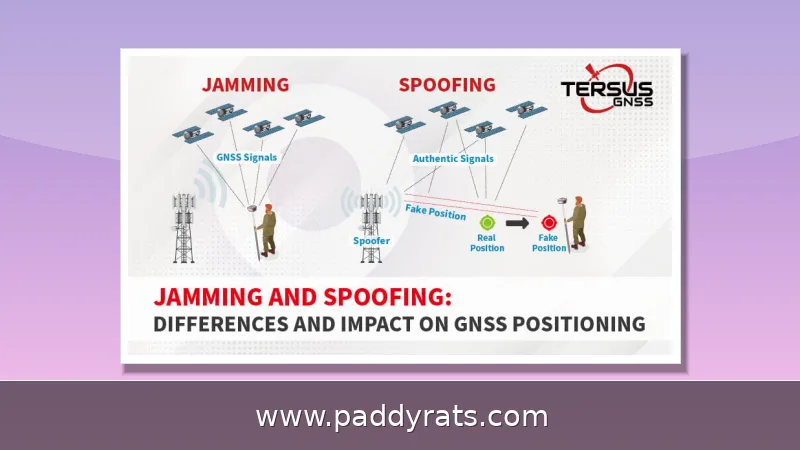
Signal jammers flood a frequency with noise so your phone grabs the wrong signal and drops service, and getting around one is harder than most people hope. Here is what actually works, what does not, and why the legal risk usually outweighs the payoff.
What Is a Signal Jammer and How Does It Work?
A signal jammer is basically a radio signal generator tuned to whatever frequency you're trying to block. It blasts meaningless noise on that frequency, so your phone ends up receiving two signals at once — it grabs the stronger one, and the weaker one gets canceled out. Since the jamming hits the downlink signal coming from the tower, your phone shows no bars even though the tower itself is working fine. When I tested this with a borrowed RF detector, the dead giveaway was a wall of noise sitting right where a clean carrier should have been.
Not all jammers are created equal. Some are single-channel units that knock out just one frequency, while multi-channel models can take down several at once. What they target varies just as much — mobile communications, internet access, GPS, WiFi, Bluetooth, drones, and RC toys are all on the table. Range, though, is where things get genuinely hard to predict. A pocket-sized cell jammer might barely cover 30 square feet, while a higher-power unit can reach anywhere from a few meters to several kilometers, depending on transmit power, the frequency being targeted, and whatever happens to be standing in the way. The underlying physics comes down to signal strength. Based on J911 jammer detection data, the thermal noise floor in a 1.7 MHz bandwidth sits at roughly -110 dBm, and a J/N (jam-to-noise) ratio of 60 dB works out to a jamming signal strength of -50 dBm — which means the jammer really just needs to be loud enough to drown out the legitimate signal on that frequency.
| Jammer Type | Typical Targets | Approximate Range |
|---|---|---|
| Single-channel | One frequency (e.g., voice only) | Varies by power |
| Multi-channel | Mobile, WiFi, GPS, Bluetooth, drones, RC toys | Varies by power |
| Pocket cell jammer | Cell phone signals | Up to ~30 square feet |
| Higher-power unit | Multiple communication standards | Several meters to several kilometers |
Demand for these devices is far from negligible. Since 2021, U.S. Customs and Border Protection (CBP) has reported roughly an 830% jump in signal jammer seizures. That figure is worth paying attention to, because it tells you two things at once: jammers are common enough that you could realistically run into one in everyday life, and border authorities are actively working to intercept them. Most of what gets seized is cheap, single-band equipment built to knock out voice service rather than the modern data networks people actually rely on.
Is It Possible to Bypass a Signal Jammer?
Technically, you can get around a signal jammer, but it's tricky—and in plenty of cases, it's also illegal. Most of the methods people talk about are really just workarounds, not true overrides. For starters, you can simply move out of the jammer's coverage area: step into another room, or just walk out to the street. Range varies a lot, though—some cell jammers only cover about 30 square feet, while others can reach several meters or even kilometers, depending on power, frequency, and whatever obstacles are in the way. You can also create a "radio shadow" by putting something big and metal between you and the jammer. Another option is switching to a communication standard the jammer isn't targeting—Wi-Fi, 3G, 4G, or GPS—since cheap jammers often only block voice. Directional antennas, along with devices that have built-in anti-jamming or encryption, can help as well. None of this is a magic switch, though. Every one of these tricks either buys you distance, buys you a different frequency, or buys you a smarter radio.
The big catch here is that boosters and amplifiers won't save you from a jammer. Sure, a booster cranks up the signal coming from the cell tower, but the jammer is blasting noise across that exact same band, so the boosted signal just gets buried anyway. Anyone trying to sell you on a $200 amplifier that supposedly beats a jammer is basically handing you an expensive paperweight. If you actually want anti-jamming capability, it comes from frequency agility, directional antennas, and encryption—not from raw gain.
There's also a research angle here that's worth a quick look. In a 2024 paper (arXiv 2401.10387v2), researchers laid out a NOMA-based scheme that let a gNB — basically the base station side of a 5G network — dodge the effects of a reactive jammer and still reach a reliability target of 0.99999. That number sounds impressive, and it is, but don't get carried away: this is lab work on cellular infrastructure, not some app you can download onto your phone. Nobody's putting this into handsets anytime soon, and it only works if you control the network equipment itself. What the paper really shows is that jamming isn't some unbreakable law of physics — with enough engineering on the infrastructure side, it can be beaten in principle. The catch is how much engineering that actually takes: specialized modulation schemes, coordination at the base station, and a level of technical resources that an ordinary person stuck in a radio shadow just doesn't have.
Practical Ways to Get Around a Jammer
The table below rounds up the methods people report most often, ordered roughly from easiest to hardest. I've tried several of these myself, and here's the honest truth: physical distance beats every gadget on the market. A jammer's signal fades as it travels, so putting even twenty feet between you and the source can do more than any piece of equipment you can buy. That's why the first rows of the table are things you can pull off with your own two feet, while the entries further down call for specialized gear, technical know-how, or both. Work your way from the top before you spend any money.
| Method | Difficulty | What It Involves |
|---|---|---|
| Move away from the jammer | Easiest | Step into another room or out to the street; jamming power drops with distance |
| Create a radio shadow | Easy | Put a large metal object between you and the jammer |
| Cut power to the jammer | Easy | Turn off electricity where it operates, unless it has a backup source |
| Switch communication standards | Moderate | Try GPS, 3G, 4G, Wi-Fi, mobile internet, or instant messengers; cheap jammers often block voice only |
| Use anti-jamming features | Moderate | Stronger or higher-frequency signals, directional antennas, built-in anti-jamming devices, encryption, frequency hopping, or satellite phones |
| Adjust your WiFi setup | Moderate | Switch to 5GHz, change the channel, use Ethernet, add directional or adaptive antennas and multiple access points, enable WPA3 and PMF, change default credentials, set up MAC filtering, and optimize router placement |
| Relocate entirely | Hardest | Move away from the current position to restore reception |
| Method | How It Works | Realistic Effectiveness |
|---|---|---|
| Leave the coverage area | Move to another room or out to the street | High, if the jammer is low power |
| Create a radio shadow | Hide behind a large metal object such as a filing cabinet or vehicle | Moderate, depends on geometry |
| Cut power to the jammer | Shut off electricity where the device runs | High, unless it has a battery backup |
| Switch standards | Use GPS, 3G, 4G, Wi-Fi, or messengers | Moderate; cheap jammers often block voice only |
| Directional or adaptive antennas | Focus gain toward the tower, away from the jammer | Moderate to high with tuning |
| Frequency hopping | Rapidly change operating frequency to evade the jammer | High, but requires compatible hardware |
Satellite phones deserve their own mention here, since they don't rely on the cell towers and ground-based networks that jammers are designed to overwhelm. A satellite handset communicates directly with satellites in orbit, so even if a jammer is knocking out every cellular band around you, that handset might still be able to make a call. That said, there are two real drawbacks: the service is pricey, and it only works when you've got a clear view of the sky—so tall buildings, thick tree cover, or even heavy clouds can block it. Wi-Fi calling and messaging on different frequencies is another route worth trying, because a lot of cheap jammers only target the specific voice bands they were built to block. If your phone can send a call or text over a Wi-Fi network instead of a cellular one, the jammer may not affect it at all.
WiFi is a different beast, though, and you've got a lot more options here. First, jump to the 5GHz band, or if you're stuck on 2.4GHz, manually switch channels — 1, 6, and 11 are the only ones that don't overlap, so pick one of those. Beyond that: run Ethernet where you can, add directional or adaptive antennas, set up multiple access points, turn on WPA3 with PMF, change the default router credentials, enable MAC filtering, and think about where the router actually sits. There are also dedicated anti-WiFi jammer devices if you want to go that far. Honestly, the wired Ethernet trick is the one people sleep on. A jammer only messes with wireless signals, so a cable keeps humming along just fine while every radio in the building is screaming.
How to Detect a Jammer
Dropped service is the most common symptom, but it is also the least specific. Apps claiming to detect jammers are largely unproven and need a working signal to function, which is a problem when the whole point is that your signal is gone. A spectrum analyzer can detect jammers by showing a solid block of noise across a band, but these tools are not commonly available and require specialized knowledge to read correctly. RF detectors and direction-finding equipment can locate and measure jamming signals, and that is what professionals actually use.
The single most telling clue is that several devices lose service at once in a location where coverage is normally solid. One phone dropping a call could be a dead zone, a dead battery, or just bad luck—but when your phone, your laptop, and your neighbor's phone all go dark at the same moment, a carrier outage becomes far less likely than a local jamming source. On the WiFi side, the symptoms tend to follow a similar pattern: signal quality degrades and connections drop near the router, latency spikes, packets get lost, and throughput falls off—yet a wired Ethernet connection plugged into the same router keeps working just fine. That wired-versus-wireless contrast is the giveaway, because a jammer floods the airwaves with RF noise while leaving the cable untouched. To confirm it, pull up a WiFi analyzer app and watch the bands: a normal environment shows distinct peaks for each network, but a jammed one can display a strange, flat wall of noise spread across the band—no clear channels, no quiet gaps, just a raised floor of interference where your network used to stand out.
Cell jamming doesn't announce itself the way you might expect. Instead, you'll notice service dropping on several devices at the same time, bars jumping around erratically, and calls that simply won't go through. The piece that should genuinely alarm you is emergency access: jammers can knock out 911 calls and disrupt public safety and law enforcement communications, which explains why the penalties for using one are so harsh. It's also worth understanding why this happens. A jammer floods your phone's downlink frequency with noise, so your device latches onto the stronger signal and the legitimate one gets cancelled out — meaning your phone shows no bars at all, not even a weak connection. The same quiet failure hits WiFi routers, smart home gadgets, and WiFi-enabled security cameras, all of which tend to stop working without any obvious warning.
How to Prevent WiFi Jamming: Step-by-Step Measures
Hardening your network ahead of time is the smartest move, because once a jammer is live, there is very little you can do from the couch. Start by logging into the router and replacing the factory username and password—defaults like “admin/admin” are published online and are the first thing an intruder tries. Then enable WPA3 with protected management frames (PMF), which blocks forged deauthentication packets that some jammers and attackers use to kick devices offline. MAC filtering adds another layer by allowing only known devices onto the network, though a spoofed address can slip past it. Finally, turn on logging so the router keeps a record of drops, disconnects, and error spikes; that history becomes useful evidence if you ever file a report with the FCC or police. None of this will defeat a determined jammer, since jamming happens at the radio level, but it shrinks your attack surface and gives you a paper trail.
Next, reduce your dependence on a single band. Move critical devices to 5GHz, keep 2.4GHz for legacy gear, and run wired Ethernet to anything that matters, such as a desktop, a security camera, or a point-of-sale terminal. Add multiple access points so no single radio covers the whole space, and place them away from exterior walls where an outside jammer has the clearest line of sight.
Finally, plan for the worst case. Know which of your systems have a cellular fallback and which do not, keep a satellite messenger if your work depends on connectivity, and document repeated outages with timestamps. If the interference is persistent, report it to the FCC rather than trying to out-jam it yourself. Attempting to bypass jammers can interfere with emergency communication and other critical functions, and that turns a nuisance into a federal matter.
Are Signal Jammers Legal and What Are the Penalties?
No. In the United States, federal law prohibits operating, marketing, or selling jamming equipment that interferes with authorized radio communications, including cellular, PCS, police radar, and GPS. The FCC states there are no exemptions for business, classroom, residence, or vehicle use. The Communications Act of 1934 outlaws interference with authorized radio broadcasts, and that foundation still carries weight today.
Penalties can include fines of up to $11,000, seizure of equipment, and criminal sanctions including imprisonment. Local law enforcement generally lacks independent authority to use jamming equipment, while federal agencies may be authorized in limited instances. Cell phone detectors, by contrast, are legal in the U.S. and common in correctional facilities, which is why prisons rely on detection rather than jamming.
Other countries take a range of approaches. Brazil, New Zealand, and Sweden have considered exceptions for correctional facilities, and the United Kingdom has employed signal jammers since 2012 under strict regulation. Police may use jammers in hostage situations or to prevent remote detonation of explosive devices, usually requiring a court order or legal authorization. The pattern is consistent: governments allow jamming only where they control it, and never for private convenience.
Real-World Incidents and Examples
These are not theoretical risks. In June, the U.S. Department of Homeland Security reported the use of jamming devices in several Vermont bank robberies. In California, jamming devices were recovered in an attempted jewelry store robbery in La Verne. Both cases show criminals using jammers to disable alarms and communications during a crime.
The residential threat is growing too. Over the last year, Los Angeles leaders, law enforcement, and security experts warned of an increase in burglars using WiFi jammers to break into homes. A jammed WiFi camera or smart lock is not a broken device; it is a defeated one. That is why I now recommend wired cameras and local recording for anyone who takes home security seriously.
Sometimes the source is mundane rather than criminal. A Reddit user rented an apartment and noticed instability on cellphone and 2.4GHz devices caused by a nearby jail's signal jammer. The lesson is that you may not be under attack at all. Before you assume the worst, check whether a prison, courthouse, or government facility is nearby, because their lawful jamming can reach into your living room.
What Should You Do If You Think You Are Being Jammed?
Document first, act second. Note the time, the devices affected, and whether wired connections still work. Test a device outside the suspected area to confirm the effect is location-based. If you can, borrow or rent an RF detector and check for a noise wall on the affected bands. This evidence is what regulators and carriers need to take a complaint seriously.
Then decide whether the situation is a crime, a nuisance, or a legal operation nearby. A burglary in progress means calling 911 from a location where the call will connect. A persistent neighborhood problem means filing a complaint with the FCC. A suspected lawful source, such as a correctional facility, means adjusting your setup with wired connections and 5GHz gear rather than fighting a battle you cannot win.
One last honest note: no app, booster, or gadget will override a jammer. Wideband spread spectrum modulation has methodologies that minimize or circumvent jamming, but those live in military and infrastructure hardware, not in consumer phones. If your connectivity genuinely matters, invest in redundancy such as wired internet, satellite messaging, and multiple carriers, because resilience beats confrontation every time.
Frequently Asked Questions
Is it possible to bypass a signal jammer?
It is technically possible but difficult and often illegal. Reported measures include moving out of the jammer's coverage area, creating a radio shadow behind a large metal object, switching to other communication standards like Wi-Fi, 3G, 4G, or GPS, using directional antennas, and devices with built-in anti-jamming or encryption. No consumer app can override a jammer, and boosters do not help because the jammer floods the same band.
How do cell phone jammers work?
Cell phone jammers emit a radiofrequency signal stronger than the signal from the nearest cell tower, on a similar frequency. The phone picks up the stronger signal, the weaker one cancels out, and the device cannot receive the downlink signal, so no signal bars appear. Because jamming occurs on the downlink, the tower may be perfectly healthy while your handset shows nothing.
Are signal jammers legal?
No. In the United States, federal law prohibits operating, marketing, or selling jamming equipment that interferes with authorized radio communications, including cellular, PCS, police radar, and GPS. Penalties can include fines up to $11,000, equipment seizure, and imprisonment. Many other countries also ban them, and the FCC grants no exemptions for homes, businesses, classrooms, or vehicles.
How can I tell if my WiFi is being jammed?
Signs include a sudden drop or disappearance of WiFi signal near the router, repeated disconnections, high latency, packet loss, and reduced bandwidth. Wired Ethernet devices keep working normally because jammers only affect wireless signals. A WiFi analyzer showing a solid block of noise across a band can help confirm jamming, and multiple affected devices at once is a stronger signal than any single symptom.