Signal jammers overpower the radio frequencies your phone, WiFi and GPS rely on, and U.S. seizures have surged since 2021. Here is how to detect one, what actually works to work around it, and the legal routes that exist.
What Is a Signal Jammer and How Does It Work?
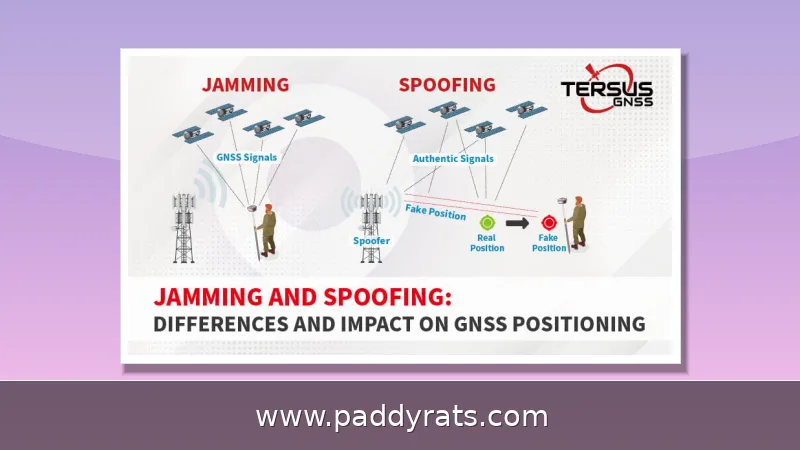
A signal jammer is really just a transmitter that floods the same radio frequencies your devices depend on, and in doing so it drowns out whatever signal is coming from a cell tower, WiFi router, or GPS satellite. Because that noise hits at a higher power level than the actual transmission, your phone can't pick the network out anymore. That's why it feels like you walked straight into a dead zone instead of watching your bars slowly tick down.
A jammer doesn't just blast noise on some random frequency—it's designed to hit the exact bands your devices rely on. The usual targets are the cellular frequencies carriers use for voice and data: 700MHz, 800MHz, 900MHz, 1800MHz, 1900MHz, and 2100MHz. GPS takes a hit too, at 1575MHz, and WiFi gets interference at 2.4GHz and 5GHz. How much damage a jammer actually does depends on how sophisticated it is. A cheap unit blocks just one frequency, which is often enough to trick a phone into thinking there's no service at all—no bars, no connection, nothing. Step up to a more advanced model and you're dealing with protocol jamming, which goes after the control channels that manage communication between devices and the network. That's a nastier form of disruption, because it doesn't just drown out a signal—it breaks the handshake your phone needs to stay connected in the first place. Then there are wide-band full-spectrum jammers, the sledgehammer of the bunch, capable of taking out several bands at once. In practice, a single device like that could silence phones, GPS, and WiFi all at the same time, which goes a long way toward explaining why these things keep showing up in criminal cases instead of just hobbyist catalogs.
None of the hardware is especially exotic, either. A basic cell phone jammer really only needs three subcircuits: an RF amplifier, a voltage-controlled oscillator, and a tuning circuit. In a typical build, resistor R1 handles emitter loading, R2 provides base biasing, capacitors C1 through C7 take care of frequency generation, feedback, noise reduction, coupling, and decoupling, transistor Q1 does the amplifying, and inductor L1 sets the frequency. That's it — and honestly, that simplicity is exactly why these devices have spread so fast.
This stopped being a hypothetical a while ago. U.S. Customs and Border Protection has logged roughly an 830% jump in signal jammer seizures since 2021, and honestly, that figure says as much about demand as it does about smuggling. Cities are feeling it, too. Over the past year, Los Angeles officials, police, and security experts have been sounding the alarm about burglars who use WiFi jammers to knock out a home's network before heading inside — take down the router and you've taken down the cameras and the alarm system right along with it. Nor is this strictly a West Coast problem. In June, the Department of Homeland Security reported that jamming devices turned up in a string of Vermont bank robberies, and equipment was recovered after an attempted jewelry store heist in La Verne, California, as well. Put those cases side by side and the takeaway is hard to miss: jammers have graduated from hobbyist gadget to a real tool in criminals' hands.
How to Tell If a Cell or WiFi Jammer Is Nearby
Detection usually comes down to patterns, not gadgets. A WiFi jammer tends to give itself away through a cluster of symptoms rather than one obvious sign. You might notice your phone or laptop's signal strength dropping sharply—or vanishing altogether—the closer you get to the router, which feels completely backwards, since standing right next to it should give you the strongest connection. Devices may keep dropping off and reconnecting, stuck in that same maddening cycle every few minutes. Latency spikes, packets go missing, and bandwidth shrinks even though you're paying for a fast plan. The real tell, though, is comparing connection types: wired Ethernet devices plugged straight into the router hum along like nothing's wrong, while everything wireless falls apart at the same time. That split points straight at a radio-frequency problem, not an internet outage—a jammer is flooding the airwaves your WiFi depends on without ever touching the cables inside your walls.
A cell jammer doesn't behave the way a WiFi jammer does, and the telltale signs usually show up across your whole neighborhood rather than on a single device. Instead of one phone dropping a call, you'll notice several phones losing service at the same time in a spot that normally has great reception. Your signal bars might also jump around erratically—up, down, up again—rather than fading smoothly the way they would if you were simply walking out of tower range. That kind of erratic fluctuation is a classic sign that RF noise is being pumped onto the same frequencies your carrier uses. And if your neighbors are complaining about dropped calls or dead zones at the exact same moment, it's almost certainly deliberate interference, not a carrier outage or a problem with a local tower. One more thing to keep in mind: apps that claim to detect jammers are mostly unproven, and they need a working signal to do anything at all—which is exactly what a jammer takes away. Short of military-level technology, the average consumer has virtually no way to detect a jammer with certainty, so spotting a pattern across multiple devices is usually the best tool you've got.
If you're trying to narrow things down in a more systematic way, the table below pairs the symptoms I check for with the culprit they most often point to.
| Symptom | Likely jammer type | Confirmation test |
|---|---|---|
| WiFi drops near router, Ethernet still works | WiFi jammer (2.4/5GHz) | Test a wired connection |
| Several phones lose service at once | Cell jammer (700-2100MHz) | Compare multiple carriers |
| Drone hovers or returns to launch | Drone jammer | Check command link status |
| GPS accuracy collapses | GPS jammer (1575MHz) | Compare with offline maps |
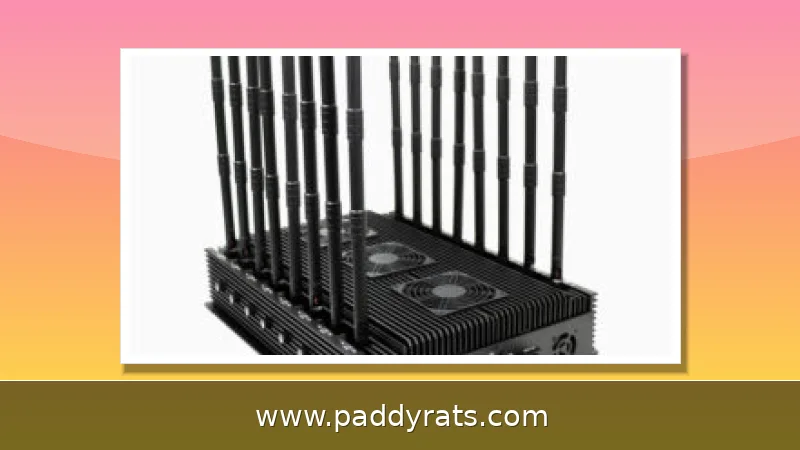
Here's a physical detail that's easy to overlook: jammers are boring to look at. Most resemble a walkie-talkie, a cell phone, or a wireless router—nothing about them screams "illegal device." That's a big reason they work so well in burglaries and robberies. A single unit can sit in a backpack, under a car seat, or in the corner of a room, and nobody looks twice. Directional drone jammers, for instance, often have their antennas built right into a handheld housing that could pass for ordinary consumer electronics. So if you spot a device you don't recognize near the edge of your property—along the fence line, tucked into the shrubs, sitting on a windowsill—treat it as a lead worth documenting before you touch anything. Take a few photos, note the time and location, and keep your distance. Also keep in mind that jamming range is usually no more than 30 square feet, so a unit parked just outside your walls could easily explain why your WiFi keeps dropping.
Can You Block a Signal Jammer? Realistic Options
The truth is, you can't really block a jammer the way most people imagine. There's no clever counter-signal that cancels it out. A jammer is simply a transmitter flooding your device's frequency with RF noise, so fighting back with another signal just adds more noise to the pile. Unless you can physically locate the device and shut it off, or seal it inside a Faraday cage so its output can't escape, you're not blocking anything—you're managing the fallout. What you can do is limit the damage, restore service where possible, and escalate through the proper channels. Relocating helps more than people expect, since jamming range is usually no more than about 30 square feet. And anything sold as an anti-jammer device deserves serious skepticism. Since jamming is illegal under FCC rules, the legitimate path runs through complaints and law enforcement, not gadgets.
Moving is probably the easiest trick in your playbook, and honestly the most underrated one. A jammer's range usually caps out around 30 square feet, so the interference has a pretty tight footprint. Walk a few steps, head into another room, or just nudge your router to a new spot, and your reception can bounce back almost instantly. That small radius doubles as a handy diagnostic tool, too. If the interference follows you across a much bigger area — down the hall, into the next room, all the way out to the street — chances are you're dealing with a stronger device, or one that's better positioned. At that point, the problem stops being a technical workaround and turns into a physical search. You're no longer outsmarting the signal; you're hunting down the source.
If the jammer is only blocking one band, there's a decent chance you can work around it by switching the frequency your phone uses. The logic here is simple enough: a cheap jammer sits on a single slice of spectrum, so if you can move your device onto a band it doesn't cover, you may be able to slip past the interference. You could try forcing your phone into a different network mode—dropping from 5G down to 4G, for instance, or locking it to 3G—or switch to a carrier whose towers broadcast on frequencies the jammer was never built to touch. Sometimes that alone is enough to get a usable connection back. But don't count on it. This is a temporary workaround, not a real fix, and it won't do a thing against wide-band or protocol jammers that blanket multiple bands at once or go after the control channels directly.
If the jammer is just a carrier on a single frequency, a notch filter found on many HF radios can be used to reject that narrow slice of spectrum. The catch is that notch filters are tuned for specific frequencies and are not a general-purpose solution. They help in controlled, technical environments, not in a home under attack by a broadband device.
Faraday Cages, Notch Filters and Shielding Explained
A Faraday cage is the most reliable passive defense. By wrapping or enclosing the jammer in a conductive layer, you stop its emissions from reaching the outside world. In a fixed installation, panels mounted on walls can passively block signals from entering or leaving a room. The principle is straightforward: a conductive enclosure redistributes the electromagnetic field so that the interior is shielded.
Shielding is not as simple as hanging foil, though. A shield that absorbs radiation can re-emit it as an antenna, transfer it to a mass, or convert it to heat. That is why professional installations use grounded, purpose-built materials rather than improvised metal. A poorly grounded shield can even make things worse by reflecting energy in unexpected directions.
For businesses and homes, the practical layering looks like this: start with strong outer defenses such as perimeter lighting, fences or gates, and video surveillance that deter threats before they reach the doors. Then use wired sensors wherever possible, since wired devices are immune to RF interference. PowerG is one option mentioned for sites without existing wiring, bridging the gap between wireless convenience and jam-resistant reliability.
It is worth noting that signal jamming can function as a cybersecurity tactic as well. A jammer can stop data transfers by creating a constant storm of white noise, which means the same physics that disrupts your phone can also sever a wireless alarm panel or a connected camera. Treat RF resilience as part of your security posture, not an afterthought.
Why Signal Boosters Cannot Beat Jammers
A signal jammer interferes with cell phone signal boosters, and the reason is simple physics. Boosters amplify an existing signal, so if a jammer has already blocked that signal, there is nothing left to amplify. Any signal jammer is effectively also a signal booster jammer, which is why cell signal amplifiers are not an effective defense against jamming.
Vendors sometimes imply that a stronger amplifier will punch through interference. In practice, amplifying noise alongside signal does not improve the signal-to-noise ratio, and in some cases it makes the situation worse by raising the noise floor. If you are buying equipment on the assumption that more gain equals more protection, you are spending money in the wrong direction.
Legal Steps: FCC Complaints and Law Enforcement
Under FCC rules, federal law prohibits the operation, marketing or sale of any jamming equipment that interferes with authorized radio communications, including cellular and Personal Communication Services, police radar and Global Positioning Systems. There are no exemptions for use within a business, classroom, residence or vehicle. Even local law enforcement agencies lack independent authority to use jamming equipment, though federal law enforcement agencies may be authorized in some instances.
Radio frequencies are legally protected by the Communications Act of 1934, which outlaws interference with authorized radio broadcasts. That gives you real leverage. Jamming is illegal, and there are multiple legal routes, including the FCC, to stop a jammer. The FCC also offers practical guidance: check device and network settings for updates, verify signal modes such as airplane mode, confirm configurations are correct, and restart the device before assuming the worst.
Filing a complaint is more straightforward than most people expect. In the FCC complaint form, select Interference in the Phone Issues box, then Signal Jammers as the Phone Interference Sub-issue. Document times, locations and symptoms as precisely as you can. If you have evidence of a crime in progress, such as the burglary pattern seen in Los Angeles or the Vermont bank robberies reported by DHS, contact local law enforcement directly rather than waiting on an administrative process.
Jammers, Pricing and What the Market Actually Offers
Understanding the commercial landscape helps you recognize what you may be up against. Vendor listings from Jammer Master show a range of devices, from handheld units to high-power directional systems. Portable signal jammers are battery powered, cordless, often have built-in antennas and offer short range, which makes them easy to conceal and hard to trace.
The table below summarizes representative listings and their advertised capabilities.
| Device | Bands targeted | Advertised price |
|---|---|---|
| 4G Phone Jammer JM021 | Mobile phone, WiFi, GPS, LoJack | $520.00 |
| Handheld WiFi Bluetooth Signal Jammer JM012 | 2.4/5.2/5.8GHz | $569.99 |
| Handheld Mobile Phone Jammer JM018 (16 antennas, 25 meters) | 700MHz to 2100MHz (2G/3G/4G/5G) | $699.00 |
| Drone UAV Signal Jammer JM004 | Drone command links | $2,399.99 |
Drone signal jammers deserve special mention. They use built-in directional antennas to break command links so that drones hover or return to their launch site. That same capability is why these devices attract regulatory attention far beyond ordinary consumer electronics. If you encounter any of this equipment in operation, the correct response is documentation and reporting, not countermeasures.
DIY and Technical Background for the Curious
A cell phone signal jammer blocks transmission between a cell phone and a base station by using the same frequency as the handset and creating strong interference. It is effective against UMTS, 3G, CDMA, GSM and PHS, which covers most of the legacy and current cellular standards in wide use. Understanding this helps explain why simple workarounds so often fail.
The three essential subcircuits are the RF amplifier, the voltage-controlled oscillator and the tuning circuit. Example components include resistor R1 for emitter loading, R2 for base biasing, capacitors C1 for frequency generation, C2 and C3 for feedback, C4 for noise reduction, C5 and C6 for coupling, C7 for decoupling, transistor Q1 for amplification, and inductor L1 for frequency generation. This is textbook RF engineering, which is precisely why the barrier to building a basic jammer is low.
That low barrier is also why the legal consequences matter. Building, selling or operating these devices in the United States violates federal law, and the enforcement trend since 2021 shows that agencies are paying attention. If your goal is protection rather than curiosity, focus your budget on detection habits, wired backups and a Faraday cage for the rare case where you actually find the device.
Frequently Asked Questions
Can you actually block a signal jammer?
Not easily. Most jammers are just transmitters, so the only real ways to defeat one are to physically locate and disable it, or shield the area with a Faraday cage. Switching frequency may work against less sophisticated jammers, and relocating often restores reception because jamming range is usually no more than 30 square feet.
How do I know if a jammer is being used near me?
Look for multiple devices losing service at once, erratic signal strength, dropped calls, and slow WiFi with high latency and packet loss near the router. Wired Ethernet devices keep working normally, which helps confirm a wireless jammer. If neighbors report the same problem at the same time, interference is far more likely than a carrier outage.
Are cell and WiFi jammers legal?
No. Under FCC rules, federal law prohibits operating, marketing or selling jamming equipment that interferes with authorized radio communications, including cellular, PCS, police radar and GPS. There are no exemptions for businesses, classrooms, residences or vehicles, and even local law enforcement agencies lack independent authority to use jamming equipment.
Does a signal booster stop a jammer?
No. Signal boosters amplify an existing signal, so if a jammer blocks that signal the booster cannot help. Any signal jammer is effectively also a signal booster jammer, and amplifiers are not an effective defense against jamming. Spending more on gain does not improve the signal-to-noise ratio when the noise itself is the problem.