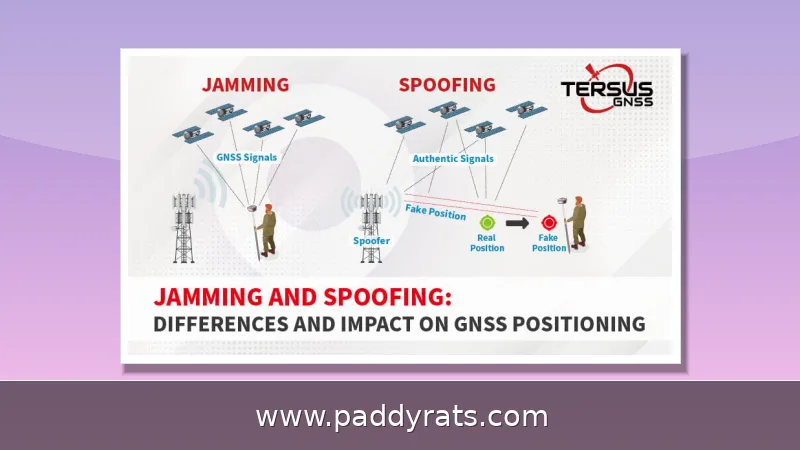
Signal jammers are illegal in the US, but knowing how they work, how to spot jamming, and which defenses actually help is the fastest way to restore your cell, WiFi, or GPS signal.
What Is a Signal Jammer and How Does It Work?
A signal jammer is a device that floods the airwaves with raw radiofrequency (RF) noise, overpowering the authorized signals around it. Cell phone jammers target the same bands your carrier's nearest tower uses, but they broadcast at a much higher power. Your phone latches onto the stronger signal, the weaker one gets canceled out, and everything falls apart. And because the jamming hits the downlink, your handset never actually hears from the tower — which is why you end up staring at zero bars.
WiFi jammers do the same thing to your home network, just aimed at the 2.4 GHz and 5 GHz bands your router depends on. They flood those frequencies with raw RF noise, and since that noise comes in stronger than your router's signal, your laptop, security cameras, video doorbell, and smart speakers can't separate the real transmission from the garbage anymore. As far as those devices are concerned, the access point isn't even there. Wide-band (or full-spectrum) jammers are the bulldozers of the bunch — rather than targeting one frequency, they slam several bands at once, so your phone, WiFi, and GPS can all drop out together. The fancier models go a step further with protocol jamming, which goes after the control channels directly instead of just drowning them in noise. Cheap single-frequency jammers look pretty basic next to that, but don't write them off. Even a simple one can convince a device there's no network in range, and that's plenty to take a camera offline or freeze up a payment terminal.
The bands jammers go after aren't picked at random—they're the same slices of spectrum your everyday gadgets already depend on. Cellular sits at 700MHz, 800MHz, 900MHz, 1800MHz, 1900MHz, and 2100MHz, GPS at 1575MHz, and WiFi at 2.4GHz and 5GHz, and those are the targets most jammers focus on. That overlap is exactly what makes jamming work so well. Rather than taking out one specific device, a single unit can flood the airwaves across several bands at the same time. Picture a jammer sitting in a car parked outside your house: it could silence your phone, kill the GPS tracker in your vehicle, and take down a wireless alarm panel all at once, without ever physically touching any of them. It's a blunt approach, sure, but that's the whole point—the more bands a jammer covers, the wider the net it throws.
| Targeted System | Common Frequency Bands |
|---|---|
| Cellular | 700MHz, 800MHz, 900MHz, 1800MHz, 1900MHz, 2100MHz |
| GPS | 1575MHz |
| WiFi | 2.4GHz, 5GHz |
| Target | Typical bands | What users notice |
|---|---|---|
| Cell phones | 700/800/900/1800/1900/2100MHz | No bars, dropped calls, failed texts |
| GPS | 1575MHz | Lost position, navigation errors |
| WiFi | 2.4GHz and 5GHz | Disconnects, high latency, packet loss |
| Alarm sensors | Wireless alarm bands | Sensors offline, no alerts |
What makes jammers so maddening is also, weirdly, what makes them beatable: their scale. Most consumer-grade models only reach about 30 square feet—think a small bathroom, or a single parked car. So you're not dealing with some neighborhood-wide blackout. Often, just walking a few feet in any direction puts you back outside the interference zone with your bars restored. That range also tells you something useful about the device itself: to kill your signal, a jammer has to be physically close, usually in the same room or just on the other side of a wall. So when your calls keep dropping, don't treat it like some mysterious network outage—treat it like a search problem. A slow, deliberate sweep of your immediate surroundings is a perfectly reasonable move, not a lost cause.
How to Tell If Your Cell or WiFi Signal Is Being Jammed
The classic giveaway for WiFi jamming is a bunch of problems cropping up all at once near your router: shaky signal quality, devices trying over and over to reconnect, high latency, packet loss, and bandwidth that tanks. Meanwhile, anything plugged in with an Ethernet cable just keeps working like nothing happened. That contrast is the real clue. If your desktop—hardwired straight into the router—is running fine while every wireless gadget in the house is struggling, you're probably looking at interference rather than an outage from your internet provider.
When a jammer is running, your phone usually tips you off in a few ways. The biggest giveaway is multiple phones losing service at once in a place where you'd normally have full bars — your living room, for example, or a stretch of sidewalk where reception has never been an issue. You might also see the signal bouncing around unpredictably or calls dropping again and again no matter where you stand. If it's just one phone misbehaving, though, the handset is the likely culprit, so try restarting it or poking through its settings before you blame the airwaves. But when several phones all go dead in the same spot at the same time, that's a strong hint something nearby is interfering with the signal. And this isn't some far-fetched scenario, either: U.S. Customs and Border Protection has logged roughly an 830% increase in signal jammer seizures since 2021, which tells you the hardware is getting cheaper and more widespread.
Detection tools have real limits. Apps that claim to detect jammers are largely unproven and need a working signal to function in the first place. Spectrum analyzers can confirm interference but are not commonly available and require specialized knowledge to interpret. In practice, the most reliable detection method is behavioral: compare wired versus wireless performance and compare multiple devices against each other.
| Symptom | Likely jamming | Likely ordinary fault |
|---|---|---|
| Wired Ethernet still works | Yes | No |
| Multiple devices fail at once | Yes | Sometimes |
| Only one device fails | No | Yes |
| Problems stop when you move away | Yes | No |
Are Signal Jammers Legal? FCC Rules and Penalties
Nope — under federal law, you can't operate, market, or sell jamming equipment that interferes with authorized radio communications, and that includes cellular and PCS service, police radar, and GPS. The FCC has been crystal clear on this: there are no exceptions. Not for businesses, not for classrooms, not for your own home, not even for your car. The Communications Act of 1934 also outlaws interference with authorized radio broadcasts, and that legal foundation is still very much in force today.
These penalties aren't just for show, either. Break the rules and you could be looking at fines of up to $11,000, having your equipment seized, and even criminal charges that include jail time. And here's an important distinction: local police departments can't just decide to run jamming equipment on their own. Only federal agencies may be authorized to use it, and even then, only in limited situations. Cell phone detectors, on the other hand, are perfectly legal in the United States—which is why you'll find them all over correctional facilities.
Other countries have taken a different path, though the details vary widely. In the United Kingdom, police forces, intelligence agencies, and prisons have been using signal jammers since 2012, but only under strict regulation that keeps the technology in institutional hands. Brazil, New Zealand, and Sweden have likewise explored allowing jamming technology inside correctional facilities, mainly to cut off contraband cell phones behind bars. It is worth noting how narrow these carve-outs are: they are written for government agencies and secure institutions, not for private citizens, businesses, or landlords. In other words, a country permitting a prison to run a jammer is not signaling that everyday users can legally block signals on their own property. The United States, for its part, has so far declined to create even these limited exceptions, which is why the FCC's blanket prohibition still stands as the default rule here.
The practical takeaway here is fairly straightforward: using a jammer is against the law, but that doesn’t leave you powerless. There are several lawful paths you can take to shut one down. You can file a complaint with the FCC, report the problem to local law enforcement, or loop in your wireless carrier—and you don’t have to break any rules yourself to get results. Each of these routes also creates an official record, which matters because regulators and investigators need documented complaints before they can act. In other words, the system is designed to handle this for you, as long as you go through the proper channels rather than trying to fight fire with fire.
How to Stop a Cell Signal Jammer: Practical Steps
Before you can shut down a jammer, you have to find it. In most cases, that means walking the area while watching your phone or WiFi indicator — the device is usually tucked somewhere within roughly 30 square feet of the affected zone, since jamming range is typically that small. Look for something out of place: a jammer often resembles an ordinary walkie-talkie, a spare cell phone, or a wireless router, which is exactly why they blend in so easily. Once you've spotted the likely source, turning it off is the most direct fix available to you. But resist the urge to grab it right away. First, photograph the device, note the time and exact location, and preserve anything nearby that might identify who placed it — that evidence matters if prosecutors or the FCC pursue a case. Then report it to law enforcement, and consider filing a complaint with the FCC as well. If the jammer turns out to be too well hidden or beyond your reach, remember that simply stepping away from the affected area may restore your signal, since the interference zone is so limited.
Relocation is the next cheapest test, and it costs you nothing but a short walk. Since jamming range is usually no more than 30 square feet, simply stepping into the next room, heading out to the yard, or driving a block or two may restore reception entirely. The logic here is straightforward: a jammer's reach is limited, so distance is your friend. If your signal comes back a block away and then dies again the moment you return, you have effectively confirmed a localized jammer is at work nearby. That pattern — signal returns with distance, disappears up close — is one of the clearest signs you are dealing with a device rather than a dead zone or a carrier outage.
Technical users can try switching the frequency their phone operates on, depending on how sophisticated the jammer is. Simpler jammers block only one frequency, so forcing the handset onto another band can work around them. Restarting the device, checking network settings, toggling airplane mode, and installing updates are all worth doing before you assume the worst.
Escalation matters. Contact law enforcement or file a complaint with the FCC, and also notify your wireless network provider, which can see anomalies on its side. Do not buy a signal booster expecting a fix: boosters and amplifiers do not stop jammers, because a jammer also jams the booster. Amplifying a blocked signal just amplifies nothing.
How to Prevent WiFi Jamming: Network and Physical Defenses
Lock down the network first. Use strong encryption and authentication such as WPA3, and enable Protected Management Frames (PMF) to protect wireless management frames from forgery or tampering. PMF mitigates some deauthentication attacks, though not every device supports it, so check your hardware before relying on it.
Administrative hygiene closes obvious doors. Change the default admin username and password, and disable unused features like Wi-Fi Protected Setup (WPS) or remote management. MAC filtering adds a layer of control by restricting access to known hardware identifiers, but it is not foolproof because MAC addresses can be spoofed.
Band and placement choices matter. Switching to 5GHz helps because jammers often target 2.4 GHz. Put the router in the center of the home and keep it away from thick walls, metal objects, mirrors, and large appliances that absorb or reflect signal. Directional or adaptive antennas can focus coverage and shrink the area a jammer can disrupt.
Redundancy and wires are the strongest practical defenses. Install multiple access points or routers so another can take over if one is attacked, and use wired Ethernet connections, which jammers do not affect. An anti-WiFi jammer device that detects jammers and alerts you when signals are blocked is a reasonable add-on for high-risk properties.
Anti-Jamming Techniques: Directional Antennas, CRPAs, and Spread Spectrum
At the engineering level, directional antennas and controlled reception pattern antennas (CRPAs) dynamically steer nulls toward the interference source, effectively tuning it out. Wideband spread spectrum modulation minimizes or circumvents jamming by spreading a signal across frequencies, making it harder for a narrow jammer to suppress.
More power than the jammer is often described as the only way to really defeat a signal jammer. That is why wired sensors are recommended where feasible, and why PowerG and similar technologies are cited as alternatives for alarm and security systems that need to survive jamming attempts.
For most homes and small businesses, the realistic stack is layered: harden the network, prefer wired connections for critical devices, keep a second access point ready, and treat any sudden, multi-device outage as a security event rather than a router glitch. That combination will not defeat a military-grade jammer, but it will keep you connected through the consumer-grade devices that show up in burglaries and interference complaints.
Frequently Asked Questions
Can you actually block or stop a signal jammer?
Physically locating and disabling the jammer is the most direct option, but jamming is illegal, so the recommended route is contacting law enforcement or filing an FCC complaint. Relocating may also restore reception, since jamming range is usually no more than 30 square feet.
Are cell and WiFi jammers legal in the United States?
No. Federal law prohibits operating, marketing, or selling jamming equipment that interferes with authorized radio communications, including cellular, PCS, police radar, and GPS. There are no exemptions for businesses, classrooms, residences, or vehicles, and penalties can include fines up to $11,000, equipment seizure, and imprisonment.
How can I tell if my WiFi or cell signal is being jammed?
Look for sudden signal loss or fluctuations across multiple devices in an area with normally good coverage, repeated disconnections, high latency, packet loss, and slower speeds. Wired Ethernet devices keep working during WiFi jamming, which helps distinguish jamming from ordinary network faults.
Does a signal booster or amplifier stop a jammer?
No. Signal boosters amplify an existing signal, so if a jammer blocks that signal, the booster cannot help. Any signal jammer also acts as a signal booster jammer, making amplifiers an ineffective defense against jamming.