A practical breakdown of how multi-band signal jammers block 2G, 3G, 4G and 5G traffic, which frequencies and power levels matter, and what buyers should weigh before spending money.
What Is a Signal Jammer for 2G 3G 4G 5G?
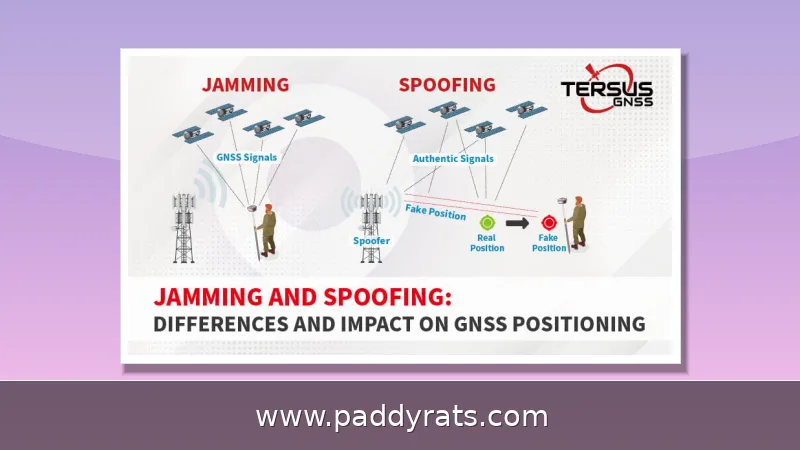
A signal jammer for 2G, 3G, 4G, and 5G is really just an RF transmitter that drowns out the downlink channels your phone depends on to talk to cell towers. It doesn't block the handset itself. Instead, it floods those same frequencies with noise, so the phone can't reliably hear the tower. The result is simple: calls, texts, and mobile data all stop working within a set radius. Vendors like Jammer Master and Hocell describe the same basic idea — noise jamming across the 700MHz to 2100MHz cellular bands, with optional coverage for WiFi and GPS.
The phrase "signal jammer for 2G 3G 4G 5G" sounds like one specific product, but it actually describes a pretty wide range of hardware — and that's what throws off a lot of first-time buyers. On one end, you've got pocket-sized, battery-powered units that can shut down a single conference room. On the other end, there are 210W desktop boxes that can cover an entire courtyard. In between, you'll find 12-band portables, 8-antenna indoor units, and fiber optic distributed systems that reach across multiple floors of a building. Most people searching for a 5G signal jammer fall into one of three groups: those who want a portable multi-band jammer for field work, those who need a fixed installation for a facility, and those who need a distributed digital system that covers room after room. Figuring out which of those three fits your situation is the first decision you have to make, because everything else — output power, cooling design, antenna count, and price — follows directly from it. Choose the wrong form factor and you'll either be hauling 14kg of desktop hardware into the field or trying to cover a warehouse with a device that only reaches 15 meters.
How Does a Cell Phone Jammer Work: Noise Jamming vs Protocol Jamming
When people ask how a cell phone jammer works, the short answer is noise jamming. The device sends out RF noise on the exact same frequencies that telecom and GPS equipment rely on, and that noise essentially builds a local barrier around the target area. Inside that bubble, phones can't send or receive anything, because the noise drowns out the legitimate signals they're trying to pick up. And since the interference rides on the downlink, your phone doesn't run into a tower that has simply vanished—it runs into a tower whose signal has been corrupted beyond recognition. Most of the time, the network responds by dropping the connection altogether instead of handing it off to another cell, which is why a jammed phone often shows "no service" or keeps failing to reconnect until the jammer stops transmitting.
Some jammers go a step further and use protocol jamming, which targets the control channels that manage the back-and-forth between a device and the network. iSecus splits its own product line along these lines, offering high-power suppression on one hand and signaling-level intelligent jamming on the other. Hocell takes a similar stance, claiming its digital jammers are much more efficient than older analog and digital designs — and that they pull this off without disrupting the carriers' base stations. How? According to Hocell, the jamming signal is transmitted only during downlink time slots, which is what keeps TDD base stations from getting thrown off.
That difference ends up mattering more than you'd expect once you're picking gear for a real job. A plain high-power suppressor is cheap, simple, and does exactly what it says—but it dumps energy across the neighboring spectrum too, so it can knock out systems you never intended to touch. On top of that, its broadband signature makes it pretty easy to detect and track down. A protocol-aware digital jammer runs more and takes some setup, but you can dial it to specific bands and timing, meaning it hits what you aim at and leaves the rest alone. This is why distributed and fiber optic cellular signal jammer setups are almost always digital—once you're covering several floors or rooms, precision and centralized control aren't extras anymore. So for most buyers, the real question isn't "analog or digital" in the abstract. It's the environment: can it live with broadband noise, or does it need surgical control?
frequency bands and U.S. Mobile Frequencies Explained
Picking the right frequencies is where most buyers mess up, and honestly, it's not hard to see why. A jammer is built for one specific country, so a unit tuned to another market's bands just won't line up with your local carriers. Every generation of mobile service sits on its own slice of spectrum, and those slices shift from region to region. A typical multi-band setup, for instance, covers CDMA/GSM 850–894 MHz, GSM 925–960 MHz, DCS/PCS 1805–1990 MHz, 3G 2110–2170 MHz, 4G LTE 738–821 MHz, WiFi 2400–2500 MHz, 5G 3300–3600 MHz and 3600–3800 MHz, plus GPS L1 at 1570–1580 MHz. Amplitec, for its part, lists the usual jammer frequencies as 869–894 MHz, 925–960 MHz, 1805–1880 MHz and 1900–1990 MHz — close cousins of the ranges above, but not identical. That tiny gap is exactly what leaves a buyer scratching their head over why their device works on one network but not another.
If you're buying in the U.S., here's what actually matters: low-band cellular usually falls somewhere in the 700–900 MHz range, mid-band PCS and AWS sit closer to 1.9–2.1 GHz, and the newer 5G mid-band allocations land around 3.3–3.8 GHz. Ericsson has noted that commercial jammers can knock out 2G, 3G, 4G, and even 5G bands, with separate versions built for the U.S. and European markets — and they can take down GPS and Wi-Fi along with them. The flip side is simple: if your target devices run on a band your unit doesn't cover, they'll just keep right on working.
Here's another thing worth keeping in mind: the uplink/downlink split. Because jamming goes after the downlink, your phone can still get a quick transmission out before it actually loses the tower. That's why people sometimes see a brief lag before their service drops—and it's also why downlink-only jamming has become the standard approach. It keeps the jammer from interfering with the base station's ability to receive signals. So when you're comparing spec sheets, check whether the listed bands are downlink-only or broadband. In dense urban spectrum, those two behave very differently.
Portable vs Desktop vs Distributed Jammers: Which Fits Your Case?
If you want something you can just grab and go, a portable jammer is the obvious pick. They run on internal batteries, so there's no cord to trip over and no outlet to hunt down—you can throw one in a backpack or a glovebox and set it up pretty much anywhere. That convenience does cost you, though. Most handheld and pocket-sized models only cover about 10–25 meters, and with total output usually sitting in the 8–21W range, you're basically trading coverage for mobility. Battery life tends to come in around 1–2 hours, so a portable unit is better suited to short, targeted jobs than to running all day. Desktop and high-power units are the exact opposite. These push 100W to 210W, reach roughly 50–150 meters, and weigh 7–14kg, which is precisely why they stay put. They also need a steady AC supply and a whole bank of cooling fans—some models run 9 to 11 of them—just to keep the amplifiers from overheating. Distributed and fiber optic systems take a third route, built from the ground up to scale across multiple floors and rooms rather than cover one open space. Since each remote antenna can be aimed and tuned on its own, the jamming is more precise, and you can monitor the whole deployment from a single point over Ethernet, WiFi, LORA, Zigbee, or Z-Wave. Bottom line: portability buys convenience but caps your reach; desktop power buys range but ties you to a wall outlet; and distributed setups buy precision and scale—at the highest cost and complexity.
Size isn't the only trade-off you're making here—matching output power to your actual environment matters just as much, and getting it wrong hurts in both directions. Undershoot, and a low-power jammer can fail outright against a high-power signal device, or even in a spot where the tower's signal comes in strong, since the noise has to overpower the tower's signal strength right at the phone's antenna. Picture a shouting match: if the cell tower is already "loud" indoors, your jammer has to shout louder to win. Overshoot, though, and you run into the opposite problem—a 210W desktop unit in a small room is just overkill. All that extra power turns into excess heat, a higher electricity draw, and compliance headaches you don't need, especially since jamming rules differ from country to country. The real trick is matching the output to the environment you're actually working in. Get it right, and the deployment does its job; get it wrong, and you've bought yourself an expensive paperweight.
When you're covering a building with multiple rooms, a distributed setup is usually the smarter choice if precision matters to you. Picture what happens with one high-power transmitter in a space full of concrete and drywall: the signal bleeds unevenly, blasting the rooms nearby while barely making it to the far corners, and you end up cranking the wattage just to reach the end of a hallway. A distributed system works the opposite way. Rather than one big blast, you place several smaller jamming heads in specific zones — a conference room here, a records office there — and a central controller keeps them in sync so coverage stays consistent from floor to floor. This kind of layout also makes monitoring and scheduling much easier, since you can check each head's status from a single interface and set jamming windows down to the hour. For facilities that only need the system running at certain times — exam sessions, visiting hours, or sensitive meetings, for example — that level of control beats running one desktop unit around the clock, and it avoids the collateral interference that comes from blanketing an entire building all at once.
Key Specifications: Output Power, Range, Antennas and Cooling
Spec sheets reward careful reading, and the fine print is where most buying mistakes happen. Hocell, for example, states that maximum jamming power per radio ranges from 1W to 100W — a 100x spread that alone tells you a 1W handheld and a 100W rack unit are built for completely different jobs. Vendors also typically quote range at a -75dBm reference condition, a relatively weak ambient signal. In the real world, that number shrinks fast: the stronger the surrounding cell signal, the closer a jammer has to sit to overpower it, so a "50-100m" claim may deliver far less near a strong tower. Antenna gain matters too — a 12dBi directional panel reaches farther than a 2.5dBi omni stick at the same wattage. Channel count and cooling design then decide whether a unit can run 24/7 or only in short bursts, since heat is what forces high-power jammers into duty cycles.
The table below summarizes representative portable and desktop configurations from the source material so you can compare like for like.
Real Product Examples and Price Ranges
Concrete examples make the market easier to read. Shenzhen Jinyatong Technology offers the JYT-2180, a 21-antenna portable jammer; the JYT-1210, a 12-band 100W unit; and the JYT-MP800 PLUS, an 8-antenna 210W model. Hocell's lineup includes a Digital 5G Cellular Signal Jammer, a Distributed Digital 5G Signal Jammer, an All-in-One Outdoor Cell Signal Jammer and a Fiber Optic Cellular Signal Jammer.
On the portable side, JammerMFG sells the PJ-06 6-band portable blocker, the JM021 4G phone jammer, the JM004 drone jammer, the JM012 WiFi jammer and the JM018 16-antenna handheld jammer. iSecus offers the DT-510 wireless signal jammer and the DT-520 portable military SDR jammer. WTPL's MPJ01 is a 10-channel unit aimed at exam rooms, offices and homes, and Alasartech's AAT-JHA-8S is an 8-band 80W indoor jammer.
A portable 12-band unit listed by agentshop.cz totals 12W with a 5-30m radius and covers 5G, 4G, 3G, 2G, WiFi 2.4G, 5.8G and GPS. A widely shared Facebook stats example claims blocking of 2G/3G/4G/5G, GPS, WiFi and UHF with a 20-60m range, roughly 8-21W of power and 1-2 hours of battery life. These numbers are vendor claims, so treat them as starting points rather than guarantees.
How Much Do Multi-Band Jammers Cost?
Pricing tracks power, channel count and build quality. Portable multi-band units cluster in the low hundreds of dollars, mid-power desktop models move into the high hundreds, and high-power or distributed systems are quoted per project because antenna runs, controllers and installation dominate the cost. The table below captures the price points disclosed in the source material.
Steps and Practices Before You Buy or Deploy
Start by confirming the frequency bands of the country of use. Jammers are customized per country and cannot be used elsewhere, so a unit configured for another market may simply be unusable where you live. From there, decide which bands to block, such as 2G, 3G, 4G, 5G, WiFi or GPS, then set the required distance, choose portable or desktop, and fix a budget.
For hospitals and gas stations, do on-site tests first to avoid affecting equipment and instruments. Medical telemetry, fuel monitoring and industrial sensors can share spectrum with consumer cellular, and a blanket noise source may disrupt them. For in-car use of AC-powered units, buy a DC12V/24V to AC110-240V inverter rated at least 260W, since startup draw on a high-power jammer can exceed its steady-state rating.
Finally, plan the cooling and power path. High-power desktop units rely on many fans, and a 210W model with 11 cooling fans plus 4 temperature-controlled fans needs airflow, not a closed cabinet. If the unit must run 7x24, verify the vendor's continuous-duty claim and keep a spare power supply on hand.
Risk, Compliance and Limitations
Rules vary by country, and the honest answer to are signal jammers legal is that it depends on where you are and what you are doing. Commercial jammers are sold in U.S. and European versions, and vendors note that jamming public or private networks you do not own is prohibited. Buyers are told to check local laws before operating any jamming device, and a widely circulated DIY jammer video warns against jamming public or private networks or drones you do not own.
Ericsson frames jamming as an attack vector in 5G wireless networks, which is a useful reminder that the same physics used to protect a room can be used to disrupt one. Vendors also state that jammers are customized by country, so using a unit configured for another country means it cannot be used as intended. Beyond legality, low-power jammers may fail against high-power signal devices, and range claims assume favorable conditions.
Timeliness is worth noting. Ericsson's discussion appeared on February 12, 2026, an Alibaba supplier guide is dated June 24, 2026, JammerMFG's U.S. frequency guide is dated July 16, 2025, iSecus published its working principle explanation on November 20, 2024, and Jammer Master's guide is dated August 23, 2023. Hocell's product pages carry dates of November 1, 2021, December 3, 2023 and December 4, 2023. Treat older specs as historical and re-verify current band support before purchase.
Common Questions Buyers Ask About 5G Jammers
Search interest keeps circling back to a few questions. Do signal jammers protect against 5G? How does a cellular network jammer work in plain terms? Could one block a direct connection? These show up on Quora and Reddit repeatedly, and the answers depend on band coverage, power and whether the target link is cellular, WiFi or point-to-point.
One recurring misconception is that a single jammer blocks everything. In reality, coverage is band-specific, and a unit tuned for 2G and 3G may leave 5G mid-band untouched. Another is that jamming is silent and invisible; in practice, affected users notice dropped calls, failed texts and stalled data within seconds, and network operators can detect the interference signature.
If you are evaluating a purchase, test in the actual environment rather than trusting a marketing radius. Signal strength at the target device, wall materials, antenna orientation and nearby base stations all move the effective range. That is also why two units with identical wattage can perform very differently in a downtown office versus an open field.
Product Comparison Table
The following table consolidates the representative specifications disclosed in the source material for direct comparison.
| Model | Bands/Channels | Total Power | Range | Weight |
|---|---|---|---|---|
| JYT-2180 | 21 channels | 21W | 10-25m | 2.8kg |
| JYT-1210 | 12 bands | 100W | 50-100m at -75dBm | 7kg |
| JYT-MP800 PLUS | 8 channels | 210W | 60-150m | 14kg |
| JammerMFG PJ-06 | 6 bands | 5W | Up to 15m | 0.6kg |
| Sunsky J12 | 12 bands | 44W | 2-60m | Not stated |
| AAT-JHA-8S | 8 bands | 80W | 20-80m | 10.5kg |
Read the table as a shape, not a scoreboard. The JYT-2180 trades range for pocketability, the JYT-1210 sits in the middle with 100W and 12 bands, and the JYT-MP800 PLUS is a fixed-installation class unit at 14kg. The PJ-06 is the smallest entry at 0.6kg and 5W, while the AAT-JHA-8S adds IP53 rating and 12dBi antenna gain for indoor use. Price follows the same curve: the PJ-06 lists at US$499.98, the JYT-2180 at US$388-448, and the JYT-1210 at US$500-600.
Price Comparison Table
Vendor pricing in the source material spans roughly US$388 to US$600 for the disclosed models, with high-power and distributed systems quoted separately.
| Model | Listed Price | Notes |
|---|---|---|
| JYT-2180 | US$388-448 | 21 antennas, 7.4V/15000mAh battery |
| JYT-1210 | US$500-600 | 12 bands, 7x24h non-stop claim |
| JammerMFG PJ-06 | US$499.98 | 6 bands, 5W total |
Prices shift with configuration, antenna options and order volume, so treat these as reference points rather than fixed retail. Distributed and fiber optic systems are usually quoted per project because cabling, controllers and installation dominate the total. If a quote looks far below the range above for comparable power, ask what is missing, since cooling, antenna gain and continuous-duty rating are the usual places where cost is quietly removed.
Frequently Asked Questions
How does a signal jammer for 2G 3G 4G 5G work?
It transmits radio frequency noise on the same downlink bands phones use, such as 700MHz to 2100MHz for cellular plus 2.4GHz and 5GHz WiFi. This noise overpowers tower signals, so devices cannot send or receive calls, SMS or data within the jamming radius.
What frequency bands do multi-band jammers cover?
Typical coverage includes CDMA/GSM 850-894MHz, GSM 925-960MHz, DCS/PCS 1805-1990MHz, 3G 2110-2170MHz, 4G LTE 738-821MHz, WiFi 2400-2500MHz, 5G 3300-3600MHz and 3600-3800MHz, plus GPS L1 1570-1580MHz. Exact coverage depends on the model and the country version you buy.
How far can a 2G 3G 4G 5G jammer reach?
Range depends on output power and local signal strength. Portable units reach about 10-25m or up to 15m, mid-power desktop models cover 50-100m, and high-power 210W units claim up to 150m. Vendors state ranges at -75dBm reference conditions, so real distance shrinks in strong-signal areas.
Are signal jammers legal to use?
Rules vary by country. Commercial jammers are sold in U.S. and European versions, and vendors note that jamming public or private networks you do not own is prohibited. Buyers are told to check local laws before operating any jamming device, and unauthorized use can carry serious penalties.