A practical guide for buyers and integrators on how meeting room signal jammers work, how many units a 200 square meter room needs, where to place them, which specs matter, and what US law says about blocking cellular and WiFi signals.
What Is a Conference Room Signal Jammer and How Does It Work?
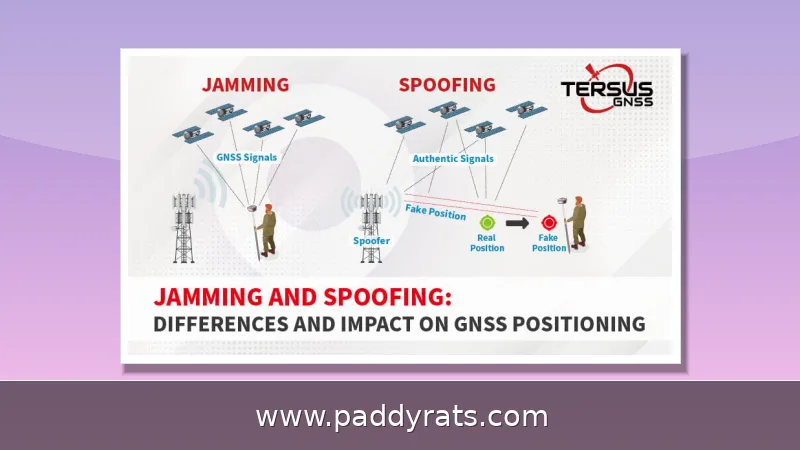
A conference room signal jammer is, at its core, an electronic device that transmits on the same frequencies your wireless systems already use. It floods those local frequencies with low-power radio noise, essentially creating a denial-of-service effect. The receiving device picks up both the original carrier signal and the noise, and it can't reliably tell which one arrived first. The practical result? Dropped calls, failed WiFi sessions, stalled GPS tracking, and radio links you simply can't depend on. Most meeting room jammers rely on power suppression through white noise — put simply, whichever device has the highest transmission power in a given frequency band wins control of the local airwaves.
Phones and WiFi don't operate on the same frequencies, so a jammer that only covers cellular bands won't touch your WiFi at all — you'd need a dedicated WiFi module to block both. On the WiFi side, you're typically dealing with 2.4GHz, 5.1GHz, and 5.8GHz, while the cellular side has to handle 2G, 3G, 4G, and 5G bands that different carriers still run simultaneously. That's a lot of ground for one device to cover, which is precisely why multi-band models exist in the first place. There's also a completely different approach that doesn't involve transmitting anything: a Faraday cage. Instead of broadcasting a signal, it uses panels bolted to the walls to physically block outside signals from getting in. From my own experience setting these up, the passive route takes longer to install and won't win any design awards, but it produces zero RF emissions — which really matters in buildings with strict compliance reviews, where an active transmitter in a meeting room can raise red flags long before it ever jams a single call.
Why Meeting Rooms Use Signal Jammers: Focus, Engagement and Confidentiality
Meeting rooms are where sensitive conversations happen, and one phone left sitting on the table can quietly record audio, forward messages, or stream a live feed to someone outside the room. That's why people shopping for a conference room mobile phone jammer usually have two things in mind: stopping the constant interruptions from ringing handsets, and reducing the risk of unauthorized recording or data leaks during closed-door sessions. In practice, those two goals tend to overlap. A jammed phone can't buzz in the middle of a presentation, and it also can't quietly upload a voice memo to the cloud. Focus and engagement are the everyday benefits everyone notices; confidentiality is what usually gets the budget approved, since one leaked negotiation or board discussion can cost far more than the hardware itself.
The market data makes the demand pretty obvious. Dataintelo values the signal jammer market at $2.8 billion in 2025 and expects it to hit $5.6 billion by 2034, which works out to an 8.1% CAGR. That kind of steady climb says a lot — more and more organizations now treat wireless leakage as a routine business risk rather than some far-fetched what-if. From what I've seen, integrators rarely stop at RF blocking alone. They typically pair it with acoustic countermeasures aimed at voice recorders, which explains why "audio jammer for conference room" shows up in search data right next to the standard RF jammer queries. The reasoning is simple enough: you can cut off a phone call, but you can't cut off a hidden recorder, so you need both layers. The goal isn't one box mounted on a wall — it's layered protection.
How Many Jammers Does a 200 Square Meter Conference Room Need?
Realistically, a 200 square meter conference room needs about 2 to 4 units, mounted at the front, the back, or split evenly along both sides. A single low-power omnidirectional jammer is rarely enough to cover a space that big on its own, and for a room roughly 14 meters long and 25 meters wide, most people end up going with four. It's also worth keeping in mind that low-power exam and conference jammers usually only shield a radius of 1 to 10 meters, and that number changes depending on how strong the surrounding signals are. So base your unit count on what the room actually demands in real-world conditions, not on the coverage claims you see on a spec sheet.
A published study on the MB06 jammer found that it could block mobile communications out to roughly 40 meters (Shojaeifard, 2018), which just goes to show how widely these devices can vary. The JF100 wall-mounted meeting room jammer, on the other hand, is listed with an influence radius of up to 100 meters — though that figure assumes a fairly weak ambient signal. When I'm planning coverage, I treat vendor range specs as best-case ceilings, not guarantees, and I always walk the room perimeter with a spectrum analyzer before I sign off on quantities.
Optimal Placement Strategy: Diagonal Corners and Supplementary Units
Put the jammer right in the middle of the meeting table rather than tucking it away in a corner — that's where the laptops, phones, and hotspots actually sit during a call anyway. Then clear the area around it. Metal shields, filing cabinets, and similar dense objects will block or absorb RF energy, and even a powerful unit can end up with dead spots right behind them. After it's up and running, walk the perimeter of the room with a spectrum analyzer and confirm that no signal makes it through at the edges. That's honestly the only proof you can rely on that your coverage is solid. For wall-mounted indoor units, the typical install height is around 1.8 to 2.5 meters off the floor — high enough to clear seated heads, but still low enough to stay below all the ceiling clutter. Also, keep the antennas away from metal trim, ceiling ducts, and crowded AV racks. Reflections and absorption from those surfaces will gradually chip away at your effective coverage, and you probably won't notice until someone's phone rings in the middle of a meeting.
For larger rooms, begin with a diagonal pair: place two units in opposite corners so their coverage overlaps across the middle of the table, then walk the room and check the corners and long walls that sit farthest from either device. If you still detect a signal somewhere, add another unit rather than trying to stretch the ones you already have. Testing is cheap and doesn't take much effort. You'll need a screwdriver, a power strip, a ladder, three phones on three different carriers, and a spectrum analyzer. Pick a spot at the far end of the room or diagonally across from the jammer, plug in the power strip, and mount the unit near the walls at the ends of the room, close to the windows — never flat on the floor. Turn it on, let the phones sit idle for a minute or two, and confirm with the analyzer. If they still connect, move in closer and run the check again.
| Test Item | Purpose |
|---|---|
| Screwdriver | Mount or adjust the jammer |
| Power strip | Power the unit at the test position |
| Ladder | Reach the recommended wall height |
| Three phones (different carriers) | Verify blocking across networks |
| Spectrum analyzer | Confirm the signal is actually gone |
Key Specifications: Bands, Output Power, Range and Antennas
When you're comparing units, the specs that really matter are channel count, power per channel, total output, antenna type, size, weight, how it's powered, battery life, ultrasound range, acoustic output, and jamming area. Range itself comes down to two factors: the transmission power of the RF module and how strong the existing signal is in that space. That's exactly why two rooms running the same hardware can end up with completely different results. The comparison below covers some representative indoor jammers and acoustic devices, based on vendor specs and side-by-side comparison data.
| Model | Channels / Bands | Power | Range | Notes |
|---|---|---|---|---|
| JF100 wall-mounted | 8 or 10 built-in antennas | 220V supply | Up to 100 m influence radius | Internal directional antenna |
| TX-H12K (Texin) | 12 customized channels | 3-5 W per channel, 60 W total | 5-40 m omni-directional | 29 x 23.5 x 6 cm, 4.0 kg |
| Hocell indoor cellular | 12 bands (2G/3G/4G/5G) | 2W/5W/20W per channel | Effect within 120 s of power-on | -110dBm sync sensitivity, removable antennas |
| EO-V Briefcase (ultrasound) | 110 emitters | 9 W acoustic output | Up to 3 m | 1 kg, battery up to 4 h |
| SHIELD (ultrasound) | 21 emitters | 3 W | Up to 1.5 m | 0.8 kg, battery up to 5 h |
| TOWERS (ultrasound) | 110 emitters | 9 W | Up to 2.5 m | 6.7 kg |
Covering the full 20–6000MHz span continuously is harder than it sounds. Because the spectrum is so wide, you need at least 17 frequency band control modules to do it without gaps. Most jammers on the market only carry 12 channels, so integrators typically combine several units and pair a low-power jammer with a medium-power one to handle the low and medium bands together. That layered approach fills in the holes a single unit would leave. If you ever want to convert a fixed jammer into a portable setup, you have a few options: pick a battery that matches the switch power supply output, add a voltage stabilizing module, or run the battery through an inverter that delivers a steady 200V AC. One small but practical detail comes from Hocell, which lists a slow start of under 3 seconds for its indoor cellular jammer. That matters when you want the room already quiet before the meeting begins, not cutting out mid-sentence.
Built-in vs External Antennas and Portable vs Desktop Jammers
Portable jammers are built to travel. They run on batteries, fit in a carry case, and can be set up in minutes, which makes them handy for site visits or temporary pop-up meetings. Desktop jammers work differently: once installed, they sit in place much like a WiFi router, drawing steady power and delivering consistent interference over a longer distance. That reliability is exactly what a conference room needs, since the room is used on a fixed schedule and the equipment rarely moves. For that reason, fixed devices are generally the recommended choice for meeting rooms. Antenna design matters just as much when a unit stays put. Built-in antennas sit inside the housing, so they resist damage better when a unit is permanently mounted on a wall or ceiling. External antennas stick out and are exposed, which means they are easily bumped during transfer. In a shared office where AV carts get rolled around weekly, that kind of contact happens more often than you would expect, and a bent or misaligned antenna can quietly degrade coverage.
Adding WiFi capability increases cost, but many customers choose jammers that block both cellular and WiFi to avoid reconfiguring routers. Aesthetic options include hiding the jammer in a replica speaker enclosure or in the ceiling with a separate power switch, or choosing a standalone unit such as the SMa-818B5. Acoustic coverage deserves its own line item: EO Security's comparison shows Circle signal jamming up to 10 m2 at 1 kg, and Faraday Safebox models that hold up to 8 devices at 6 kg with battery up to 12 hours, or up to 16 phones at 15 kg on AC power.
Is a Signal Jammer Legal in a Business Meeting Room?
In the United States, the answer is a flat no. The Federal Communications Commission has been explicit on this point: operating a phone jammer, GPS blocker, or any other device built to intentionally block or interfere with authorized radio communications is a violation of federal law. What makes the rule so unforgiving is that it carries no exceptions — not for a business, not for a classroom, not for a private residence, and not for a vehicle. The agency's reasoning is straightforward: the radio spectrum is a shared public resource, and a device that floods it with noise doesn't respect property lines, so a jammer running in your conference room can bleed into neighboring offices, streets, or public safety channels. Penalties reflect that seriousness. Unauthorized users can face civil fines, seizure of the equipment, and even imprisonment. And none of this changes because the motive is legitimate. A conference room mobile phone jammer is treated exactly like any other RF blocker, no matter how sincere the confidentiality goal behind it. Want to keep a board meeting off the record? Under U.S. law, a jammer is not the tool for the job.
For teams that need the outcome without the legal exposure, the practical path is passive containment and policy. Faraday cages, shielded rooms and Faraday Safebox style enclosures do not transmit anything, so they sit outside the jamming prohibition. I also recommend documenting the threat model, consulting counsel, and checking NTIA/ITS and FCC guidance before any RF-based deployment. Nothing in this article is legal advice, and any procurement decision should be reviewed by a qualified attorney familiar with your jurisdiction.
Deployment Checklist Before You Buy
Before purchasing, confirm the room dimensions, the ambient signal strength at the perimeter, and whether WiFi blocking is required in addition to cellular. Run a spectrum analyzer sweep at the four corners and along the long walls, then map where signal survives. That map, not the vendor datasheet, should determine how many units you order and where they mount.
Budget for calibration and periodic re-testing, because building changes, new tenants and added access points all shift the RF environment. If your organization operates outside the United States, verify local rules separately, as the FCC position is not universal. For most US businesses, the honest recommendation is to invest in acoustic countermeasures, shielded enclosures and clear meeting room policies rather than an RF jammer that carries federal penalties.
Frequently Asked Questions
How many signal jammers does a 200 square meter conference room need?
Practical guidance puts it at 2 to 4 units, placed at the front, back or symmetrically on both sides. A single low-power omnidirectional unit rarely covers a whole space, and four jammers is the recommended count for a room around 14 meters long and about 25 meters wide.
Is it legal to use a signal jammer in a meeting room?
The FCC warns that using a phone jammer, GPS blocker or other device designed to intentionally block or interfere with authorized radio communications violates federal law, with no exemptions for a business, classroom, residence or vehicle. Unauthorized users may face civil penalties, equipment seizure and imprisonment.
How does a conference room signal jammer actually work?
It is a radio transmitter that emits signals on the same frequencies phones and WiFi gear already use. The receiving device hears both signals at once and cannot easily determine which arrived first, so calls drop, WiFi sessions fail, GPS tracking stalls and radio links become unreliable.
What is the shielding range of a conference room jammer?
Low-power jammers suitable for examination rooms and conference rooms generally have a shielding radius between 1 and 10 meters, depending on the strength of nearby signals. The JF100 wall-mounted model is listed with an influence radius reaching 100 meters.