Exam room signal jammers flood targeted cellular, Wi-Fi, and Bluetooth bands with low-power RF noise, cutting the link between student devices and nearby base stations. This guide breaks down how they work, what specs matter, and why active jamming is federally prohibited in the US.
What Is a Signal Jammer for Exam Rooms?
An exam room signal jammer is basically a small RF transmitter sitting right there in the room. It raises the noise floor on specific frequency bands, which stops phones, Bluetooth earpieces, and Wi-Fi devices from completing their handshake with a base station or access point. Vendors and proctoring teams use all sorts of names for it—signal blocker, mobile jammer, indoor jammer—but the hardware does the same thing regardless: calibrated interference that stays confined to one room. Don't confuse it with a Faraday cage, which passively shields a space. An active jammer actually broadcasts energy, and that single difference shapes nearly every legal and technical tradeoff you'll run into below.
The box itself isn't really the point — the room it's sitting in is. Drop a jammer in there that's powerful enough to cover an entire campus and it won't politely stop at the walls. It'll bleed into the classroom next door, knock out the Wi-Fi in the dorms, and in some cases even interfere with the carrier coverage that a nearby cell tower depends on. So the goal isn't to crank the power as high as it'll go — it's to create a tight, contained bubble over the student seating area and nothing else, while all the wired stuff (security cameras, Ethernet, the PA system) keeps humming along like normal. That's basically why exam jammers these days get sold on things like selective band toggling, adjustable output power, and coverage numbers measured in tens of meters instead of hundreds. The logic here is pretty simple: the smaller and more precise your footprint, the fewer collateral headaches you cause, and the easier it is to explain the whole setup to administrators, neighbors, and regulators without anyone getting upset.
When I get my hands on a vendor demo unit, the first thing I look for is whether the company actually publishes per-band power and antenna gain, or just gives you one vague radius and calls it a day. The 15-channel exam room model from Krishna Sales Corporation is a good example of the former: it lays out 5W per channel and 50W total across 2G, 3G, 4G, 5G, Wi-Fi, GPS, VHF, UHF, and the 315/433/868 MHz bands. Honestly, that kind of transparency says a lot about how serious the engineering behind the product really is.
How Does an Exam Signal Jammer Work?
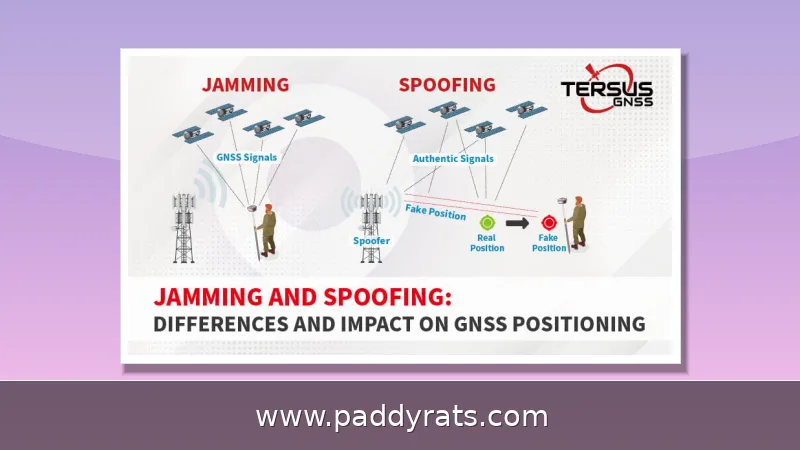
An exam room signal jammer works by constantly broadcasting calibrated RF interference across whatever frequency bands it's set to target. That interference severs the link between a phone and the cell tower it's trying to reach. The handset just sees its uplink and downlink completely flooded with noise, so it can't authenticate with the network — you're left with either zero bars or a data connection that hangs and goes nowhere. And since this disruption happens down at the RF layer rather than inside some app or operating system, it doesn't stop at cellular signals. Bluetooth earpieces and paired audio links get knocked out too, even if the device is sitting in airplane mode with an accessory that was paired ahead of time. That physical-layer reach is exactly why hardware jamming is often called more dependable than software proctoring. Sneaky Bluetooth earpieces and pre-paired audio links can slip past software monitoring, but they can't slip past a flooded band.
| Layer of Disruption | What Happens | Example Targets |
|---|---|---|
| RF / physical layer | Targeted bands are flooded with interference, so devices cannot authenticate or hold a connection | Cellular uplink and downlink, Bluetooth, Wi-Fi |
| Device-level result | No service bars, or a data connection that stalls and never completes | Phones, tablets, paired audio accessories |
It's not a software filter, and that distinction ends up mattering more than you'd expect. A jammer doesn't read packets, doesn't dig around inside a VPN tunnel, and doesn't try to spot a cheating app by name. Instead, it floods the bands you've chosen with calibrated RF noise, pushing the noise floor up until nothing can get through. That's really the whole case for calling hardware jamming more reliable than software proctoring. Think about it: a VPN-tunneled chat or a Bluetooth earpiece paired over an offline audio link can slide right past app-level monitoring, since software only sees what the operating system is willing to tell it. But neither trick holds up against a jammed frequency. Cut the RF path and the earpiece has nothing to pair with, while the tunneled chat has no carrier left to ride. Anything wired, though, just keeps humming along. Security cameras, Ethernet, and the PA system don't notice a thing, because they were never traveling on the spectrum you're blocking. That's precisely what makes selective band targeting so appealing to exam administrators: you can shut down cellular, Wi-Fi, and Bluetooth around student seating while the room's own infrastructure carries on as usual.
Modern exam jammers have gotten much smarter about how they target frequencies. Instead of blasting every band at once, a properly configured unit can be set to block only Wi-Fi and phone calls, or to focus on 4G, 5G, Bluetooth, and Wi-Fi while leaving GPS and public safety bands untouched. Some models won't even power up their 5G modules until a site survey confirms there's actual 5G coverage in the area. That makes sense — why waste power on a band students couldn't connect to in that room anyway?
Key Specifications: Range, Power, and Frequency Bands
Spec sheets are where exam jammer marketing tends to get vague, so when I'm comparing units I stick to four things: per-channel power, total output, antenna type, and the radius you can realistically expect in an actual room. For exam halls and conference rooms, low-power jammers are really the right fit; the high-power prison models are built to reach hundreds of meters, which is overkill for a testing space. The 15-channel Krishna unit is a good reference point for what an exam-grade device looks like: 15 channels covering 2G, 3G, 4G, 5G, Wi-Fi, GPS, VHF, UHF, and the 315/433/868 MHz bands, 5W per channel with 50W total, a high-gain omni antenna, and a built-in rechargeable lithium battery that keeps it running for 2-3 hours on either AC110V-240V or DC12V.
Manufacturers love to throw around big coverage numbers, but you should take those with a grain of salt. Take the Krishna Sales Corporation 15-channel jammer—its spec sheet says 5 to 40 meters, which works out to an eightfold difference in area. That alone tells you real-world performance depends heavily on where you actually put the thing. Phantom Technologies is a little more upfront about its indoor jammers, claiming 2G through 5G cellular, Wi-Fi at 2.4 and 5 GHz, and GNSS, but only "within tens of meters" indoors. Then there's the Jammer Store JF100, a wall-mounted unit advertising 8 or 10 built-in antennas, an internal directional antenna, 220V input, and a claimed radius of up to 100 meters. Sounds impressive—until you remember that number was probably measured in open air with the antenna perfectly positioned and nothing whatsoever in the way. Real exam rooms don't cooperate like that. Drywall, metal shelving, concrete columns, even the sheer number of students packed into the room—all of it absorbs or reflects RF energy, so usable range can fall off fast once the signal has to push through an actual physical space. So the only sane way to read these specs is as a best-case ceiling, not a guaranteed floor. And the only range that really matters is the one you measure in your own room before exam day.
| Model / Vendor | Claimed Coverage | Bands / Features Noted |
|---|---|---|
| Krishna Sales Corporation 15-channel jammer | 5–40 meter radius | 15 channels (2G, 3G, 4G, 5G, Wi-Fi, GPS, VHF, UHF, 315/433/868 MHz); 5W per channel, 50W total |
| Phantom Technologies indoor jammers | Tens of meters indoors | Cellular 2G–5G, Wi-Fi 2.4/5 GHz, GNSS (GPS) |
| Jammer Store JF100 (wall-mounted) | Up to 100 meters radius | 8 or 10 built-in antennas, internal directional antenna, 220V input |
Price mostly comes down to how many channels you need and how well the thing is built. A unit that only blocks a handful of cellular bands costs way less than one that also covers Wi-Fi, GPS, and several 5G frequencies, because every extra band needs its own antenna, amplifier, and filtering. Jammer Master's lineup shows the tiers pretty clearly: the JM010 runs $856.99, the JM005 jumps to $1,365.99, and the JM029 sits at $5,200.00. Portability matters too, though maybe not as much as you'd expect—portable units usually weigh around 1.5 kg on average, so hauling them between rooms isn't a big deal. Putting a few models side by side makes it a lot easier to see where those tiers actually fall.
| Model | Price |
|---|---|
| Jammer Master JM010 | $856.99 |
| Jammer Master JM005 | $1,365.99 |
| Jammer Master JM029 | $5,200.00 |
| Model / Vendor | Bands & Power | Claimed Range | Notes |
|---|---|---|---|
| Krishna Sales Corporation 15-channel | 15 channels, 5W each, 50W total | 5-40 m radius | CE certified, lithium battery, 2-3 h runtime |
| Jammer Store JF100 | 8 or 10 built-in antennas | Up to 100 m | Wall-mounted, internal directional antenna, 220V |
| Phantom Technologies indoor | Cellular 2G-5G, Wi-Fi 2.4/5 GHz, GNSS | Tens of meters indoors | Indoor deployment focus |
| Jammer Master JM029 | Multi-band portable | Room-scale | $5,200.00, roughly 1.5 kg class |
Specs only tell part of the story, though. What really sets a classroom-ready unit apart from a generic one comes down to features. Adjustable output power, for instance, usually covers rooms anywhere from 20 to 200 square meters, so you're not blasting more coverage than you need. Independent band toggling is another big one, since it lets staff shut off GPS or emergency bands without killing the whole signal. Then there's the noise factor: passive cooling or low-noise fans keep exam halls quiet, which matters when students are trying to concentrate. And timed activation is a nice touch, letting you sync the blocking windows to the exam schedule so the room stays clean before and after testing.
Installation and Placement Best Practices
Placement is what separates an exam room jammer that actually holds the back row from one that only blankets the first few desks. In practice, schools lean on two mounting approaches: wall-mounted units and ceiling installation. For wall units, the sweet spot is along the sides of the blackboard, just a touch above it, plus the front and back walls — that arrangement lets the coverage zones overlap so no pocket of the seating area slips through. There's also a height rule of thumb worth remembering: keep the unit roughly 1.8 to 2.5 meters off the floor. That range puts the antennas above students' heads, where bodies and desks won't soak up the RF energy, while still keeping the signal contained instead of bleeding out into the hallway. Get this part wrong and you'll either leave dead zones near the rear or create interference complaints from the classroom next door.
| Placement Factor | Recommendation |
|---|---|
| Mounting type | Wall-mounted or ceiling installation |
| Ideal wall positions | Sides of the blackboard, slightly above it, front and back walls |
| Height-to-width ratio | 1.8 to 2.5 meters |
Antenna discipline is non-negotiable. Every antenna has to match its labeled band, and all antennas must be screwed in and seated before you flip the power switch; running a jammer with a missing or mismatched antenna can fry the amplifier, turning a $800-plus purchase into a paperweight. Point each antenna vertically upward so its polarization lines up with the signals you're trying to disrupt. Keep the unit at least 0.2 meters away from AC lines and audio/video cabling, since induced noise can creep into nearby equipment. And leave 1–2 meters of separation from speakers, wireless microphones, recorders, computers, TVs, and Wi-Fi routers — those devices both suffer from the jamming field and can distort it, which is the last thing you want in a room where coverage needs to be predictable.
Deployment should stay temporary and low-key, reserved for high-stakes exams rather than baked into the daily routine. Pair any jammer with physical supervision, and limit it to selected rooms so you don't blanket the whole campus in interference. Frequency zoning matters here too: by activating only the bands you actually need, you stay inside local telecom boundaries instead of stepping on carriers' turf. Staff should also keep a simple log of which bands are live in each room, so nothing gets switched on by accident. In my experience, a short walk-through with a phone in hand before students arrive catches about 90% of placement mistakes — it's a five-minute habit that saves a lot of grief later.
How to Test Jammer Effectiveness in an Exam Room
Testing should happen before the exam, not during it. Select the farthest point in the room, place three phones from different carriers on a table with no obstructions, wait 1-2 minutes, and check for signal. If signals remain, attempt calls and data, then move the phones closer until no signal appears. That boundary tells you where the coverage actually ends, which is rarely where the spec sheet says it does.
A spectrum analyzer or signal generator gives a more definitive answer than bars on a screen. Use it to detect phone emissions and confirm whether the jammer is suppressing the uplink in the bands you care about. Test multiple carrier networks, not just one, because a single-carrier test can miss a band that a second provider uses heavily in your area.
Thermal behavior is normal, not a fault. Surface temperature around 40-50 degrees Celsius after long operation is expected on many units, and passive cooling designs rely on that heat path. If a unit runs hot enough to smell or throttle, cut power and recheck antenna matching. Logging results per room, per carrier, and per band creates a repeatable record that protects staff if a complaint is ever filed.
Legal and Compliance Considerations
Active radio jamming is prohibited by FCC rules in the United States, and jammers are generally illegal for private use, including in schools and exam rooms. The FCC's jammer enforcement page is explicit, and complaints can be filed under Interference or Radiofrequency Jamming. Vendors may sell hardware, but that does not make operation lawful. Anyone weighing a cell phone jammer for schools should treat the legal question as settled unless Congress changes the statute.
A Faraday cage is the permitted alternative that keeps coming up in academic forums, including threads on r/Professors. Instead of broadcasting interference, a Faraday cage or RF shielding blocks external signals from entering a room, which achieves exam integrity without transmitting on licensed spectrum. It is expensive to retrofit and awkward for large halls, but it does not invite federal enforcement.
Jammers can also affect nearby base stations, which is the technical reason regulators treat them harshly. A 2018 study by Shojaeifard, cited 17 times, examined electromagnetic field exposure from mobile phone jammers on mature rats, adding a health-research dimension to the compliance debate. On the market side, Future Market Report put the global signal jammer market at 10,950.50 million in 2025, reaching 21,100.70 million by 2033 at an 8.54% CAGR, with the United States leading at a 19.8% share. Those figures describe a growing commercial category, not a legal safe harbor.
Do You Need a Jammer, or a Different Exam Security Layer?
Before buying hardware, separate the problem you are solving. If the risk is a student texting answers, a jammer addresses it directly but illegally in the US. If the risk is a Bluetooth earpiece relaying audio, a jammer plus physical screening is more effective than software monitoring alone. If the risk is a coordinated ring using VPN-tunneled apps, no RF device will read the content, but it will still sever the connection while active.
The realistic layered stack looks like this: physical proctoring, device collection at the door, Faraday-cage or shielded rooms where budgets allow, and network-level controls on authorized devices. Jamming, where lawful, is a temporary supplement for high-stakes windows rather than a permanent installation. I would never recommend running one continuously in a building with public safety or medical traffic nearby.
Cost is the last filter. A room-scale unit can run from roughly $850 to over $5,000 depending on channels and build, and that money competes with proctor hours, lockers, and shielding retrofits. If your institution cannot operate a jammer legally, the same budget spent on a Faraday cage and trained proctors delivers defensible exam integrity without federal exposure.
Frequently Asked Questions
How does an exam room signal jammer work?
It continuously emits interference signals on targeted frequency bands, disrupting the link between phones and base stations. This blocks calls, data, Bluetooth, and Wi-Fi so candidates cannot use communication devices to cheat, while wired systems like cameras and PA systems keep running. Selective models can toggle individual bands such as 4G, 5G, Bluetooth, or Wi-Fi.
Are signal jammers legal in exam rooms?
Active radio jamming is prohibited by FCC rules in the United States, and jammers are generally illegal for private use. Some sources note that holding an exam inside a Faraday cage is a permitted alternative, and enforcement complaints can be filed with the FCC. Vendors may sell the hardware, but operating it in a school remains unlawful.
What range and power do exam room jammers have?
Low-power jammers suit examination rooms and conference rooms, while high-power prison models reach hundreds of meters. One 15-channel exam room model lists a 5-40 meter radius, 5W per channel, 50W total, and 2-3 hours of work time after a full charge. Real-world coverage shrinks with walls and metal obstructions.
How do you test a signal jammer in an examination room?
Place phones from different carriers at the farthest point, wait 1-2 minutes, and check for signal. If they still connect, move them closer and repeat. A spectrum analyzer or signal generator can confirm whether phone emissions are detected. Testing multiple carrier networks, not just one, gives a far more reliable picture of actual coverage.