Jamming attacks are rising fast in the US, from WiFi jammers used in home burglaries to cell jammers in bank robberies. Here is how to recognize the symptoms and what tools can actually confirm a jammer nearby.
What Is a Signal Jammer and How Does It Work?
A signal jammer works by transmitting radio energy on the very same frequencies your phone, Wi-Fi router, or GPS receiver relies on—basically drowning out the real signal with noise. In technical terms, it's a denial-of-service attack on the radio spectrum: rather than hacking into a device, the jammer just makes the airwaves unusable. Cell jammers, for instance, emit electromagnetic signals on the same bands mobile phones use, so handsets can't reach cell towers anymore. WiFi jammers are similar in principle—they blast powerful RF signals across 2.4 GHz and 5 GHz, creating digital noise that keeps laptops, cameras, and smart devices from connecting to a router or access point.
Not every jammer is some broadband monster that kills everything at once. The cheaper, simpler ones only hit a single frequency, and honestly, that narrow approach can be harder to catch. Your phone won't flash a "jammed" warning — it just decides there's no network available and quietly sits there with zero bars, like you're standing in a basement somewhere. And the tech itself is nothing new. Jammers got their start as military and law enforcement tools, designed for things like stopping cell-phone-triggered explosives and cutting off communications during hostage standoffs. What's different now is who can actually get their hands on one. U.S. Customs and Border Protection has logged about an 830% spike in signal jammer seizures since 2021, and cheap handheld units are being sold right out in the open online. Low cost, high disruption — that pretty much sums up how jamming made its way from battlefields into neighborhoods, schools, and offices.
Common Signs Someone Is Using a Signal Jammer
The first thing people usually notice is that their signal drops in a place where it's normally fine. If your phone suddenly shows no bars in your living room, or the signal jumps between full strength and nothing within seconds, jamming should be on your list of possible causes. It also helps to compare devices and carriers at the same time: when several phones on different networks all fail at once, a jammer becomes more likely, since a typical tower outage tends to hit one provider harder than the rest. Along with the dropped signal, you might see Wi-Fi instability, Bluetooth dropouts, or even a faint high-pitched buzz or electronic hum. Just don't rely on that noise as proof. Plenty of jammers run silently, and plenty of ordinary electronics make similar sounds.
Context matters just as much as the symptom. Look at the pattern Los Angeles officials, law enforcement, and security experts pointed to in September 2025: burglars are increasingly using WiFi jammers to take out home cameras and alarms before breaking in. The same tactic turned up in June, when the U.S. Department of Homeland Security reported jamming devices in a string of Vermont bank robberies, and again when jamming equipment was found after an attempted jewelry store robbery in La Verne, California. So what connects these cases? The wireless devices all failed at once, while anything connected by cable kept running without a hiccup. That gap is the giveaway. One camera dropping offline or a single phone losing bars could mean just about anything. But several wireless devices going down together, in the same spot, more than once? That's a pattern you shouldn't brush off. Treat it as a real signal, not a coincidence.
WiFi Jammer vs Cell Phone Jammer: Different Symptoms
WiFi jammers and cell jammers hit different parts of the radio spectrum, so they leave behind different fingerprints—and that difference is usually the quickest way to figure out which one you're dealing with. A WiFi jammer goes after your local network by blasting powerful RF signals on the same 2.4 GHz and 5 GHz bands your router relies on. What does that look like in practice? Your Wi-Fi strength tanks or disappears even when you're standing right next to the router, devices keep dropping and reconnecting, latency spikes, packets get lost, and bandwidth falls apart. The biggest giveaway is that wired Ethernet keeps humming along just fine, because a jammer only messes with wireless links—so if your laptop plugged into Ethernet is working while every phone and tablet in the house is struggling, that's a strong sign of WiFi jamming. A cell jammer behaves differently. It emits electromagnetic signals on the same frequencies your phone uses to reach cell towers, which means mobile service dies even though Wi-Fi might still be perfectly fine. Calls won't go through, texts get stuck, and mobile data vanishes—often on several phones at once, in a place where you normally get great reception.
| Sign | WiFi Jammer | Cell Phone Jammer |
|---|---|---|
| Main impact | Local network (2.4 GHz / 5 GHz bands) | Mobile service to cell towers |
| Typical symptoms | Wi-Fi drops near the router, repeated disconnects, high latency, packet loss, collapsed bandwidth | Calls fail, texts stall, mobile data disappears, signal fluctuates between full bars and none |
| Wired Ethernet | Keeps working normally | Unaffected |
| Wi-Fi | Directly disrupted | May still work fine |
The table below puts the two side by side, so you can get a clearer sense of which device you're probably dealing with before dropping any money on detection gear.
| Symptom | WiFi Jammer | Cell Phone Jammer |
|---|---|---|
| Primary victim | Wi-Fi, cameras, smart home gear | Phones, texts, mobile data |
| Signal behavior | Wi-Fi drops near the router | Bars fluctuate from full to none |
| Wired connections | Ethernet still works | Ethernet still works |
| Other wireless impact | Bluetooth dropouts | Wi-Fi and Bluetooth may also suffer |
| Typical range | Usually under 30 square feet | Usually under 30 square feet |
The range is way smaller than most people think, and that one detail totally changes how you go looking for the source. According to Wilson Amplifiers, jamming usually reaches no more than 30 square feet—about the size of a small bedroom or the inside of a parked car. That's why the effect feels so localized: one room goes to zero bars while the hallway right outside is completely fine. A short radius is actually good news, since it means the culprit is probably within arm's reach instead of sitting on some far-off cell tower. If you can walk ten feet and your service comes back, the jammer—or whatever else is causing the interference—is almost certainly right there. So before you spend money on any gear, try a low-tech test: walk slowly through the space and note exactly where the outage starts and stops. Mapping that boundary is one of the simplest, most useful things you can do, and it narrows the search down to a single room or corner.
| Observation | What it suggests |
|---|---|
| Outage confined to roughly 30 square feet or less | Consistent with a nearby jammer, not a tower problem |
| Service returns after walking about ten feet | Source is likely in the immediate area |
| One room affected, hallway unaffected | Localized interference rather than a network-wide fault |
How to Confirm Jamming Instead of a Network Fault
Losing your connection doesn't automatically mean someone is jamming you. Faulty equipment, routine carrier maintenance, and physical obstructions like new construction or thick walls can all produce symptoms that look identical to an attack, so it's worth working through a short checklist before you point fingers. Start by confirming that multiple devices — different models, different carriers — all fail at the same time in the same spot. A single phone acting up is usually just a phone problem, but a whole roomful of gadgets going dark together tells a different story. Next, test your wired connections. If an Ethernet-connected computer browses normally while every wireless device drops, the problem is almost certainly in the RF environment around you, not with your internet provider. That split between wired and wireless performance is one of the clearest early clues that something is interfering with radio signals rather than your broadband service.
| Check | What it tells you |
|---|---|
| Multiple devices, different models and carriers, fail at once in the same spot | Points to a shared environmental cause rather than one bad device |
| Wired Ethernet keeps working while all wireless devices drop | Suggests the problem is in the RF environment, not your internet provider |
Third, move the test. Walk the affected device away from the dead zone and see whether service returns at a predictable distance, then walk back and watch it fail again. Fourth, reboot once and note whether the outage returns immediately, since failing hardware rarely recovers and fails on such a clean schedule. Without highly advanced, military-level technology, it is virtually impossible for the average consumer to definitively detect a cell phone jammer, but this layered approach can separate a jammer from ordinary network trouble with reasonable confidence. Document times, locations, and which devices failed, because that record matters if you later contact your carrier or law enforcement.
Tools That Detect and Locate a Jammer
A spectrum analyzer is the standard tool for confirming RF jamming, and it works by displaying the interfering signal as a bright beacon against the normal noise floor on the screen. The catch is that these are professional-grade instruments, not consumer gadgets, so you need real skill to operate one and interpret what it shows. A directional antenna offers a simpler way to track down the source: you point it in different directions and compare signal strength readings, and the strongest reading points toward the jammer. A frequency reader, meanwhile, can measure signal strength on the specific bands you care about, whether that's cellular or Wi-Fi. For hobbyists who don't want to spend thousands, a Reddit user suggested a roughly $20 RTL-SDR USB stick paired with free software, which is enough to spot suspicious bumps in noise levels. HackRF One has also been used as a smart spectrum analyzer with machine learning, teaching it what normal looks like so it can flag hidden noise that would otherwise go unnoticed.
The table below summarizes what each option is good for and where it falls short.
| Tool | What it does | Limitation |
|---|---|---|
| Spectrum analyzer | Displays jamming signal clearly | Expensive, needs expertise |
| Directional antenna | Locates source by signal strength | Requires a receiver to pair with |
| RTL-SDR USB stick | Reveals noise bumps on a budget | Limited range and sensitivity |
| HackRF One | Real-time RF detection with ML | Steep learning curve |
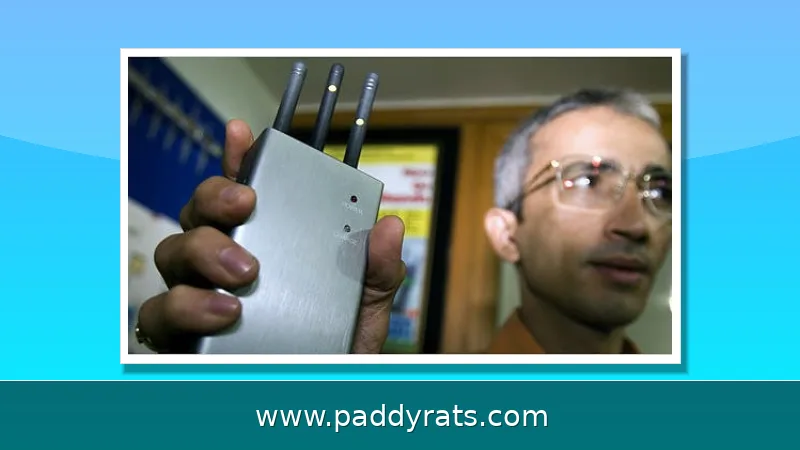
Apps that claim to detect jammers are largely unproven and require a working signal to function, which defeats the purpose when the signal is being blocked. If the jammer can be physically located, it usually looks like a walkie-talkie, a cell phone, or a wireless router, so an unfamiliar box-like device with an antenna in a closet, ceiling panel, or parked car is worth noting. Tech-savvy users may try switching the frequency their phone operates on, and simply relocating often restores reception. If you find a device, do not tamper with it; photograph it, note the location, and report it to the FCC or local police.
Are Signal Jammers Legal and What Are the Risks?
No. In the United States, federal law flatly prohibits operating, marketing, or selling jamming equipment that interferes with authorized radio communications — a category that covers cellular and PCS signals, police radar, and GPS. The FCC keeps a dedicated Jammer Enforcement page laying out these rules, and it offers no exemptions for businesses, classrooms, residences, or vehicles. In other words, a school using a phone jammer, a landlord blocking Wi-Fi, or a driver running a GPS jammer in a car is breaking federal law, no matter how good the intention behind it. That last point matters, because people often assume a "justified" use — keeping students off their phones, cutting off a noisy neighbor's network — makes the device acceptable. Legally, it doesn't. Penalties can include substantial fines and seizure of the equipment.
There is also a practical trap worth understanding. A signal jammer also blocks a cell phone signal booster, because boosters amplify an existing signal and cannot work if that signal is blocked. Cell signal amplifiers are not an effective defense against jammers, so buying one to fight interference usually wastes money. The realistic playbook is detection and reporting: confirm the pattern across devices, document it with timestamps, and escalate to your carrier, the FCC, or law enforcement. This article is not legal advice, and rules can vary by jurisdiction, so consult a qualified professional for your specific situation.
Frequently Asked Questions
What are the most common signs of a signal jammer?
Dropped service is the most common symptom. Look for a sudden loss of signal bars in an area with normally good coverage, signal strength jumping between full and no bars, multiple phones or carriers affected at once, unstable Wi-Fi or Bluetooth, and unusual high-pitched or buzzing electronic noise.
How can I confirm a jammer instead of a normal network problem?
Check whether several devices of different models and carriers fail at the same time in the same spot. Also test wired connections: a jammer only affects wireless links, so Ethernet-connected computers keep working normally while Wi-Fi and cellular devices drop.
What tools detect a cell jammer?
A spectrum analyzer is the standard tool, and a directional antenna can help locate the source by signal strength. A $20 RTL-SDR USB stick with free software can reveal suspicious noise bumps, and HackRF One has been used with machine learning for real-time RF jammer detection.
Are signal jammers legal?
No. In the United States, federal law prohibits operating, marketing, or selling jamming equipment that interferes with authorized radio communications, including cellular, PCS, police radar, and GPS. There are no exemptions for businesses, classrooms, residences, or vehicles.