Signal jammers are cheap, illegal, and increasingly seized at the border, yet the real-world risk to a well-built home security setup is smaller than headlines suggest. Here is how Wi-Fi and cell jamming actually works, what the FCC says, and the practical steps that keep your cameras and alarms online.
What Is a Signal Jammer and How Does It Disrupt Wireless Security?
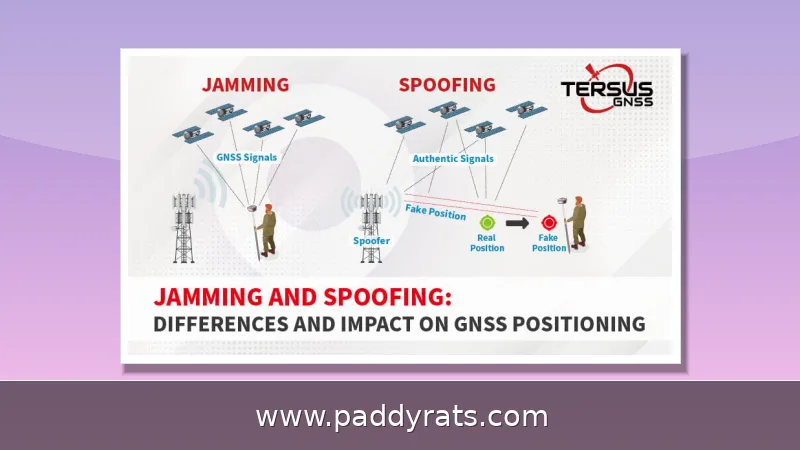
A signal jammer is basically a radio transmitter designed to overpower other radios. It doesn't hack into your camera or alarm system — it just blasts a stronger signal on the same frequency, so the receiving device picks up noise instead of actual data. That's the core concept behind all the terms you'll come across: signal blocker, RF jammer, interference generator, wireless signal jammer. They all mean the same thing — drowning out a wireless link rather than cracking its encryption.
Underneath it all, this comes down to basic physics: any device built to pick up a weak wireless signal on a certain frequency can be overwhelmed by a stronger signal on that same frequency. Picture someone shouting over a whispered conversation—the person listening on the other end just can't make out the original voice anymore. Wi-Fi jammers exploit this by blasting powerful RF energy onto the bands your router depends on, usually 2.4 GHz and 5 GHz. What you get is digital noise that drowns out the normal back-and-forth between your devices and your access point. Cameras, doorbell cams, hubs, smart locks—they all rely on that quiet exchange to stay connected, so once the noise floor climbs high enough, they essentially go deaf. And none of this requires sophisticated hacking or a password. All it takes is raw power on the right frequency. Some jammers put out noise up to 10 watts, more than enough to flood an entire 2.4 GHz and 5 GHz area and take every wireless device nearby offline at once.
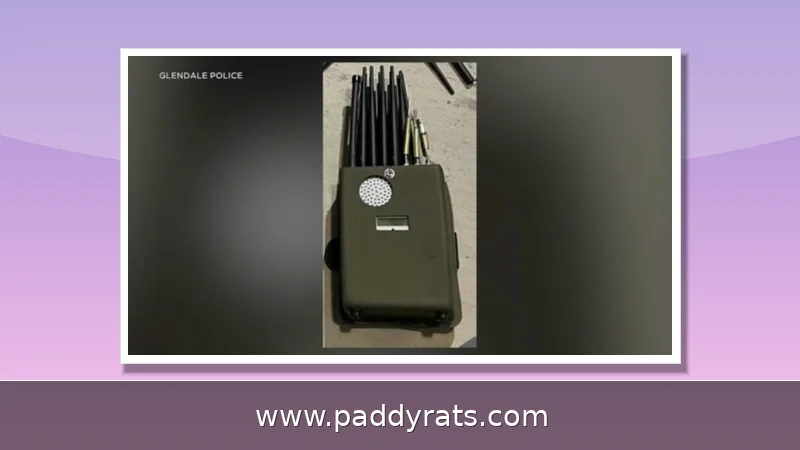
Cell jammers work on the same principle, except they target cellular bands. They flood the frequencies your phone relies on to communicate with nearby towers. Once that link is broken, any device within range can lose its ability to make emergency calls — and public safety communications operating outside the jammed network may be blocked as well. And it doesn't stop with just one technology. Multi-band indoor jammers can combine cellular (2G, 3G, 4G, 5G), Wi-Fi (2.4 and 5 GHz), and GNSS (GPS) blocking into a single unit, with a range that typically maxes out at tens of meters indoors. That's more than enough to cover a house or a small office.
Price isn't really the barrier anymore. You can reportedly buy a Wi-Fi jammer for around $40, which means just about anyone with a credit card and a grudge could get one. And the supply side keeps growing: industry coverage citing market research projects the signal jammer market will expand by USD 1.08 billion at a CAGR of 5.66% between 2023 and 2028. Cheap hardware plus a booming market adds up to a lot more of these devices floating around out there — which is probably part of why U.S. Customs and Border Protection has reported a roughly 830% jump in signal jammer seizures since 2021. Once a tool is this affordable and this easy to find, the question stops being whether people can get their hands on one. It becomes how often they actually do.
Cell Jammers vs Wi-Fi Jammers: Key Differences and Warning Signs
These two types of devices target completely different radios, and that difference shapes what you notice first. A Wi-Fi jammer knocks out your local network, not your cell service. You might see weak signal quality and constant drops even when you're standing right next to the router. Devices disconnect and reconnect over and over, latency spikes, packets go missing, and bandwidth tanks. The clearest giveaway, though, is how wired and wireless split apart: anything plugged in through Ethernet keeps running fine while every Wi-Fi gadget in the house falls apart. A cell jammer does the opposite. Your home network stays fine, but the link between your phone and the nearest tower gets cut, so the first thing you'd probably notice is losing service on multiple devices in a spot where you normally have strong reception.
A cell jammer leaves a different kind of fingerprint. You won't see one device acting up on its own — instead, several phones in the same room will drop service at once, even in spots where reception is usually rock solid, and the signal bars will jump around in ways that don't match their normal behavior. DHS keeps the diagnosis simple: if you can't communicate in places that normally have good radio or cell coverage, jamming is one possibility worth taking seriously. It also helps to understand why the hardware reacts this way. When a stronger signal on the same frequency drowns out a phone, the phone keeps straining to reach the tower, which drains the battery faster and makes it run hotter than usual. The same logic applies to other wireless gear. So if a router or a connected device overheats for no obvious reason — no heavy streaming, no firmware update, no direct sunlight — that's another clue that interference is in the air rather than a gadget going bad.
Before you assume someone is jamming you, slow down and rule out the boring explanations first. Yes, a dropped cell or Wi-Fi connection can be an early sign of interference, but those same symptoms pop up all the time for totally innocent reasons: a router that's on its way out, your ISP running network maintenance, or something as simple as a new metal shelf blocking the signal or the router getting nudged a few feet out of place. That last one matters more than people realize, since metal and concrete can weaken a signal just as effectively as a jammer would. So before you picture a burglar sitting in a van outside, check whether multiple devices on different platforms are all dropping at once, in the same spot. If your laptop, phone, and smart speaker all go dark together, that pattern is worth looking into. If it's only one device acting up, it's probably just that device.
The table below compares cell jammers and Wi-Fi jammers in the situations people actually run into day to day. It's based on how the FCC and DHS explain jamming, plus the consumer-grade devices that keep turning up in real cases. The goal is simple: give you a quick, practical read on the differences without forcing you to dig through all the technical stuff on your own.
| Feature | Cell Jammer | Wi-Fi Jammer |
|---|---|---|
| Targeted frequencies | Cellular bands (2G, 3G, 4G, 5G) | Wi-Fi bands, typically 2.4 GHz and 5 GHz |
| Primary effect | Phones in range cannot reach cell towers; emergency calls and public safety communications are blocked | Wireless devices cannot communicate with a router or access point |
| Typical warning signs | Loss of service on multiple devices in areas with normally good reception; erratic signal fluctuations | Poor signal quality and disconnections even near the router; devices repeatedly dropping and reconnecting; high latency, packet loss, reduced bandwidth |
| What still works | Wired connections and non-cellular communications | Wired Ethernet connections continue to function normally |
| Example specs | Multi-band indoor units blocking 2G–5G within tens of meters indoors | 2.4/5.2/5.8 GHz coverage, up to 10 watts of noise, ranges around 25 meters |
Are Signal Jammers Legal? FCC Rules and Enforcement
Short answer: no. The FCC is blunt about this—federal law bans operating, marketing, or selling any jamming gear that interferes with authorized radio communications, and that's a broad category. We're talking cellular and PCS service, police radar, GPS, all of it. What makes the rule so far-reaching is that there are zero exceptions written into it. Business owner trying to kill phone signals in a conference room? Teacher in a classroom? Homeowner in your own house? Someone behind the wheel of a car? Doesn't matter—all of it is prohibited. And it doesn't stop there. Even local law enforcement agencies don't have independent authority to run jammers. Only certain federal agencies may be authorized to use them in specific situations, and that authority doesn't trickle down to city or county departments.
Selling or buying jamming equipment without the proper certifications is illegal, and in most countries, actually using a Wi-Fi jammer breaks the law as well, because it interferes with public communication systems. The reasoning behind that is fairly straightforward: the radio spectrum is a shared resource, and a device that deliberately drowns out licensed users doesn't get a pass just because it happens to be small and cheap.
DHS doesn't write this off as some petty property crime — they treat it as a public safety problem. When jammers illegally knock out communication systems, whether that's GPS, radio, or wireless, they can disrupt public safety communications and leave first responders without the information they need to do their jobs. That's a big reason regulators come down so hard on jammer sales instead of shrugging them off as some gray-market gadget.
For homeowners, the practical takeaway is that you cannot legally buy your way out of the problem. You cannot deploy your own jammer to fight a jammer, and any product marketed as a personal signal blocker for home use is itself unlawful to operate or sell in the United States. Defense has to come from hardening your own network instead.
How Real Is the Threat of Burglars Using Wi-Fi Jammers?
Technically possible, but very unlikely in real life. That is the assessment from Consumer Reports test engineer Fred Garcia, and CNET has made a similar point: Wi-Fi jammers need to be very close to the target and do not work as well as people imagine. Jamming a specific wireless radio also requires knowing its broadcast frequency, whether that is 315 MHz, 433 MHz, 900 MHz or a Wi-Fi band, plus the right equipment and criminal intent.
The public record is thinner than the headlines. Many reports are general police messages, with scant evidence presented that Wi-Fi jammers were actually used, only that homes in affluent neighborhoods were robbed. Some reports say burglars could be using jammers or are suspected of it, not caught in the act. A 2023 Connecticut arrest did produce proof of jammer devices, one of the few confirmed cases.
In June, DHS reported jamming devices used in several Vermont bank robberies, and jamming devices were recovered in an attempted jewelry store robbery in La Verne, California. Los Angeles leaders, law enforcement and security experts have warned of an increase in burglars using Wi-Fi jammers over the past year. Those cases are real, but they cluster around high-value commercial targets and organized crews rather than typical home break-ins.
Even when jamming happens, it does not do what movies suggest. Brute-force Wi-Fi jamming does not stop local video storage on a camera, rarely acts fast enough to remove clear video of a suspect, and does not affect sirens or motion lights. You also cannot jam a lock and force it to open. Burglars more often smash windows or drill out deadbolts, because that is faster than buying and learning new tech.
Baseline crime data supports that view. According to a 2019 FBI report, burglaries accounted for only 16% of property crimes, about 60% involved residential burglary, and roughly half involved some kind of forced entry. Burglaries decreased by about 50% between 2010 and 2020. Suspicious smart home failures are far more likely to be dying batteries in wireless devices or motion detection issues with zones and sensitivity than a targeted attack.
How to Detect a Wi-Fi Jammer at Home
Start with a controlled test. Walk your home with two devices on different operating systems and check whether both lose Wi-Fi at the same spot while a wired laptop keeps a stable connection. If only one device fails, the problem is probably that device. If every wireless device fails in the same area while Ethernet is fine, interference or jamming becomes a real possibility.
Next, check the router itself. Look for unusual heat, repeated channel changes, or a sudden cluster of disconnects in the router log at a time when nobody was home. DHS-style indicators apply here too: if you cannot communicate in areas where you typically have good coverage, and the problem follows you across multiple networks and carriers, something external may be at work.
Then eliminate the boring explanations. Wireless cameras on low batteries, motion zones set too aggressively, a new appliance, or a neighbor's congested 2.4 GHz network can all mimic jamming. Rebooting the router, swapping a battery, and moving a camera a few feet will resolve most false alarms. Document what you find, because a pattern of simultaneous failures across brands and bands is the only thing that justifies calling it jamming.
If you genuinely suspect an active jammer, do not confront anyone. Report it to local law enforcement and, for interference complaints, to the FCC, which handles illegal jamming enforcement. Keep in mind that a jammer must be close to your home to work, so a persistent problem is also a physical-security problem worth documenting with timestamps and photos.
How to Prevent Wi-Fi Jamming: Encryption, 5GHz, Local Storage and Wired Backup
Encryption and authentication come first. Use WPA3 on the router and strong, unique passwords for both Wi-Fi and every device app. WPA3 does not stop a jammer from drowning your signal, but it does stop the far more common attack of someone joining your network and tampering with devices, which is the realistic threat most homeowners should worry about first.
Switch as much traffic as you can to 5 GHz. Most Wi-Fi jammers target 2.4 GHz, and 5 GHz plus automatic band-switching makes devices harder to jam because the attacker has to cover more spectrum. Where a device supports it, lock it to 5 GHz and keep 2.4 GHz for legacy gear only. Directional antennas can also help, focusing your signal toward the devices you care about instead of spraying it in every direction.
Keep video local. Use local storage on cameras and recorders so footage survives if the cloud connection drops, and treat the cloud as a backup rather than the primary record. A jammer that cuts your internet link does not erase an SD card or NVR, and that is exactly the footage police will want if something does happen.
Finally, build in redundancy. Use wired Ethernet connections wherever possible, because wired devices keep functioning during jamming. Smart home encryption can notify owners immediately or switch to cellular connections, and cellular backup helps devices stay online when Wi-Fi is jammed. Layer those defenses, and a $40 jammer stops being a single point of failure for your entire home security setup.
Which Devices Are Most Vulnerable to Jamming?
Anything that depends on a wireless link and has no wired or local fallback is a candidate. That includes Wi-Fi cameras, video doorbells, smart locks, garage controllers, hub-based sensors and any alarm panel that reports only over Wi-Fi. Devices on 2.4 GHz are the easiest targets because that band is crowded, long-range and the default for cheap jammers.
The good news is that the most important safety functions are also the hardest to jam. Sirens and motion lights are local and hardwired or battery-powered, so they keep working. Local video storage keeps recording. Wired keypads and Ethernet-connected cameras stay online. The vulnerability is concentrated in the cloud-dependent, wireless-only layer that people add for convenience.
A simple audit helps. List every security device in your home, note whether it is wired or wireless, whether it records locally, and whether it has a cellular or battery backup. Any device that answers no to all three is the one a jammer would take offline. Prioritize those for upgrades, and your exposure drops sharply without replacing the whole system.
Frequently Asked Questions
How do Wi-Fi jammers work?
Wi-Fi jammers flood the 2.4 GHz or 5 GHz bands with strong radio noise on the same frequencies your router uses. This interference overwhelms the connection, so wireless devices cannot send or receive data, causing cameras, alarms and smart devices to drop offline within seconds. Wired Ethernet devices keep working normally.
Are signal jammers legal?
No. According to the FCC, federal law prohibits operating, marketing or selling any jamming equipment that interferes with authorized radio communications, including cellular, PCS, police radar and GPS. There are no exemptions for use in a business, classroom, residence or vehicle, and even local law enforcement lacks independent authority.
Can a burglar really jam my wireless security system?
Jamming attacks are technically possible but very unlikely in real life. Jamming requires close proximity, knowledge of the exact broadcast frequency and working black-market hardware. Brute-force Wi-Fi jamming does not stop local video storage, rarely removes clear footage of a suspect, and does not affect sirens or motion lights.
How can I prevent Wi-Fi jamming at home?
Use WPA3 encryption and strong unique passwords, switch devices to the 5 GHz band, keep local storage on cameras instead of relying only on the cloud, add directional antennas, and use wired Ethernet connections where possible. Cellular backup and smart-home encryption can also notify you when a connection drops.