Underground basements lose cell signal because there is no clear line of sight to the nearest tower, and concrete can cut signal strength dramatically. A properly installed booster can recover 20-40 dB or more, and this guide explains how to choose and install one.
Why Cell Signal Struggles in Underground Basements
Cell signals travel by line of sight, so if you're below ground, there's no clear path to the nearest tower. That one physical limitation is the whole reason basements are such a pain to cover. It also explains why your phone can show four bars at the front door and then drop to one bar, or even "No Service," the second you head downstairs. The radio path just isn't there.
Building materials only make things worse. According to Lintratek, thick walls and poured concrete can weaken cellular signals by as much as 90% down in a basement. Toss in metal framing, foil-backed insulation, radiant floor barriers, and grounded ductwork, and you've basically got yourself a Faraday cage. The higher frequency bands that 5G and mid-band LTE rely on take the biggest hit, which explains why your phone might hang onto a faint low-band signal yet still give you painfully slow data.
Most people underestimate how widespread this problem really is. According to FCC data cited by Lintratek, nearly 70% of Americans depend on mobile devices to communicate, and about 25% of calls placed indoors fail simply because reception is too weak. The same source points to Pew Research Center numbers showing that close to 97% of adults now own a cellphone. On top of that, a 2022 Connectivity Benchmark Report found that over half of users say they get frustrated by unreliable mobile service in underground spaces.
Rural areas get hit with a double whammy. According to OpenSignal data cited by Lintratek, signal strength out in the countryside runs about 15–30% weaker than what you'd find in the city. So if your basement happens to sit in a rural spot or out on the suburban fringe, the outside signal you're trying to pull in is already on the weak side — and that's before concrete even enters the picture. This is precisely the kind of situation where a good booster with the right specs really proves its worth.
How a Basement Cell Signal Booster Works
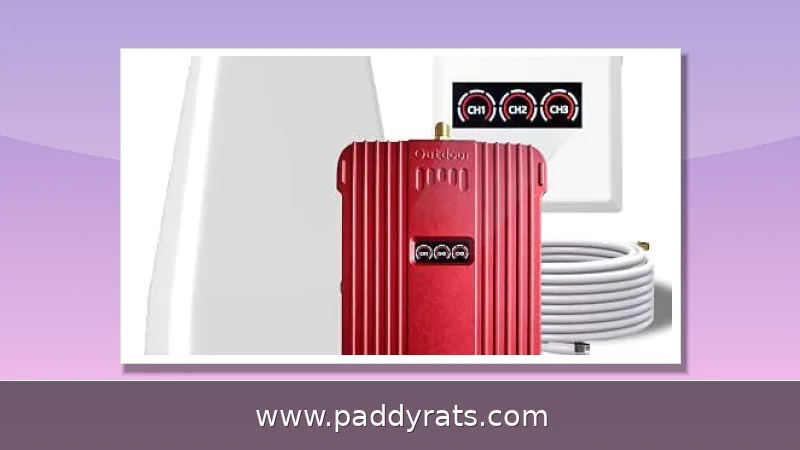
A basement signal booster basically does its job in three steps. First, you mount an outdoor antenna somewhere it can actually pick up usable signal—usually on the roof, a gable, or a pole that clears the roofline. That antenna grabs the cell signal from the tower and sends it down a coaxial cable to the booster unit. From there, the amplifier kicks the signal up and pushes it to an indoor antenna, which rebroadcasts it throughout the basement so your phone can finally connect.
The whole thing also works in reverse. When you make a call or send data, your phone transmits to the indoor antenna, the booster amps up that uplink signal, and the outdoor antenna beams it back to the tower. That two-way setup is exactly what sets a real booster apart from a passive antenna or one of those sticker-style "signal patches."
Here's the thing people need to understand about boosters: they don't create signal out of thin air. What they actually do is pull in whatever weak cellular signal exists outside, amplify it, and then rebroadcast that stronger signal indoors — both Lintratek and signalbooster.com make this point clear. So if there's genuinely no usable signal anywhere outside the building, no amplifier on the market can magically produce one. That's exactly why picking the right spot for your outdoor antenna ends up being the most critical decision you'll make during the whole installation.
If you install a basement cell phone signal booster, there's a good chance you'll see a real difference: many users report gains of 20–40 dB in signal strength, according to HiBoost and other industry reporting. High-gain models like the Cel-Fi GO X are listed at 100 dB gain in the Waveform guide, though what you actually get depends a lot on how strong the outside signal is, what your building is made of, and how carefully the system was set up.
Key Specs to Compare: Gain, Power, Coverage and Bands
Booster marketing loves to throw around square footage, but that's not what tells you how well a unit will actually perform. The numbers that matter are gain (measured in dB), uplink and downlink power (in watts), which frequency bands are supported, and whether it plays nice with your carrier. Gain is basically how much the amplifier can pull up a weak signal, while power decides how far that boosted signal can push through walls and floors. So a high-gain unit with low transmit power might do great in a single room but fall flat across a whole basement — a balanced system is what gets you full coverage.
Frequency band compatibility is the one spec people skip over most when they're shopping for a booster, and it matters more than almost anything else. If you buy a unit that only handles Band 12 or Band 13, it'll clean up your low-band LTE but won't do a thing for mid-band 5G. So before you spend the money, look up which bands your carrier actually uses — that step really pays off if 5G coverage in the basement is what you're after.
If your basement is under about 100 square meters, a 500 mW booster will typically get the job done. Once you go past 300 square meters, or if the layout is unusually complicated, you'll probably need to step up to 2W or more, per Lintratek. Just keep in mind that coverage isn't only about the booster itself—the strength of the signal outside matters just as much. Take the HiBoost Sidekick: if the outdoor signal is weak, say two bars, your improved indoor coverage might drop to around 500 square feet. But when you've got a strong five-bar signal coming in, you can expect the full rated coverage range.
The table below summarizes how the main specs translate into real expectations for a basement installation.
Top Tested Boosters and Typical Price Ranges
The consumer booster market has consolidated around a handful of brands, and prices track gain and coverage almost linearly. Entry-level kits for a single room start around $260, while whole-home and multi-carrier systems with 100 dB gain run past $1,800. Reddit's r/CellBoosters community cites a $1,300-$2,000 range for serious basement booster setups, which matches the retail landscape once you add professional installation.
Cel-Fi GO X is cited as the best consumer booster for homes and buildings with 100 dB gain, the highest figure in the Waveform guide. Cel-Fi Go G32 achieves 100 dB gain in stationary applications and up to 70 dB in mobile use, according to PCMag, and covers up to 15,000 square feet, roughly a third of an acre or three NBA basketball courts. It can be expanded with additional antennas, but it boosts one carrier at a time. Cel-Fi also offers all-three-major-carrier boosters at almost five times the cost of the single-carrier Go G32.
SureCall Flare 3.0 is priced at $379.99 and earned Editors' Choice recognition for homes, covering up to 3,500 square feet with a directional outdoor antenna and an omnidirectional indoor antenna. It supports AT&T, T-Mobile, and Verizon. PCMag notes its range may be limited by signal-blocking materials such as metal or concrete, which is a real consideration in a poured-concrete basement.
HiBoost Sidekick is priced at $259.99 and targets smaller homes and apartments under 2,000 square feet, supporting 4G and 5G on AT&T, T-Mobile, Verizon, and MVNOs. For larger jobs, HiBoost 15K Smart Link is priced at $1,029.99 for businesses, and weBoost offers Home Room up to 1,500 square feet, Home MultiRoom up to 5,000 square feet, and Installed | Home Complete at $1,499.99 for a hands-off installation. SureCall Fusion2Go 3.0 RV is priced at $449.99 for RV use.
Free Fixes to Try Before Buying a Booster
Before spending several hundred dollars, run through the free diagnostics. They take an afternoon and can save you the purchase entirely. Start by checking with your carrier; they may suggest a microcell or femtocell, and some carriers provide one at no cost if you can demonstrate poor indoor coverage.
Keep your phone charged. A low battery can hurt its ability to acquire and hold a signal, because many phones reduce radio power or drop to a lower band when power is constrained. Remove the phone case and test whether reception improves; some thick or metallic cases measurably degrade reception. Then walk the basement and try different spots, especially near a window or beneath a floor opening, to find a sweet spot where calls hold.
Make a quick signal map of the basement to know where signal is best and worst. Field test mode on most phones shows the actual dBm reading rather than bars, and a simple sketch with readings in each corner will tell you whether you have a usable outside signal to work with. If the best reading anywhere in the basement is still worse than about -110 dBm, a booster may struggle unless the outdoor antenna can reach a much better location.
Wi-Fi calling is the other free option. It works on newer smartphones and all U.S. carriers, and can substitute for cellular if Wi-Fi coverage in the basement is solid. If your router reaches the basement reliably, enabling Wi-Fi calling solves voice coverage immediately, though it does nothing for data outside Wi-Fi range.
Installation Steps for a Basement Booster System
Installation quality decides whether a 100 dB booster performs like a 100 dB booster or like a $300 paperweight. The outdoor antenna placement is the critical step: mount the directional outdoor antenna to a pole or a securely anchored roof spot, run cable into the house, and plug it into the base unit, as described in PCMag's coverage of the SureCall Flare 3.0. Aim the directional antenna at the tower, which you can locate with a carrier coverage map or a signal meter.
Once the outdoor side is live, connect the indoor antenna in the basement, keeping it away from the outdoor antenna to avoid a feedback loop. If the booster has a gain or oscillation indicator, adjust until the light shows a stable state. Then test with a phone in several basement rooms and note the dBm readings. HiBoost includes all necessary mounting hardware and a comprehensive guide explaining each step, which makes a first-time DIY install realistic.
The table below is a quick reference for the sequence and the common failure points.
Will a Booster Work in a Basement or Metal Building?
Yes, if you can place the outdoor antenna where signal is available and run cabling, according to T-Mobile. That conditional is the whole answer. A booster is a relay, not a generator. If you can use your phone outside your building without problems, a booster will likely work well in your basement. If the outside signal is already marginal, a higher-gain unit and a better antenna location become mandatory rather than optional.
Metal buildings and basements with metal studs, rebar mesh, or metal ductwork are harder cases, but they are not impossible. The outdoor antenna simply has to be mounted outside the metal envelope, with a clean cable run to the amplifier. In extreme cases, a directional high-gain outdoor antenna pointed precisely at the tower makes the difference between a dead basement and full bars.
Boosters work with all networks and carriers such as Verizon, AT&T, T-Mobile, and US Cellular, according to weBoost. That broad compatibility is a major advantage over microcells and femtocells, which create a localized cell signal but require a broadband internet connection and work only for one specific carrier. If you switch carriers or host guests on different networks, a booster is the more flexible investment.
Health concerns about boosters come up in Facebook groups and Reddit threads from time to time. Consumer boosters operate at power levels governed by FCC rules, and the more practical compliance issue is interference: a poorly installed or overpowered booster can interfere with nearby towers, which is why interference should not be ignored when selecting a booster, per Lintratek. FCC Approved labeling appears on Amazon listings for home and office boosters up to 5,000 square feet that boost 5G and 4G LTE for all U.S. carriers.
Basement Booster Costs and What Drives the Price
Basement booster pricing is driven by three variables: gain, coverage area, and carrier flexibility. A single-carrier 100 dB system costs far less than a multi-carrier equivalent, and a 500 mW single-room kit costs less than a 2W whole-basement system. Understanding that structure makes it easier to decide where to spend.
The table below shows typical price bands and what each tier realistically covers.
Choosing the Right Booster for Your Basement
Work backward from your outside signal. Measure dBm outside the building at the planned antenna location, then match the booster gain to the gap you need to close. If the outside reading is around -85 dBm and you need roughly -95 dBm indoors for reliable calls, a 20-40 dB improvement is sufficient and an entry-level or mid-tier kit will do the job. If the outside reading is -105 dBm or worse, you need a 100 dB unit such as the Cel-Fi GO X or Cel-Fi Go G32.
Then match coverage to square footage and materials. A 500 mW booster suits basements under 100 square meters, while spaces over 300 square meters generally need 2W or higher. Concrete, metal, and multiple floors between the indoor antenna and the phones all reduce effective coverage, so size up rather than down when your basement is divided into rooms.
Finally, decide on carrier strategy. If everyone in the house uses the same network, a single-carrier booster delivers the most gain per dollar. If you have a mix of AT&T, T-Mobile, and Verizon lines, a multi-carrier system is worth the premium, even at nearly five times the cost in some Cel-Fi comparisons.
For most homeowners, the practical sweet spot is a mid-tier multi-carrier kit with a directional outdoor antenna and a well-placed indoor antenna, installed with attention to antenna separation and cable routing. That combination reliably delivers the 20-40 dB of improvement that turns a dead basement into a usable workspace.
Frequently Asked Questions
Will a cell signal booster work in an underground basement?
Yes, if you can place the outdoor antenna where usable signal exists. The booster captures that outside signal, amplifies it, and rebroadcasts it indoors through an indoor antenna. If you can use your phone outside your building without problems, a booster will likely work well in your basement.
How much does a basement signal booster improve reception?
In areas where a basement cell phone signal booster is installed, many users see improvements of 20-40 dB in signal strength. High-gain models such as the Cel-Fi GO X are cited at 100 dB gain, though real results depend on outside signal strength and building materials.
What size booster do I need for my basement?
For basements under 100 square meters, a 500 mW booster is usually enough. Larger or more complex spaces over 300 square meters may need 2W or higher. Coverage also depends on outside signal: a weak two-bar signal may only deliver roughly 500 square feet of improved indoor coverage.
Do I need internet for a basement signal booster?
No. A signal booster captures and amplifies existing cellular signals and does not require internet service. By contrast, a microcell or femtocell creates a localized signal but requires a broadband internet connection and only works for one specific carrier.
How does a basement cell signal booster work?
A booster uses an outdoor antenna to capture weak cell signal, a coaxial cable to send it to an amplifier, and an indoor antenna to rebroadcast the amplified signal inside your basement. The process works in reverse for uplink, allowing your phone to transmit back to the tower. It does not create signal; it only amplifies existing outdoor coverage.
Will a cell signal booster work in a concrete underground basement?
Yes, if you can place the outdoor antenna where a usable signal exists and run cable to the amplifier. Concrete and metal attenuate signal heavily, so the outdoor antenna location is critical. If you have at least a weak signal outside, a high-gain booster can typically improve indoor coverage by 20-40 dB or more.