Signal bars lie, so measure real outdoor signal in dBm before you buy a booster. Here is how RSRP, SINR, and gain in dB decide whether a booster will actually work for you.
Why Signal Bars Are Misleading for Booster Selection
Phone bars are a rough estimate, not a real measurement—and each manufacturer tunes that display differently. The same spot might show three bars on one carrier's phone and one bar on another, because every brand maps raw radio readings to its own scale. That's why two people standing side by side can disagree about whether coverage is "fine," even as one of them keeps dropping calls. When I started testing boosters, the bar icon was the first thing I stopped trusting.
If you really want to pick the right booster, forget the bars on your phone and pay attention to dBm instead — decibel-milliwatts, if you want the full name. It's always a negative number, and the closer it gets to zero, the stronger your signal actually is. For reference, something like -70 dBm is a solid outdoor reading, while -110 dBm or below means you're barely hanging on. Wilson Amplifiers and Waveform both say the same thing: bars shift depending on your carrier, your phone, and where you're standing, so they're basically useless for comparing hardware. A real dBm reading is the only number you can trust when you're trying to figure out what to buy.
How to Read dBm, RSRP, RSSI, SINR, and RSRQ
When you're shopping for a booster, it's easy to lump four different metrics together, but they're actually answering separate questions. RSRP (Reference Signal Received Power) gives you the most accurate read on LTE and 5G signal strength because it isolates the power of one specific reference signal. RSSI (Received Signal Strength Indicator) is a broader number — it captures total power, which means noise and interference get folded in too. RSRQ (Reference Signal Received Quality) mixes strength and quality together, while SINR (Signal to Interference plus Noise Ratio) tells you how your signal stacks up against the background noise.
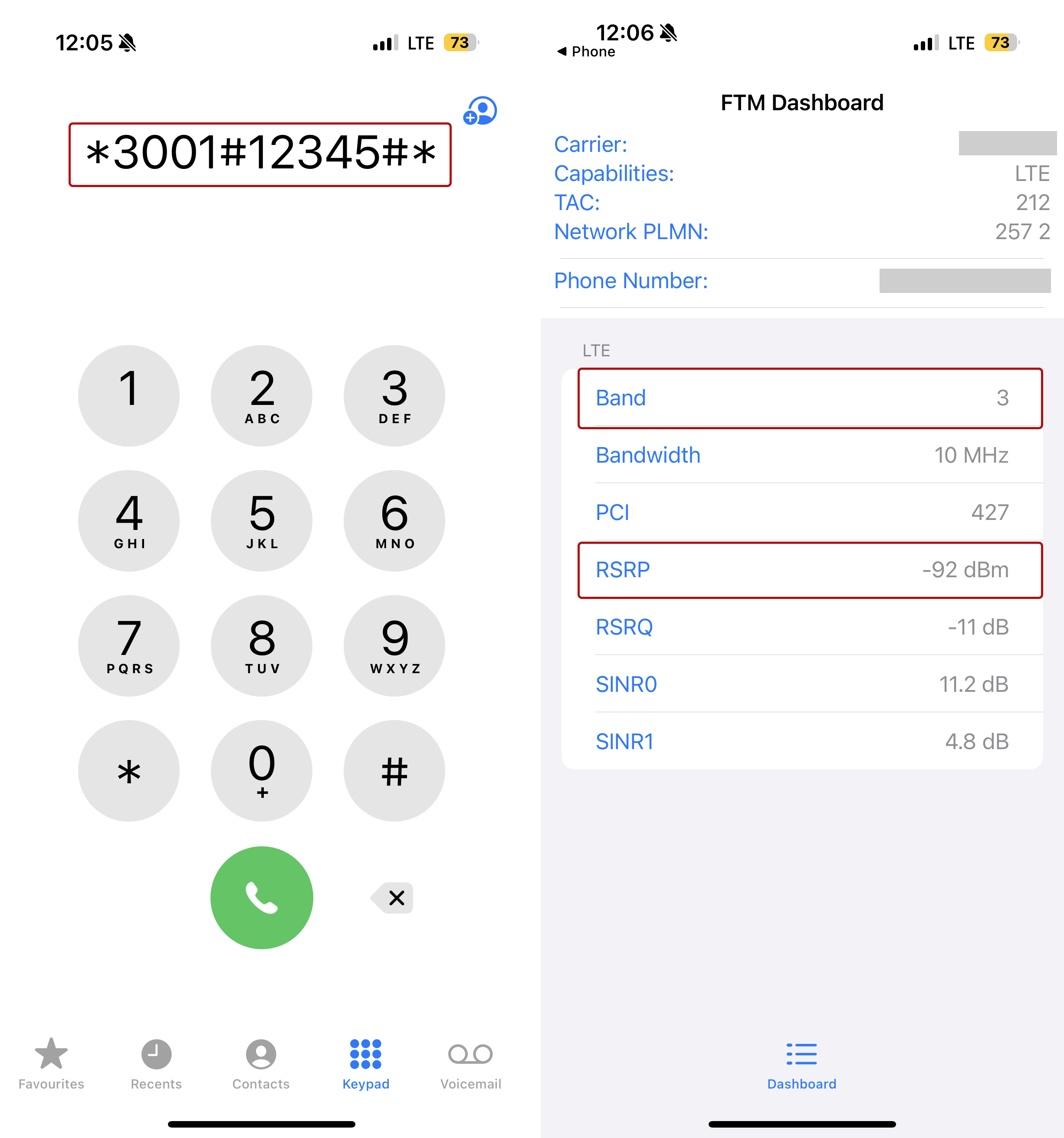
For most people shopping for a booster, RSRP is the number that matters most, and SINR is what breaks the tie. If your RSRP looks strong but your SINR is poor, that usually means the tower is nearby but the channel is congested — something you'll see a lot in dense urban neighborhoods. Wilson Amplifiers points out that a reading like -95 dBm will show up as a negative number in Field Test Mode, and that's the figure you want to jot down. Record both values for each spot you test, since a booster can boost power but it can't create quality that the tower was never sending in the first place.
| Metric | What it measures | Why it matters for a booster |
|---|---|---|
| dBm | Absolute signal power, always negative | The core number; -70 dBm strong, -110 dBm weak |
| RSRP | Power of a specific LTE/5G reference signal | Most accurate strength reading for 4G and 5G |
| RSSI | Total received power including noise | General indicator only, less precise |
| SINR | Signal versus background noise | Explains slow data despite decent strength |
| RSRQ | Combined strength and quality | Useful secondary check on congestion |
In practice, reading those two numbers together tells you a lot. Say your RSRP sits around -85 dBm but your SINR is barely above zero—you'll probably get calls that work fine while data crawls, and you'd want a directional outdoor antenna pointed at the cleanest sector you can find. On the flip side, if RSRP is already at -70 dBm, a high-gain amplifier is overkill and might actually cause interference. The pattern I keep running into is people chasing maximum gain when their real issue is quality, not raw power.
Step-by-Step: Using Field Test Mode on iPhone and Android
Field Test Mode is already built into your phone, so there's nothing to download. On an iPhone, just turn off Wi-Fi, open the Phone app, dial *3001#12345#*, and hit call. That opens the Field Test Mode dashboard, where the dBm value shows up next to RSRP under the 5G and/or LTE sections. One thing to keep in mind: don't just glance at it once from the kitchen table and call it done. Walk around the property and jot down the number at each spot, since signal can shift a lot from one corner to the next.
On Android, the exact path depends on your manufacturer, but it usually goes Settings → About Phone → Status or Mobile Networks, then you look for SIM Status or Network and check the dBm under Signal Strength. On some builds it's hidden, and you have to tap the build number a few times to unlock it. One thing to keep in mind: take your measurements outside first, ideally up on the roof or wherever you can get the highest point, since that's basically where an external antenna would end up living anyway.
| Platform | Path | What to record |
|---|---|---|
| iPhone | Wi-Fi off, Phone app, dial *3001#12345#* | dBm next to RSRP under 5G/LTE |
| Android | Settings, About Phone, Status, SIM Status | dBm under Signal Strength |
| Both | Repeat at multiple outdoor points | Best and worst dBm per location |
Two things worth keeping in mind. First, turn off Wi-Fi before you start, otherwise your phone might show you Wi-Fi calling numbers instead of actual cellular readings. Second, don't just test once and call it done—take readings at the same time of day over a couple of days. Network traffic fluctuates, and one afternoon's snapshot can push you toward a booster with way more gain than you actually need. Jotting down five or six readings is usually enough to spot the pattern.
Using Signal Strength Apps to Measure Before You Buy
Apps make it a lot easier to take repeat readings, especially on Android. Network Cell Info Lite on Google Play, the weBoost App (Google Play and the App Store), and OpenSignal on both stores all show dBm values, and the weBoost App even has a color-coded gauge, so a weak reading jumps out right away. I'll run an app for the walk-around and then use Field Test Mode as a cross-check, since the two don't always line up perfectly.
iPhone support is the catch. Apple restricts the radio data third-party apps can access, so the same apps do not deliver identical detail on iOS. If you are on an iPhone, treat Field Test Mode as your primary instrument and the app as a convenience. Either way, capture the outdoor number at the exact spot where an external antenna would be mounted, because that location, not your couch, determines what a booster can deliver.
Matching Outdoor Signal Strength to Booster Gain and Coverage
Gain is measured in dB, and it is the multiplier a booster applies to what the outdoor antenna captures. Vehicle kits illustrate the range well. The weBoost Drive Sleek delivers up to +23 dB of gain for a single device, the weBoost Drive Reach pushes to about +50 dB for multiple devices, and the Nextivity (Cel-Fi) GO M with a marine antenna reaches up to 65 dB, though it serves one carrier at a time, per SignalBoosters.com. Higher gain suits very weak outside signals and larger areas, but over-amplifying invites interference.
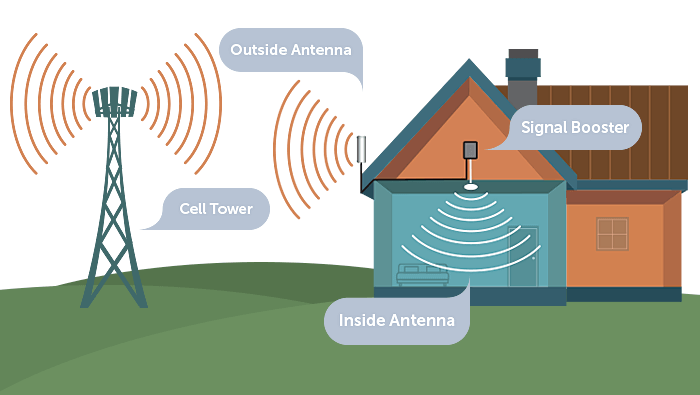
A useful rule of thumb from booster communities is that reaching 0 dBm from a weak outdoor reading can require enormous gain, which is why nobody should promise a full-bar result from a -115 dBm site. Coverage also scales with the indoor footprint. Small spaces such as one or two rooms, apartments, basements, RVs, and small offices need modest systems; single-family homes and small warehouses sit in the middle; commercial buildings, campuses, and industrial facilities need larger, professionally planned installs.
| Outdoor reading | Typical gain to consider | Realistic expectation |
|---|---|---|
| -70 to -85 dBm | Entry-level, around +23 dB | Reliable indoor coverage in a small space |
| -85 to -100 dBm | Mid-range, around +50 dB | Whole-home coverage with good antenna placement |
| -100 to -110 dBm | High gain, 65 dB class | Usable coverage in targeted rooms, not whole buildings |
| No signal outdoors | None | A booster cannot create signal that does not exist |
That last row is the hard limit. If there is no usable signal outside, no amplifier will fix it, because a booster only captures, amplifies, and rebroadcasts what already exists. If the outdoor signal is weak but present, a high-gain outdoor antenna aimed correctly usually works. Measure before you spend, and let the dBm number, not the marketing spec sheet, set your budget.
What to Check Before Buying: Carrier, FCC Approval, and Installation
Before choosing hardware, confirm which carriers and frequency bands you actually need, since multi-carrier and single-carrier boosters differ in both price and performance. Then verify FCC approval and carrier certification. In the United States, all signal boosters must be FCC approved and carrier-certified to operate legally and safely; non-certified units can interfere with carrier networks, perform poorly, or be shut down by carriers. Cheap marketplace listings often cut corners on parts and skip certification entirely.
Installation planning matters as much as the box. Keep at least 5 to 7 meters of separation between the indoor and outdoor antennas, a figure repeated in booster community groups, or the system will oscillate and cancel its own gain. Decide between omni-directional antennas, which capture from multiple directions and suit urban sites, and directional antennas, which focus on one bearing and suit rural ones. Budget for professional installation if the run is long or the roof access is difficult.
Finally, judge results by data speed and stability, not bars. Powerful Signal's recommended sequence is straightforward: determine outside signal strength in dBm, ideally on the roof; calculate the square feet of indoor coverage by multiplying length by width; then talk to experts about matching gain to that footprint. Buying from a trusted manufacturer with real support matters, because tuning a marginal install is where most disappointing booster stories begin.
How do I measure cell signal strength before buying a booster?
Measure outdoors in dBm rather than bars. Use your phone's Field Test Mode or a signal strength app to read RSRP for 4G and 5G, plus SINR for quality. On iPhone, dial *3001#12345#*; on Android, check Settings, About Phone, and SIM Status. A stronger outdoor signal means more indoor coverage options.
What dBm reading means I need a signal booster?
Signal strength is measured in dBm, and the closer the number is to zero, the stronger the signal. A typical strong signal sits around -70 dBm, while a weak signal might be -110 dBm or lower. If there is no signal at all outdoors, a booster will not work, because it can only amplify existing coverage.
What is the difference between RSRP and SINR?
RSRP (Reference Signal Received Power) is the most accurate measurement of LTE and 5G signal strength, capturing the average power of a specific reference signal. SINR (Signal to Interference plus Noise Ratio) indicates quality by comparing your signal to background noise. RSRP is the key metric for most buyers, with SINR as the quality check.
Can I use signal bars to choose a booster?
No. Signal bars are a rough estimate that varies by carrier, device, and location. Measure in dBm (decibel-milliwatts) instead for a precise numerical reading. That precision helps when troubleshooting weak signal, choosing a booster, and testing results before and after installation, which bars simply cannot show.
What should I check before buying a signal booster?
Confirm carrier support and frequency bands, know your indoor coverage area in square feet, and verify FCC approval plus carrier certification. Plan for antenna separation of at least 5 to 7 meters and decide between omni-directional and directional outdoor antennas. Judge performance by data speed, not bars, and buy from a manufacturer that offers real support.
Frequently Asked Questions
How do I measure cell signal strength before buying a booster?
Measure outdoors in dBm rather than bars. Use your phone's Field Test Mode or a signal strength app to read RSRP for 4G and 5G, plus SINR for quality. On iPhone, dial *3001#12345#*; on Android, check Settings, About Phone, and SIM Status. A stronger outdoor signal means more indoor coverage options.
What dBm reading means I need a signal booster?
Signal strength is measured in dBm, and the closer the number is to zero, the stronger the signal. A typical strong signal sits around -70 dBm, while a weak signal might be -110 dBm or lower. If there is no signal at all outdoors, a booster will not work, because it can only amplify existing coverage.
What is the difference between RSRP and SINR?
RSRP (Reference Signal Received Power) is the most accurate measurement of LTE and 5G signal strength, capturing the average power of a specific reference signal. SINR (Signal to Interference plus Noise Ratio) indicates quality by comparing your signal to background noise. RSRP is the key metric for most buyers, with SINR as the quality check.
Can I use signal bars to choose a booster?
No. Signal bars are a rough estimate that varies by carrier, device, and location. Measure in dBm (decibel-milliwatts) instead for a precise numerical reading. That precision helps when troubleshooting weak signal, choosing a booster, and testing results before and after installation, which bars simply cannot show.