Most signal booster failures trace back to antenna placement, not defective hardware. Getting separation, aiming, and cable runs right is what preserves gain and keeps your booster from shutting down.
Why Antenna Separation Decides Booster Gain
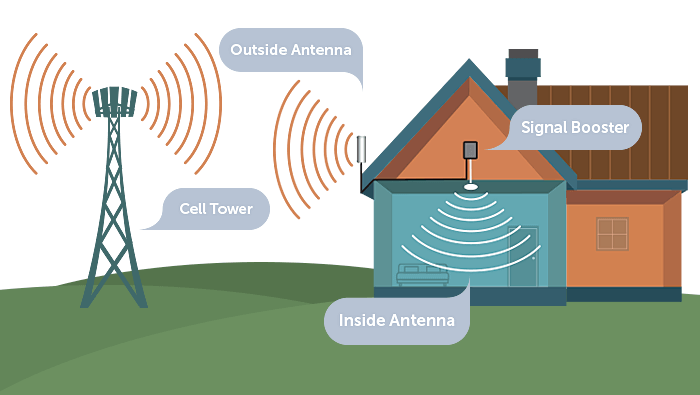
A signal booster is basically a closed loop: an outside antenna grabs a weak cellular signal, the amplifier boosts it, and an indoor antenna rebroadcasts it wherever you need coverage. The uplink side runs the same chain in reverse. That loop only stays stable when the two antennas sit far enough apart physically. Put them too close and each one picks up the other, turning a gain device into a feedback machine. In my own installs, separation has always mattered more than amplifier wattage, antenna brand, or how much I spent on coax.
Wilson Amplifiers puts concrete numbers on this: you need at least 50 feet of horizontal separation between the antennas, or 20 feet of vertical separation, to prevent oscillation. weBoost calls 25 to 30 feet of vertical separation ideal, and points out that the horizontal distance required is always greater than the vertical distance. It comes down to simple geometry. Vertical separation lets the floor or roof structure between the antennas act as a shield, while horizontal separation relies mostly on distance alone.
The Minimum Required Separation Distance (MRSD) isn't a single fixed number — it varies based on antenna type, gain, and whatever sits between the two units. Point the antennas away from each other, and put a roof or wall in between, and you can shrink that distance quite a bit. Omnidirectional outdoor antennas, though, need more separation than directional ones. That's because they transmit and receive in every horizontal direction rather than focusing energy toward a single cell tower.
What Is Signal Oscillation and How Does It Kill Gain?
Oscillation is the technical term for the feedback loop that forms when the output from your indoor antenna leaks back into the outdoor antenna. The booster amplifies that leaked signal, broadcasts it again, and the cycle just keeps repeating. Modern boosters catch this almost instantly. Under FCC rules, every cell signal booster sold in the US has to auto-detect oscillation and take corrective action right away — and if dialing back the gain doesn't fix it, the unit must shut itself off completely, all within a few hundredths of a second.
That regulatory behavior explains the most common support call in this category: the booster shows red lights and stops working. Red means oscillation, not a dead unit. The booster is protecting the cellular network, since uncorrected oscillation interferes with transmission and reception on the tower side. The fix is almost always physical. Put more distance between the indoor and outdoor antennas, re-aim them so they face away from each other, or add some structure between them, then power cycle the unit. It won't restart until the oscillation condition is gone.
When a red light shows up, I treat it as a placement problem before I assume something's wrong with the hardware. Before calling the manufacturer or ordering a replacement part, I'll move the indoor antenna a few feet, make sure no window or thin wall sits directly in the path between the two antennas, and check that the outside antenna isn't aimed back toward the house. More often than not, that's all it takes to clear the fault.
Indoor Antenna Placement Mistakes That Limit Coverage
Even with perfect separation, a booster can still underperform if the indoor antenna is in the wrong spot. Bolton Technical notes that putting the indoor antenna in a corner or an obstructed area limits how far the signal reaches, since the corner absorbs and blocks energy rather than spreading it around. Move the indoor antenna toward the middle of the space you want to cover, and you'll get much more even coverage. That's exactly why ceiling-mounted dome and panel antennas show up so often in larger homes and offices.
The second mistake people make is putting the indoor antenna right next to the wall where the outside antenna is mounted, usually in a room on that same side of the house. It's tempting because the cable run ends up short, but it's also the quickest way to trigger oscillation. The third mistake is tucking the indoor antenna behind furniture, inside a metal cabinet, or into a basement corner with concrete on three sides. Obstructions don't just weaken the broadcast signal—they bounce it right back toward the outside antenna.
Booster Overload: When Too Much Signal Shuts You Down
Oscillation is one failure mode. Overload is the other, and from the outside the two can look almost identical. Overload sets in when the amplifier gets more outside signal than it can handle. Wilson Amplifiers lays out the classic pattern: a cheaper booster, a fantastic outdoor signal, a terrible indoor signal, and high-gain antennas paired with low-loss cable. The amplifier saturates, and the booster shuts down completely to protect itself.
Here's the thing that trips people up: a stronger outside signal isn't automatically better. Mount your outside antenna at the single strongest spot on the roof, pair it with a high-gain directional antenna, and you can actually push the amplifier past what it was designed to handle. So what do you do about it? You've got a few options. You can add an inline attenuator to knock the signal down before it ever reaches the amplifier, upgrade to a commercial-grade booster that handles attenuation automatically, or just put the outside antenna somewhere with a slightly weaker signal—or aim it away from the strongest tower on purpose.
Automatic gain control, which you'll find on models from weBoost and other major brands, is basically the set-it-and-forget-it option. These units constantly adjust gain across all five frequency bands used by the big US and Canadian carriers — AT&T, Verizon, T-Mobile, Rogers, Bell, and Telus. Manual gain control, on the other hand, lets you adjust each band individually, but you have to tune it yourself. That's handy for tricky installs and pretty annoying just about everywhere else.
Cable Runs, Connectors, and Other Gain-Killing Errors
Every foot of coax eats signal. CellTeks warns that excess cable anywhere in the system kills gain the longer the run gets, and recommends choosing a booster rated for at least four times the square footage you actually need so headroom survives the loss. That is why a tidy, short, direct cable run beats a long hidden one routed through an attic and around three walls.
Signal measurement is the other place installers go wrong. Measure in dBm, not bars. A reading of -80 dBm is meaningfully better than -105 dBm. weBoost grades coverage as follows: -90 dBm or better is excellent, -91 to -105 dBm is good, -106 to -110 dBm is fair, -111 to -119 dBm is poor, and around -120 dBm is a dead zone. Put the outside antenna where those measurements show the strongest signal, not where the cable run is easiest.
How Far Apart Should Booster Antennas Be?
Separation requirements vary by source and by antenna type, so the practical answer is to treat the numbers below as minimums and add margin. Vertical separation is generally more efficient than horizontal separation because building structure does the shielding work.
How to Fix Placement Mistakes and Restore Gain
The repair process is mostly methodical surveying. Start outside: walk every side of the building at ground level and again higher up, taking several dBm readings per side, and note which direction gives the best signal. Mount the outside antenna at that strongest location and aim it at the tower. Then keep the coax run short and direct, and place the indoor antenna where coverage is needed, well away from the outside antenna and out of corners.
Before drilling holes or sealing anything, test the complete system temporarily. Power it up, check the indicator lights for red oscillation warnings, and confirm the indoor signal improves. If red lights appear, increase separation and retest. Only after a clean test should you commit to permanent mounting. One limitation worth stating plainly: a booster cannot create coverage where no usable outside signal exists, and no amount of placement tuning changes that.
Borrowing Lessons From TV and Wireless Audio Installations
The same physics applies outside cellular. Sound Design Live's Stephen Pavlik lists three recurring antenna placement mistakes: putting the receive antenna in front of the transmit antenna, incorrect spacing, and building an antenna farm of clustered antennas. Directional antennas still pick up some signal from behind, which is why opposite-facing orientation matters even when you think the pattern protects you.
Antennas Direct adds practical rules for mast-mounted setups: when combining multiple antennas on the same mast, keep at least 4 to 6 feet of vertical separation, keep antennas at least 20 feet (6 meters) from power lines, and add a preamplifier if the cable run exceeds 100 feet. Install My Antenna notes that experts usually recommend mounting a TV antenna at least 10 to 20 feet off the ground, because obstacles cause signals to arrive out of phase. Grounding protects against voltage surges from nearby lightning strikes, though not a direct strike.
Placement Cheat Sheet: Symptoms, Causes, and Fixes
Use this table as a quick diagnostic when a booster underperforms. Each row maps a visible symptom to its most likely placement cause and the correction that usually resolves it.
Final Thoughts on Protecting Booster Gain
Most booster gain loss is self-inflicted. Too little separation, a corner-mounted indoor antenna, an overloaded amplifier, and a long coil of excess coax account for the majority of weak or dead installations I have seen. None of those are hardware defects, and none require a new purchase to fix. Measure in dBm, respect the separation minimums, keep cable runs short, and test before you drill. Do that, and the gain you paid for is the gain you actually get.
Frequently Asked Questions
How far apart should signal booster antennas be?
Antennas need at least 50 feet of horizontal separation or 20 feet of vertical separation to prevent oscillation, though weBoost recommends 25 to 30 feet vertically as ideal. Vertical separation is more efficient because building structure shields the antennas. Treat these figures as minimums and add margin, since required distance depends on antenna type and gain.
Why does my signal booster show red lights and stop working?
Red lights usually mean oscillation, a feedback loop where the indoor antenna's output leaks back into the outdoor antenna. Under FCC rules, boosters must detect this and shut down within hundredths of a second. The fix is physical: increase antenna separation, re-aim them away from each other, add structure between them, then power cycle the unit.
Where should I place the indoor antenna for best coverage?
Mount the indoor antenna near the middle of the space you want to cover, not in a corner or behind furniture. Corners absorb and block energy, while obstructions reflect signal back toward the outside antenna. Ceiling-mounted dome or panel antennas work well in larger homes and offices because they distribute coverage more evenly.
Can too much outside signal shut down a booster?
Yes. Overload happens when excessive outside signal saturates the amplifier, causing a full shutdown. Fixes include adding an inline attenuator, upgrading to a booster with automatic gain control, or placing the outside antenna in a slightly weaker spot. A stronger outside signal is not always better for stable booster operation.