A signal jammer is a radio denial-of-service device, and finding one takes the right RF gear rather than guesswork. Here is how spectrum analyzers, directional antennas, triangulation, and dedicated detectors actually pinpoint a jammer.
What Is a Signal Jammer and How Does It Work?
A signal jammer deliberately disrupts the connection between a device and its signal source by transmitting on the same radio frequencies. That makes it a radio-frequency denial-of-service attack, not a hack. I've watched a handheld unit wipe out every bar of LTE in a room within seconds, and the mechanism behind it is pretty simple: the jammer floods the receiver with noise on the exact channel it's trying to hear.
Most jammers you'll run into target a set list of frequencies: the cellular bands at 700MHz, 800MHz, 900MHz, 1800MHz, 1900MHz, and 2100MHz, GPS at 1575MHz, and Wi-Fi at both 2.4GHz and 5GHz. Some units only block a narrow slice of that, while wide-band full spectrum jammers go after several bands at once. Either way, the effective range is usually pretty small—often no more than about 30 square feet—so when you're trying to track one down, physically getting close to the source is half the battle.
A jammer typically looks like a walkie-talkie, a cell phone, or a wireless router, which means it can sit right out in the open on a desk or inside a bag without anyone giving it a second look. Signal boosters are a different story — they amplify whatever signal is already there, but they can't stop a jammer, and in fact a jammer will jam the booster too. People mix these two up all the time, and honestly, it makes sense why: when a booster that used to work just fine suddenly stops helping, that's often the first hint that something is actively interfering with your signal.
How Do You Detect Jamming on Your Devices?
The most telltale sign of cell phone signal jammer interference is dropped service. Your device suddenly can't make calls, send texts, or use data — and the failure usually hits all at once, tied to a specific spot, rather than creeping in gradually. So if your phone works fine out in the parking lot but goes dead the second you step into a particular room, a carrier outage probably isn't your problem.
The old-school approach still gets the job done: walk off in three or four different directions until your bars come back, then map out where service returns. The shape of those dead zones usually points you toward the center of the interference. You can also try a wide band field strength meter hooked up to an antenna in your car — it'll tip you off when a jammer is close by, and driving around the lot a few times helps you narrow the signal down before you even think about opening a laptop.
Apps such as Jammer Detector keep an event log and note the location whenever jamming or a loss of service is picked up, which can be handy for piecing together a timeline. That said, Wilson Amplifiers points out that these apps are mostly unproven and need a working signal to do anything at all, so I'd file them under documentation rather than detection. Bottom line: they show you where your service dropped out, which isn't always where the transmitter is actually sitting.
Equipment for Locating a Jammer: Spectrum Analyzers and Directional Antennas
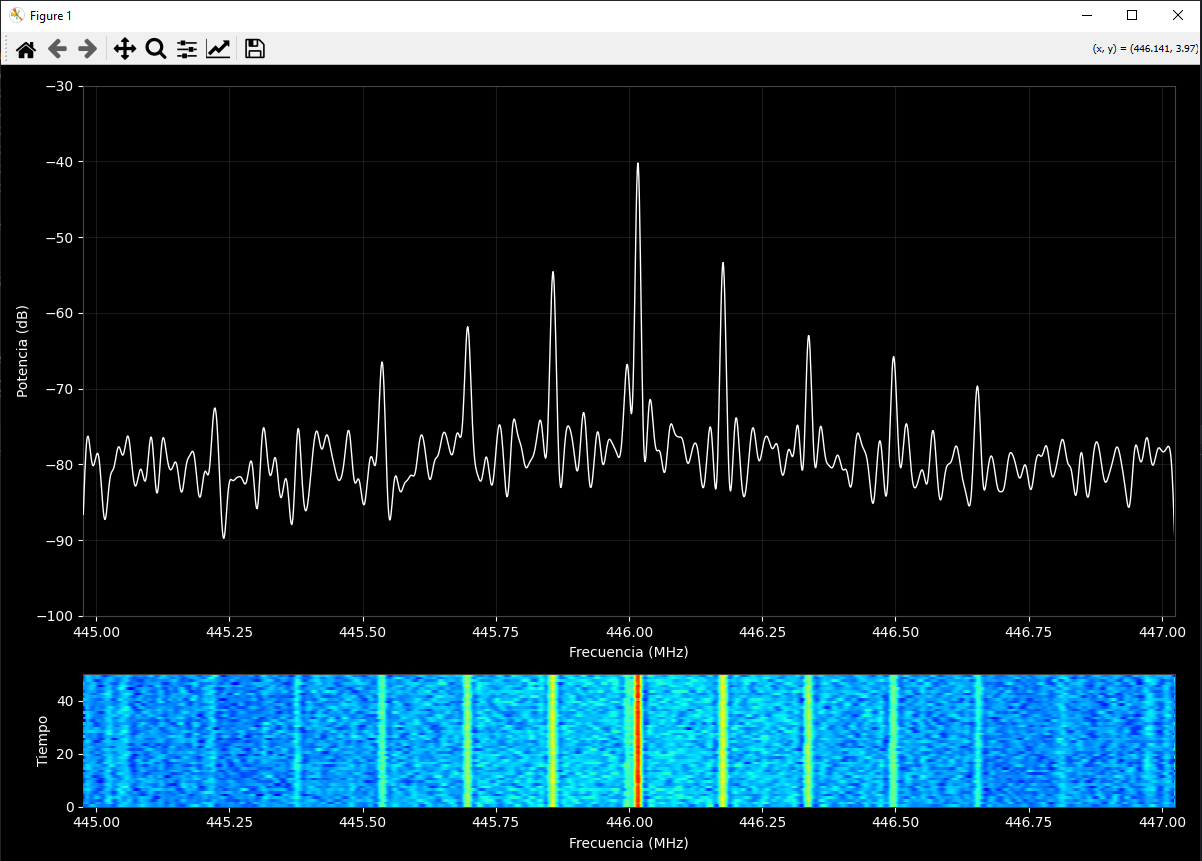
A spectrum analyzer paired with a directional antenna is really the heart of any serious detection setup. Sweep the antenna across a room or down a street, and the jamming signal lights up like a beacon against an otherwise quiet noise floor—the energy rises and falls as you move, so you can pull a bearing in just a few seconds. That directional piece matters more than people think. Without it, you're only measuring how much interference is present, not where it's actually coming from.
Software Defined Radio, like the HackRF One, works by first learning what the normal spectrum looks like at a given location and then flagging any hidden noise or spikes that don't belong there. That baseline-and-compare approach really pays off in offices and apartment buildings, where legitimate Wi-Fi and cellular traffic is already crowding the band. The table below breaks down the main tools and what each one is actually good at.
| Tool | Best Use | Key Limitation |
|---|---|---|
| Spectrum analyzer + directional antenna | Seeing and bearing the jamming signal | Cost and operator skill |
| Wideband field strength meter in a vehicle | Rapid drive-around sweeps | Imprecise indoors |
| Software Defined Radio (HackRF One) | Baseline spectrum comparison | Needs a known clean reference |
| Phone apps (Jammer Detector) | Logging outage events and locations | Largely unproven, needs signal |
Once you've got a bearing, you'll want to take readings from three separate points to triangulate the transmitter. Two bearings will cross along a line, but three give you a fix that holds up even with reflections bouncing off buildings and metal. In dense urban RF environments, I always grab a fourth reading to sanity-check the intersection before I trust it enough to go knock on someone's door.
Triangulation: Finding the Jammer's Position
Triangulation is what turns those bearings into an actual location. You start by recording the direction of the strongest signal from point A, then you do the same thing from points B and C, and the three lines should intersect right around where the transmitter is. The farther apart your measurement points are, the tighter and more precise that intersection gets. That said, there's a tradeoff: you still need a strong enough signal at each stop to pull a clean bearing in the first place, so you can't just space the points out endlessly and expect good results.
J911 takes a different route by using aggregate phones reporting J/N, meaning the jammer-to-noise ratio, along with position, to locate a jammer. That crowd-sourced approach is fast when many devices are affected in the same area, because the phones themselves become the sensor network. It is a good example of how mass telemetry can beat a single expensive instrument for speed, if not for precision.
In practice, I combine both: a field strength meter for the rough sweep, then a directional antenna for precise bearings, then triangulation to fix the spot. If the jammer is indoors, expect multipath reflections to bend your lines, so move a few feet and re-check. The goal is not a perfect map, it is a confident enough fix to hand to building security or law enforcement.
Wi-Fi and GPS Jammer Detectors
Wi-Fi Jammer Detector is an Ethernet-connected device that monitors Wi-Fi and RF signals and alerts on nearby Wi-Fi jammers. Because it sits on the wired network, it keeps reporting even when the wireless spectrum around it is being drowned out, which is exactly the scenario you care about. That wired backhaul is the detail that makes it more than a novelty.
GP-Probe Nano is a portable GNSS and GPS jammer detector that works standalone or via USB-C to Android, with real-time alerts and logging. Digitpol's JamDetect detects GPS jammers in car parks and alerts a control room, security guards, or law enforcement within seconds. Both target the GPS band specifically, which matters because GPS jamming rarely shows up as a dropped phone call.
The pattern across these products is specialization. A general RF sweep finds cellular interference, but GPS and Wi-Fi jammers often need dedicated monitoring because the symptoms look like device failure rather than interference. If your fleet's trackers all go dark in one lot at the same time, a GPS-specific detector is the right first tool, not a phone app.
Legal and Regulatory Considerations
It is illegal to sell, advertise, distribute, or operate cell signal jammers in the United States and much of the world. The FCC says jamming equipment poses serious risks to critical public safety communications and can prevent 9-1-1 calls, and the Communications Act of 1934 outlaws interference with authorized radio broadcasts. That legal weight is why you document and report rather than confront.
To report, contact law enforcement or file an FCC complaint; the FCC Jammer Enforcement page has an Interference > Signal Jammers option. I keep a written log with timestamps, locations, and device symptoms before filing, because a clean record makes the complaint actionable. Do not try to seize or disable a device yourself, and do not transmit on the jammed frequency to fight back, since that can create its own violation.
This article is informational and is not legal advice. If jamming is affecting safety-critical systems, treat it as an emergency and call the authorities rather than running your own countermeasures. The detection work is yours to do, but enforcement belongs to the regulators.
What Does a Signal Jammer Look Like in the Real World?
A jammer usually resembles a walkie-talkie, a cell phone, or a wireless router, and that camouflage is the whole point. I have seen units taped under desks, tucked into ceiling tiles, and hidden inside a router shell with the antennas still attached. Physically locating and disabling the device is often the only practical way to stop it, since jamming range is typically no more than about 30 square feet.
When you get close, look for heat, an unusual power brick, or antennas that do not match the device they are attached to. A router-shaped object with no Ethernet cable and a suspiciously warm case is worth a second look. Pair that physical inspection with your RF bearings, and you can usually confirm the source in minutes instead of hours.
Remember that the jammer does not need to be in the same room to hurt you. Through a wall or from a vehicle outside, a 30-square-foot effective radius can still take down a small office. That is why I always finish with a bearing check from outside the building before naming a suspect device.
Why Detection Beats Guessing
The difference between a frustrating outage and a solved problem is measurement. A spectrum analyzer with a directional antenna, a few triangulation points, and a dedicated detector for the affected band will find a jammer far faster than swapping SIM cards or rebooting routers. Every method here is about turning a vague complaint into a bearing and a location.
Start with symptoms, confirm with spectrum, fix the position with triangulation, and document everything for the FCC or local police. Keep expectations realistic: apps are unproven, boosters will not save you, and a wide-band jammer can hide several problems behind one symptom. The tools are mature, but the discipline of taking clean readings is what actually closes the case.
Frequently Asked Questions
How can I detect a signal jammer near me?
Use a spectrum analyzer with a directional antenna to spot abnormal RF noise on cellular, Wi-Fi, or GPS bands. A wideband field strength meter in a vehicle can also indicate a nearby jammer during a drive-around sweep. Phone apps exist but are largely unproven and need a working signal to function, so treat them as logging tools rather than detectors.
What equipment is needed to locate a jammer?
A spectrum analyzer and a directional antenna are the core tools, since they reveal both the presence and the bearing of the jamming signal. Taking bearings from three separate points allows triangulation of the transmitter. Software Defined Radio setups like HackRF One can also monitor RF activity and flag unusual noise or spikes against a known baseline.
Are signal jammers legal in the United States?
No. It is illegal to sell, advertise, distribute, or operate cell signal jammers in the United States and much of the world. The FCC states jamming equipment poses serious risks to public safety communications and violates the Communications Act of 1934. Report suspected jamming to law enforcement or through the FCC's Jammer Enforcement complaint process instead of intervening yourself.
What does a signal jammer look like?
A jammer usually resembles a walkie-talkie, a cell phone, or a wireless router, which helps it blend into a desk or ceiling. Physically locating and disabling the device is often the only practical way to stop it, since jamming range is typically no more than about 30 square feet. Look for mismatched antennas, unusual power supplies, and warm cases.