WiFi 6 does not transmit at higher power than WiFi 5, but it reaches farther in practice because it can use the 2.4 GHz band alongside 5 GHz. Here is how bands, walls and real-world layouts decide your coverage.
What Is WiFi 5 and What Bands Does It Use?
--- WiFi 5 is the consumer-friendly name for the IEEE 802.11ac standard released in 2013-14 that ultimately became what almost all routers used through much of last decade by default. The defining hardware characteristic is equally simple: it runs on the 5 GHz band only. That single-band design is what gives rise to many of the range complaints people have about WiFi 5 product even today.
Here's the thing about 5 GHz versus 2.4 GHz: the shorter wavelength lets it push more data per second, but that same physics means the signal bleeds off faster as it travels through distance, drywall, brick, and furniture. WiFi 5 works around this by leaning on wider channels (80 MHz and 160 MHz), 256-QAM modulation, and downlink-only MU-MIMO, which together get theoretical throughput to around 3.5 Gbps in typical setups. Push 802.11ac to its absolute limit, though, and some vendor documentation—Spiceworks included—cites numbers as high as 6.9 to 7 Gbps.
The practical trade-off is coverage. WiFi 5 access points tend to be fast enough in a living room, but fall off sharply two or three walls away. A comparison table published by STRONG gives a figure of 35 meters for the reach of a Wi-Fi signal on 5 GHz hardware, which is in contrast to around double that range at more than 70m for signals over older Wi-Fi 4 hardware. That shorter number is the one that defines your floor plan since WiFi 5 has no 2.4 GHz fallback of its own!
What Is WiFi 6 and How Does It Differ?
WiFi 6 is just the consumer-friendly name for 802.11ax, and it started showing up on store shelves around late 2019 and into 2020. What actually sets it apart isn't some big jump in transmit power—it's the fact that WiFi 6 radios can work on both 2.4 GHz and 5 GHz. That means one access point can handle a smart plug sitting far away on the slower but farther-reaching band while simultaneously serving a laptop on the faster band, no problem.
WiFi 6 also brings efficiency improvements that are important in crowded homes and offices. OFDMA divides a channel into resource units, allowing one transmission to serve multiple devices simultaneously; improved MU-MIMO works in uplink and downlink instead of just working on the downlink side; and 1024-QAM nests about twenty-five percent more data per signal than the WiFi-5's 256-QAM. Target Wake Time schedules the wake windows of devices in order to maximize battery life while BSS coloring minimizes interference from adjacent networks, and WPA3 is generally preferred as a default security.
The speed boost between generations is real, but it's easy to misread. WiFi 6 is rated for up to 9.6 Gbps theoretical, which is nearly triple the 3.5 Gbps figure you'll commonly see attached to WiFi 5. TailWind found that businesses moving up to WiFi 6 typically gain 30 to 40 percent in speed, and Ezurio points to a benchmark of roughly 1.1 Gbps throughput at a distance of 15 feet. Just keep in mind what these numbers actually represent: throughput gains, not range gains that come along for free.
Back in April 2020, US regulators opened up the full-length of a completely new land for wi-fi use with 1,200MHz spread within the newly-opened-up half-dozen GHz band — into which WiFi 6E expands on an identical IEEE802.11ax commonplace» Meanwhile, WiFi 7 (802.11be) popped onto the scene in late-2023 supporting rated speeds of over Candy Crush Widowpeep Suspects Collapsing multi-link operations up to 40 Gbps and even higher.devices that could capture our life today The mainstream of WiFi 6 by the end of 2026, and both retail sales volume and revenue share for wifi7 routers exceeding those for wi-fi- 6 models.
WiFi 6 vs WiFi 5 Range: Why Band Support Matters
Does Wifi 6 have greater range than WiFi 5? Yes, but not because WiFi 6 is super loud. Regulatory authorities put a limit on how much transmit power can be used, which is why you can expect WiFi 6 routers and wifi5 routers in the same country to radiate similar output powers over the same band. This measures the frequency advantage (which bands it can work on and how well)
WiFi 5 exists exclusively on the 5GHz band. WiFi 6 can go down as low frequency at the limit of high-band; which is GHz. In short, this means that a WiFi 6 Network can maintain an actual connection to a device in the farthest bedroom or even garage while most connections for WiFi 5 hand off poorly or simply drop. A summary of the main differences is shown below in a table.
| Feature | WiFi 5 (802.11ac) | WiFi 6 (802.11ax) |
|---|---|---|
| Bands supported | 5 GHz only | 2.4 GHz and 5 GHz |
| Max theoretical speed | About 3.5 Gbps (some sources 6.9-7 Gbps) | Up to 9.6 Gbps |
| Channel width | 80 MHz and 160 MHz | 20, 40, 80, 160 MHz |
| Modulation | 256-QAM | 1024-QAM |
| MU-MIMO | Downlink only | Downlink and uplink, up to eight users |
| Key efficiency features | Limited | OFDMA, TWT, BSS coloring |
| Typical security | WPA2 | WPA3 |
Treat that table like coverage, not a spec sheet. This is the 2.4 GHz row, and this one adjusts how many rooms are still connected together. This is why a WiFi 6 network feels solid with twenty devices, (although individually the device to device might not grow as large). OFDMA and MU-MIMO rows are where these gains exist. This security row is relevant for anyone with older IoT hardware which they are unable to easily update.
How 2.4 GHz, 5 GHz and 6 GHz Affect Signal Reach
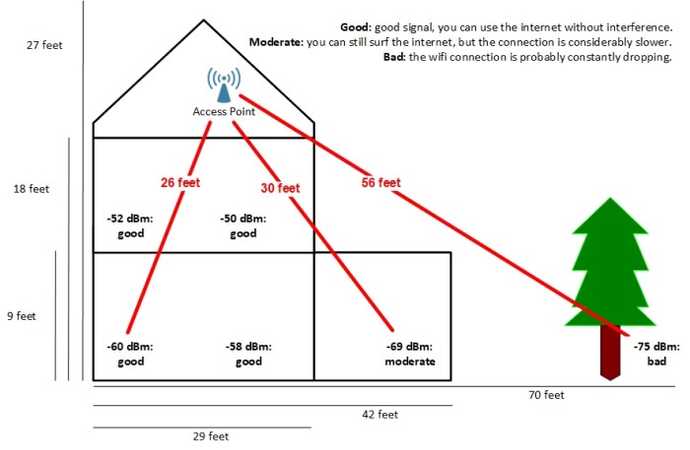
Frequency physics drives everything here. Lower frequencies have longer wavelengths, which means they diffract around obstacles and lose less energy per wall. Higher frequencies carry more data but attenuate faster. This is why 2.4 GHz reaches the far corner of a house while 5 GHz may struggle past two interior walls, and why 6 GHz, added by WiFi 6E, has the shortest reach of the three.
The practical consequence is that band choice often matters more than the WiFi generation printed on the box. A WiFi 6 router forcing a device onto 5 GHz will not out-reach a WiFi 5 router serving the same device on 5 GHz. A WiFi 6 router that lets the device fall back to 2.4 GHz usually will. Intel's own guidance makes the same point: 2.4 GHz for range and wall penetration, 5 GHz and 6 GHz for speed at close range.
STRONG's comparison table illustrates the ceiling clearly. It lists a 70-meter signal range for 2.4 GHz on Wi-Fi 4 hardware, and 35 meters for Wi-Fi 5, 6, 6E and 7 when measured on their fastest bands. Maximum signal rates climb from 5,300 Mb/s on Wi-Fi 5 to 10,530 Mb/s on Wi-Fi 6, roughly 11,000 Mb/s on WiFi 6E and 40,000 Mb/s on WiFi 7. Range, in other words, has barely moved across generations; throughput has multiplied.
Speed vs Range: WiFi 6 vs WiFi 5 by the Numbers
If you compare the two standards strictly by rated throughput, WiFi 6 wins by a wide margin. If you compare them by rated range on their primary bands, the gap nearly disappears. That asymmetry is the single most misunderstood part of the WiFi 5 versus WiFi 6 debate, and it explains why some buyers feel underwhelmed after upgrading.
The table below puts the two standards side by side on the numbers most often cited by vendors and reviewers. Treat the speed figures as theoretical maximums that require ideal conditions, wide channels and client hardware that supports every feature.
| Metric | WiFi 5 | WiFi 6 |
|---|---|---|
| Standard | 802.11ac | 802.11ax |
| Release era | 2013-2014 | 2019-2020 |
| Rated max speed | Up to 3.5 Gbps | Up to 9.6 Gbps |
| Typical range on primary band | About 35 m | About 35 m at 5 GHz, about 70 m at 2.4 GHz |
| Bands | 5 GHz | 2.4 GHz and 5 GHz |
| Best for | Basic connectivity, uncongested 5 GHz | Multi-device homes, mixed-distance coverage |
Two caveats keep this honest. First, WiFi 6 routers and compatible devices cost more, and older WiFi 5 or earlier hardware will not benefit from OFDMA, TWT or 1024-QAM. Second, WiFi 5 has one underrated advantage: its 5 GHz-only design means it never competes with the crowded 2.4 GHz band used by microwaves, baby monitors and Bluetooth. In dense apartments, that can make WiFi 5 feel more consistent than a poorly configured WiFi 6 network.
The upgrade math therefore depends on your device mix. If most of your gear is WiFi 6 or newer, the efficiency features pay off in stability and battery life. If most of your gear is older, a mesh system or a better router placement will improve your coverage more than a standard change will.
Do You Actually See a Range Difference in Real Life?
Real-world testing tells a more nuanced story than spec sheets. In a January 2023 Linus Tech Tips community discussion, the consensus among experienced users was blunt: you are not really going to see a range difference going from WiFi 5 to WiFi 6, and how WiFi 6 devices use the 2.4 GHz band matters far more than the generation label. That matches what most home users report after swapping routers.
The reason is that range is dominated by physics and placement, not by the standard. Transmit power is capped by regulation, antennas are usually similar, and walls do not care whether the packet is 802.11ac or 802.11ax. What WiFi 6 changes is how gracefully the network degrades: OFDMA and BSS coloring keep throughput usable at the edge of coverage, so a distant device may hold a stable video call instead of stuttering.
Where WiFi 6 genuinely expands usable coverage is in mixed-band operation. A WiFi 6 router can keep a doorbell camera, a smart thermostat and a printer on 2.4 GHz while laptops and consoles run on 5 GHz. That split reduces congestion and effectively extends the distance at which each device still works, even if the radio's maximum range has not changed.
For coverage problems, the highest-leverage fix remains mesh networking: a main router plus satellite nodes placed around the home or office, handing off connections as you move room to room. NETGEAR, for example, recommends its Orbi WiFi 7 Whole-Home Mesh Systems for exactly this use case. The same principle applies to WiFi 6 mesh kits, which are now widely available and often cheaper.
WiFi 5 vs WiFi 6: Pros, Cons and Who Should Upgrade
Weighing the two standards comes down to cost, device mix and how much congestion you face. WiFi 6 delivers higher theoretical speeds, better multi-device efficiency, broader band support, stronger built-in security and more flexible coverage. It also costs more, and its best features only activate with WiFi 6-capable clients.
WiFi 5 remains a reasonable choice for basic connectivity, especially on an uncongested 5 GHz band where it can outperform a crowded WiFi 6 network. Its weaknesses are the shorter reach that comes with 5 GHz-only operation and potential backward-compatibility friction with 2.4 GHz-only devices, which cannot connect to a 5 GHz-only access point at all.
The table below summarizes the trade-offs in a form you can apply to your own setup. Use it as a checklist rather than a verdict, because the right answer depends on your floor plan and device inventory.
| Factor | WiFi 5 | WiFi 6 |
|---|---|---|
| Coverage flexibility | 5 GHz only, shorter reach | 2.4 GHz plus 5 GHz, fewer dead zones |
| Multi-device performance | Downlink MU-MIMO only | OFDMA plus uplink and downlink MU-MIMO |
| Security | WPA2 | Typically WPA3 |
| Battery impact on IoT | Higher | Lower with Target Wake Time |
| Cost | Lower | Higher routers and devices |
| Best fit | Light device counts, older hardware | Many devices, mixed distances |
My own rule of thumb after testing both generations in a two-story house with thick interior walls: if you have more than fifteen connected devices or any room that regularly drops, WiFi 6 or WiFi 6E with a mesh node is worth the money. If you have five devices and one dead corner, move the router first. Placement beats generation almost every time.
Timeline: How WiFi Standards Evolved Toward WiFi 7
Understanding the generational timeline helps you judge whether a router is current or simply old stock. Each generation changed either the band it used, the modulation it supported, or both, and range has stayed remarkably flat since 2.4 GHz first appeared.
| Generation | Standard | Year |
|---|---|---|
| WiFi 1 | 802.11 | 1997 |
| WiFi 2 | 802.11b | 1999 |
| WiFi 3 | 802.11g | 2003 |
| WiFi 4 | 802.11n | 2009 |
| WiFi 5 | 802.11ac | 2013-2014 |
| WiFi 6 and 6E | 802.11ax | 2019-2020 |
| WiFi 7 | 802.11be | 2023 |
The pattern is clear: each step forward added throughput and efficiency, while the 2.4 GHz band remained the long-distance workhorse. WiFi 6E's 6 GHz spectrum, approved by US regulators in April 2020, added clean air for short-range speed rather than more reach. WiFi 7 pushes rated speeds toward 40 Gbps and introduces multi-link operation, but it does not repeal the physics of wall penetration.
That is why the honest answer to whether WiFi 6 has better range than WiFi 5 is yes in practice, no in radio power. WiFi 6 reaches farther because it can use the band that reaches farther, and because its efficiency features keep marginal connections usable. If your goal is fewer dead zones, band flexibility plus mesh placement will do more for you than any single spec on a box.
Frequently Asked Questions
Does WiFi 6 have better range than WiFi 5?
Yes, in practice. Upgrading from WiFi 5 to WiFi 6 improves speeds, network range, security and device capacity. WiFi 6 operates on both 2.4 GHz and 5 GHz, while WiFi 5 works only on 5 GHz, so WiFi 6 combines the longer reach of 2.4 GHz with 5 GHz throughput. The radio power itself is similar; the band flexibility is what extends usable coverage.
Does WiFi 5 penetrate walls better?
No. Higher frequency wavelengths like 5 GHz and 6 GHz offer higher speeds but have shorter range and cannot penetrate solid objects as effectively as 2.4 GHz. WiFi 5 relies on 5 GHz, while WiFi 6 also uses 2.4 GHz, which travels farther and passes through walls more effectively. That is why a WiFi 5 network often loses signal first in far rooms.
What are the downsides of using WiFi 6?
Cost and compatibility. WiFi 6 routers and compatible devices can be expensive, and upgrading an entire network adds up quickly. Older devices that only support WiFi 5 or earlier will not benefit from new features like OFDMA, Target Wake Time or 1024-QAM, so full benefits require newer hardware. A mesh node is often a better first purchase than a new router.
Is WiFi 6 outdated now?
WiFi 6 is not outdated, just no longer the newest standard. As of 2026, WiFi 6 is still a mainstream choice for home and business networks, offering a strong combination of speed, capacity and reliability. WiFi 7 is the newest standard, and WiFi 7 routers now outsell WiFi 6 models, but WiFi 6 hardware remains widely supported and affordable.