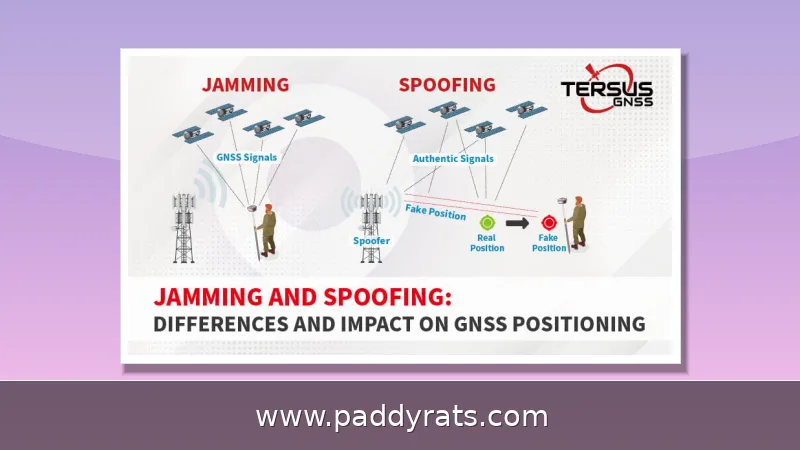
Desktop signal jammer prices run from about $369 for a 6-band unit to more than $2,250 for a 20-band all-frequency model. Here is what drives the cost, which specs actually matter, and how to compare vendors before you buy.
What Is a Desktop Signal Jammer and How Does It Work?
A desktop signal jammer is a stationary RF transmitter that's designed to shut down wireless communication in a fixed space, like a conference room, an office, or an exam hall. It works by broadcasting radio waves on the same frequency bands as the signals you want to disrupt, which prevents phones, WiFi devices, or GPS receivers within the coverage radius from ever completing a connection. You'll run into these devices under a lot of different names, too: signal blockers, stationary jammers, indoor jammers, RF jammers, cell phone jammers. Usually, the label just tells you which band it targets—it doesn't mean you're dealing with a different kind of technology.
If you look past the branding and the sales copy, desktop signal jammers all follow pretty much the same blueprint. There's an RF generator inside that creates the interfering signal, an amplification stage that pushes it up to a usable level, transmission modules that route it to the right frequency paths, and a separate antenna for each band the unit supports. That hardware chain is exactly why no smartphone app can ever jam anything—your phone simply doesn't have an RF generator, an amplifier, or an antenna built to transmit blocking signals. Jamming is a hardware job, period. So as you browse listings and compare prices, keep in mind that three specs really drive both the sticker price and how the thing performs in practice: how many bands it covers, how much total output power it puts out, and how well its antennas are built.
Desktop Signal Jammer Price Ranges and Examples
Desktop signal jammer pricing really comes down to three things: how many bands or antennas the unit has, how much output power it puts out, and the overall build quality. The gap between the cheap end and the expensive end is wide enough that browsing a few vendor catalogs can get confusing fast—especially when you're trying to compare wattage against antenna counts that don't line up neatly from one brand to the next. As a rough map of the market, basic 6-band desktop units start around $370, mid-tier models with 8 to 12 antennas usually fall somewhere between $600 and $1,100, and high-power or all-frequency units push past $1,800 and can reach $2,250. The table below pulls together actual listed prices from current vendor pages so you can see how the tiers stack up.
| Model / Vendor | Listed Price | Notes |
|---|---|---|
| JammerMFG 6-band desktop jammer | $369.91 (was $669.91) | 5 versions, 10–40 m range, 3.0 kg |
| Sistel desktop jammers | From $400 | Entry-level pricing tier |
| JammerX Shield 8 | €649.99 (was €949.99) | 24W, 8 antennas, 20–50 m |
| JammerMaster JM003 | $635.99 | 8 antennas |
| JammerMaster JM001 | $749.99 | 12 antennas |
| GeekJammers 5G 8 Band Jammer | $799.00 | 8-band, 5G coverage |
| JammerMaster JM014 | $899.00 | All-in-one |
| Jammer-store HPJ1000-5G | $999.00 | 5G model |
| JammerMaster JM031 | $1,050.00 | Mid-to-high tier |
| JammerMaster JM002 | $1,088.99 | 16 antennas |
| JammerMaster JM005 | $1,365.99 | Full band |
| Sistel 18-antenna high power | $1,540.00 | High-power build |
| Sistel 26-antenna WiFi6/FM | $1,600.00 | 26 antennas |
| JammerMaster JM006 | $1,839.99 | 5G |
| GeekJammers TSJ 255C | $1,850.00 | High-power model |
| GeekJammers TSJ 5G | $2,090.00 | 5G coverage |
| Jammer-store 20-band all-frequency desktop jammer | $2,250.00 | 130–5900 MHz |
| Model | Bands / Antennas | Listed Price |
|---|---|---|
| JammerMFG 6-band desktop jammer | 6 bands, 5 versions | $369.91 (was $669.91) |
| JammerX Shield 8 | 8 antennas, 24W | €649.99 (was €949.99) |
| JammerMaster JM003 | 8 antennas | $635.99 |
| JammerMaster JM001 | 12 antennas | $749.99 |
| JammerMaster JM014 all-in-one | Multi-band | $899.00 |
| Jammer-store HPJ1000-5G | 5G capable | $999.00 |
| JammerMaster JM005 full band | Full band | $1,365.99 |
| Jammer-store 20-band all-frequency | 20 bands, 130-5900 MHz | $2,250.00 |
Put these listings side by side and a couple of patterns jump out. For one thing, almost every seller leans on discounts to draw buyers in: JammerMFG's 6-band desktop unit is listed at $369.91, marked down from $669.91, and the JammerX Shield 8 plays the same game at €649.99 instead of €949.99. For another, brand name often counts for as much as raw specs when it comes to price. Take JammerMaster — it charges $1,088.99 for the 16-antenna JM002, but its 5G-focused JM006 climbs to $1,839.99, a gap that says more about band coverage and market positioning than about antenna count. Sistel's desktop lineup starts around $400 and runs up to roughly $1,600 for a 26-antenna WiFi6/FM model, while GeekJammers offers a 5G 8-band unit for $799 next to premium TSJ models at $1,850 and $2,090. If you're on a tighter budget, Jammer-store's HPJ1000-5G comes in at $999.00, though its 20-band all-frequency desktop jammer sits way up at $2,250.00. So when you're working out a realistic budget, think of $400 to $800 as the entry tier and $1,500 and up as the professional tier.
| Model | Price | Notes |
|---|---|---|
| JammerMFG 6-band desktop jammer | $369.91 (was $669.91) | 5 versions, 10–40m range |
| JammerX Shield 8 | €649.99 (was €949.99) | 24W, 8 antennas, 20–50m |
| JammerMaster JM002 | $1,088.99 | 16 antennas |
| JammerMaster JM006 | $1,839.99 | 5G-focused |
| Sistel 26-antenna WiFi6/FM | $1,600 | Desktop jammers start around $400 |
| GeekJammers 5G 8-band | $799 | TSJ models at $1,850 and $2,090 |
| Jammer-store HPJ1000-5G | $999.00 | 20-band all-frequency model at $2,250.00 |
Key Specifications: Bands, Power, Range, and Antennas
Most buying mistakes happen at the spec sheet stage. That headline "100m range" figure? It rarely holds up once concrete walls get involved. What actually matters is the number of bands or antennas, total output power in watts, rated range in meters, power supply type, weight, dimensions, cooling design, per-band power adjustment, and whether remote control is supported. Take the TXJammer 12-channel desktop wall-mount unit — it's rated at 60W with a 10-50m range, weighs 4.6 kg, measures 32x35.5x10cm, uses a built-in antenna, and runs on AC110-240V or DC24V.
Power ratings vary wildly, even between jammers that look basically the same on the outside. Part of the reason is that output power gets measured in different ways—peak versus average, total across all bands versus per-band—so a spec sheet never tells the full story. SignalJammerPhone's lineup shows just how wide the spread can get: a T-N8 with 8 bands at 20W, a T-N12 with 12 bands pushing 25–30W over a 50m range, a T-N8P at 42W that reaches 100m, a T-20Pro at 155W covering 20–80m, and a 22-band T-N22 at 56W. JammersHub's Advanced 4G model belongs to a different class entirely, claiming a 50–150m range, -90 to -100 dBm sensitivity, 75W output, 300W power draw, and a 6.1 kg weight—notice that the 300W draw is roughly four times the rated output, which is a good reminder that heat and electricity costs scale right along with wattage. Generally speaking, more wattage gets you more range and better penetration through walls, but you pay for it with extra heat, higher power consumption, and a bigger price tag. And don't overlook cooling—the JammerX Shield 8 advertises a system that keeps operating temps below 45°C, which honestly matters a lot if you plan to leave the thing running all day.
| Model (Brand) | Bands | Output Power | Range |
|---|---|---|---|
| T-N8 (SignalJammerPhone) | 8 | 20W | — |
| T-N12 (SignalJammerPhone) | 12 | 25–30W | 50m |
| T-N8P (SignalJammerPhone) | 8 | 42W | 100m |
| T-20Pro (SignalJammerPhone) | — | 155W | 20–80m |
| T-N22 (SignalJammerPhone) | 22 | 56W | — |
| Advanced 4G (JammersHub) | — | 75W (300W draw) | 50–150m |
| Spec | Entry Tier | Mid Tier | High Power |
|---|---|---|---|
| Bands / antennas | 5-8 | 12-16 | 20-26 |
| Output power | 6-24W | 25-72W | 75-155W |
| Rated range | 5-40m | 20-50m | 50-150m |
| Typical price | $370-$800 | $800-$1,400 | $1,400-$2,250 |
Range specs deserve some healthy skepticism, since the advertised number almost never matches real-world performance. That impressive 100 m figure? It's measured in open space, with a clean RF environment and nothing in the way. Once you put a few interior walls, metal studs, concrete, or just the everyday electromagnetic noise from phones, WiFi routers, and appliances between the jammer and its target, that number can drop fast—sometimes by half or more. So if reliable coverage matters more to you than saving a few bucks, pay closer attention to output power and antenna count than to whatever range the listing claims. A unit with higher wattage and more antennas will usually hold up better across a space than one leaning on a single optimistic figure. It's also worth checking that the unit lets you adjust power per band, so you can target the frequencies you actually need instead of blasting every band at full strength, which wastes energy and creates interference you don't want.
Desktop vs Portable vs High-Power Jammers: Which Fits Your Case?
Desktop jammers occupy a distinct middle ground: more capable than a handheld, less overwhelming than a rack-mounted installation. The typical desktop unit is designed to sit on a table or be mounted to a wall, cover one room or a small area, and draw power from a standard AC outlet. Portable jammers trade away range and band coverage for battery power and mobility, which makes them handy for short field trips but usually unreliable for covering a full-size room. High-power systems go the other direction, adding more bands, external antennas, and stronger amplifiers, and the price tag scales accordingly. That gap explains why the 20-band Jammer-store unit at $2,250 and the JammerMaster JM006 5G at $1,839.99 sit right at the top of the desktop-adjacent range—priced well above a basic 6-band model like the JammerMFG unit at $369.91, yet still meant for room-level coverage rather than a whole building.
| Type | Typical Coverage | Power Source | Example Price |
|---|---|---|---|
| Portable | Small area, short field use | Battery | Lower range |
| Desktop | Single room or small zone | AC power | $369.91–$2,250 |
| High-power | Larger area, more bands | AC power, external antennas | $1,839.99–$2,250+ |
For most buyers, the real deciding factor is coverage area, not raw power. A conference room or a single office usually doesn't need more than 20–50m of range, and a mid-tier unit with 8 to 12 antennas can cover that for a fraction of what a high-power model costs. But if you're dealing with larger exam halls, warehouses, or multi-room floors, you'll need to step up to higher wattage and more antennas—and once you do, it's worth budgeting for proper ventilation and a stable power circuit too. Weight and dimensions matter as well: a 6.1 kg unit drawing 300W isn't something you'll want to move around casually, whereas a 3.0 kg chassis at 305×140×51mm can be repositioned without much hassle.
Common Use Cases and Applications
Desktop jammers show up in a fairly predictable set of environments. Conference rooms and executive offices use them to stop meeting recordings or leaks. Exam rooms and classrooms block cheating via phones or hidden earpieces. Hospitals and clinics restrict wireless traffic in sensitive areas, gas stations reduce ignition risks tied to mobile use, and prisons and government or military facilities deploy them for security. Vehicles are another category, though mobile use raises its own legal questions. The common thread is a controlled indoor space where the operator wants to suppress specific wireless signals for a defined period.
Matching the device to the scenario is what separates a useful purchase from an expensive paperweight. A unit blocking GSM, 3G, 4G, and WiFi handles most office and classroom needs, while GPS L1-L5 coverage or low-frequency bands serve specialized requirements. Vendors such as JammerMFG sell the same 6-band desktop chassis in five versions covering GSM/3G/4G/WiFi for US and EU markets, VHF/UHF, GPS L1-L5, and low frequency, which is a good illustration of how band selection, not just power, defines the product. Before ordering, list the exact frequencies you need to block and confirm the model covers every one of them.
Legal and Regulatory Considerations
Legality is the part of this market that buyers most often underestimate. In the United States, the FCC maintains a dedicated Jammer Enforcement page stating that RF jammers are radio frequency transmitters designed to block communications, and that enforcement applies to their sale, marketing, and operation. That means devices in this category are generally not legal to operate in the US outside narrow government or federal exceptions, regardless of what a vendor's product page implies. Other countries have their own rules, and some permit limited use in specific facilities under license or government authorization.
Because the rules vary so much from one jurisdiction to the next, it makes sense to treat any desktop signal jammer purchase as a compliance decision first and a hardware decision second. Before you add anything to your cart, verify the current regulations in the exact place you intend to use the device, confirm whether a license or written authorization is required, and check whether the vendor can supply documentation for legally permitted deployments. That last point matters more than most buyers expect: a seller who ships a 6-band or 20-band unit without any paperwork may leave you holding hardware you can never switch on. Prices and specs are easy to line up side by side, but an inexpensive jammer that cannot legally be turned on is not a bargain — it is a liability. If your use case touches public safety, prisons, or government facilities, go through the proper authorization channel instead of buying first and asking questions later. This article is informational and does not constitute legal advice.
How Big Is the Signal Jammer Market?
Market research firms don't see eye to eye on the exact size of the signal jammer market, but they do agree on where it's headed. Fortune Business Insights sizes the market at USD 4.61 billion in 2025, growing to USD 9.27 billion, while Strategic Market Research puts it at USD 2.85 billion in 2025, reaching USD 4.64 billion by 2032 at a 7.2% CAGR. Research and Markets estimates USD 2.35 billion in 2026, rising to USD 3.64 billion by 2030 at an 11.5% CAGR, and Technavio projects additional growth of USD 1.08 billion at a 5.66% CAGR over 2023–2028. That's a wide spread — roughly double from the lowest to the highest 2025 figure. The gap comes down to definitions: some analysts count only dedicated RF jamming hardware, while others fold in adjacent categories like drone countermeasures, prison security systems, and government contracts. Different base years and forecast windows add to the noise. Still, every forecast points the same way: sustained demand, driven by security concerns, exam integrity, and the sheer spread of wireless devices.
| Source | Base Year Value | Forecast Value | CAGR / Growth |
|---|---|---|---|
| Fortune Business Insights | USD 4.61B (2025) | USD 9.27B | — |
| Strategic Market Research | USD 2.85B (2025) | USD 4.64B (2032) | 7.2% |
| Research and Markets | USD 2.35B (2026) | USD 3.64B (2030) | 11.5% |
| Technavio | — | +USD 1.08B | 5.66% (2023–2028) |
For a buyer, the practical takeaway is that this is not a shrinking niche with disappearing support. Multiple vendors, including JammerMFG, JammerX, JammerMaster, Jammer-store, GeekJammers, Sistel, SignalJammerPhone, TXJammer, and JammersHub, actively list desktop models with published specs and prices, which makes comparison shopping realistic. The competitive pressure also explains the frequent discounting seen on entry-tier units. Still, market growth says nothing about legality in your location, so keep the compliance check from the previous section in your decision process.
Desktop Signal Jammer Buying Guide: What to Check Before You Pay
Start with a written requirement list: the frequencies you need blocked, the size of the space, whether the unit must run continuously, and the power available at the installation point. Then match those requirements to band count and output power rather than to the biggest number on the page. A 6-band, 10-40m, 3.0 kg unit at $369.91 with a 1-year warranty and free worldwide shipping may be entirely sufficient for a single conference room, while a 20-band 130-5900 MHz system at $2,250 is overkill unless you genuinely need wide spectrum coverage.
Then evaluate the vendor, not just the spec sheet. Confirm the warranty length, check whether shipping and duties are included, and look for real documentation of cooling performance and power supply compatibility. Ask about adjustable per-band power and remote control if you need fine tuning, and verify the antenna configuration, since built-in antennas simplify installation but external ones often perform better. Finally, confirm the legal status of operation in your jurisdiction before ordering. Comparing three or four vendors on these points will tell you more than any single discounted price.
Frequently Asked Questions
How much does a desktop signal jammer cost?
Prices vary widely by band count and power. Listed examples include a 6-band desktop jammer at $369.91, an 8-antenna Shield 8 at €649.99, a 12-antenna JM001 at $749.99, and a 20-band all-frequency unit at $2,250.00. High-power models frequently exceed $1,800, while entry-tier 5- to 8-band units generally start around $400.
What is the range of a desktop signal jammer?
Desktop jammers typically cover 20 to 50 meters, with some higher-power models rated up to 100 meters. Actual range depends on output power, the signal being blocked, and environmental obstacles such as walls, metal framing, and existing electromagnetic interference, so real coverage is often lower than the advertised figure.
How does a desktop signal jammer work?
It emits radio waves on the same frequency band as the targeted signals, disrupting communication so devices cannot connect properly. The key components are an RF generator, a signal amplification stage, transmission modules, and one antenna per band. Band count, output power, and antenna quality determine how effective the unit is.
Are signal jammer apps effective?
No. Smartphone apps lack the RF generator, amplification, and antennas needed to block signals, so they cannot physically disrupt wireless communications. Only dedicated hardware jammers can interfere with radio traffic, and in the United States the FCC states that RF jammers are generally not legal to operate outside narrow exceptions.