Company vehicle GPS tracking works best when employers pair telematics data with clear driver notices, tight data access controls, and written privacy rules. Here is how fleet tracking works, what it costs, and how to prevent misuse and unauthorized tracking.
What Is Company Vehicle GPS Tracking and How Does It Work?
Company vehicle GPS tracking means putting a telematics device in a work truck, van, or car so a fleet manager can see where it is, how fast it's going, and what's going on under the hood. The tracker figures out its position from satellite signals through trilateration — basically timing how long radio signals take to arrive from several satellites in the GNSS constellation. Those signals cover the roughly 12,000 miles to Earth's surface in about one-fifteenth of a second, which is what makes near-real-time location possible.
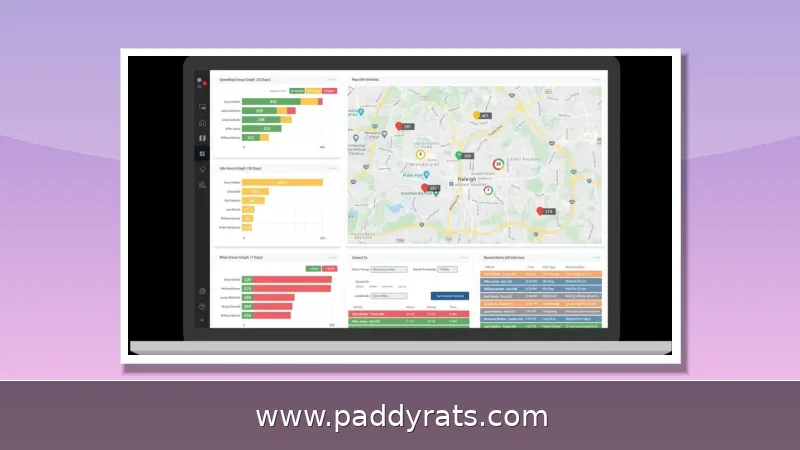
Three main pieces make this work: the GPS satellites (30-plus of them, each broadcasting time-stamped radio signals), the ground control and monitoring stations that keep the constellation on track, and the position processing that happens inside the device in the vehicle. Once the tracker figures out where it is, it sends that data over a cellular network—4G LTE or 5G—to a cloud platform. From there, fleet managers can watch their vehicles on a live map and get alerts for things like speeding, geofence breaches, excessive idling, or maintenance issues.
Installation is usually pretty straightforward. You either plug the device into the OBD-II port or hardwire it into the vehicle's power system, and most installs take less than five minutes. How often the unit reports back depends on your plan — it can range from real-time updates every 5 or 10 seconds to simple pings every 1 or 3 minutes. There's also a difference between active and passive tracking: active systems send data continuously at set intervals, while passive ones store it onboard so you can download it later. Either way, the data itself comes from three places: the Global Positioning System, diagnostic plug-ins, and driver input.
Accuracy comes with a big caveat, though. GPS precision is measured in something called CEP, or circular error probability. So when you see a "10m CEP 50%" claim, it means the reported location lands within a 10-meter radius only half the time — the other half, it's somewhere outside that circle. That distinction matters more than people realize. Older units tend to struggle in dense urban environments, where buildings and interference throw off the signal, and rural or remote areas can leave you with blind spots no matter how good the hardware is. There's also the network side to think about: 3G has been sunset, so 4G is now the baseline, and 5G is showing up on the more advanced units.
Prevention Tips: How Employers Can Use GPS Tracking Responsibly
When we talk about prevention here, we're not talking about shutting down fleet tracking altogether. The goal is to prevent two specific failure modes that erode trust: tracking employees without their knowledge, and mishandling the data once it's collected. Transparency is the first rule. Be clear and upfront about how, when, and why GPS is used, and give drivers a written privacy policy along with specific notice before or at the time they sign up. If a policy only surfaces in an HR folder after a dispute breaks out, it was never really a policy.
Rule number two is access control. Keep GPS data limited to the people who actually need it for work, and write down who's allowed to see what. Rule number three is purpose limitation. Tracking should be restricted to specific times and reasons, like finding a lost or stolen vehicle, detecting an accident, or getting roadside assistance. It's not meant to be a way to watch what employees do during off-duty hours. On top of that, the data should never be used for anything outside of business, and a manager should never be able to pull someone's location history just to settle a personal score.
Rule number four is security and retention. You need to protect location data using technical, physical, and administrative controls, and you shouldn't hold onto it any longer than necessary. Once the retention window closes, dispose of it securely. And since states have different rules about GPS use in vehicles, run your specific program past legal counsel before you roll it out. If drivers are allowed to opt out or switch tracking off in certain situations, give them written instructions so the process stays consistent instead of turning into a case-by-case thing.
Drivers also want to know how to keep their own personal vehicles from being tracked without their knowledge, but that's a separate issue from fleet tracking. Signal jammers and tampering with the device are still genuine threats, so companies need to counter them with security measures like tamper alerts and wiring that's harder to mess with. For employers, though, the real lesson is that prevention comes down mostly to process: give notice, get consent, restrict who can see the data, limit how long you keep it, and delete it securely when you're done. No amount of technology will save a program that's missing those safeguards.
Key Features to Compare in a Fleet GPS Tracking System
Feature sets vary a lot from one system to the next, and the cheapest device almost never means the cheapest program overall. What you want to look for is real-time location tracking, geofencing with unlimited virtual boundaries, driver behavior monitoring with safety alerts, dashcam video for context, maintenance alerts and vehicle diagnostics, plus solid reporting and mobile access. Accuracy, update frequency, connectivity options, and battery life all differ between devices too, so the smart move is to match the hardware to the routes you actually run.
The table below puts representative device pricing and capabilities side by side, drawing on vendors like US Fleet Tracking and BrickHouse Security. Keep in mind these are list prices taken from the source material, and they tend to shift over time, so use them as a rough starting point for budgeting rather than an actual quote.
| Device or Plan | Approximate Price | Notes |
|---|---|---|
| USFT TF-V4 | $149.00 | Real-time tracking, 5-second or 10-second intervals |
| USFT ATv4+ | $129.00 | IP66-rated ATv4-Pro variant available |
| USFT QWKv4 | $75.00 | Entry-level option |
| IZONPro / IZONBase | $189.00 / $129.00 | Requires a 6-month purchase |
| BrickHouse TrackPort OBD | $14.95 | Monthly plans start from $9.95 |
| BrickHouse EON SolarTrack | $99.95 | Solar-powered asset tracker |
| BrickHouse EON TailLight Tracker | $124.95 | Concealed tail-light mounting |
Location-only trackers sit at the bottom of the pack. They don't give you vehicle health, driver behavior, or fuel efficiency data, and you'll usually have to bolt on extra equipment just to cover those gaps. On top of that, traditional GPS isn't always reliable—signal interference and hardware limitations can throw off readings, and older units struggle even more in dense urban areas. When tracking is off, the fallout adds up: inefficient routes, higher fuel costs, poor customer service, lower productivity, missed business opportunities, and real safety risks. That's the thing—accuracy and update frequency matter far more than whatever price tag catches your eye.
On the software side, US Fleet Tracking offers 5-second and 10-second real-time GPS update intervals, live traffic and weather overlays, geofencing alerts with unlimited zones, and 90-day activity playback. Those capabilities are the difference between a map that shows where a truck was yesterday and a system that can actually reroute a driver around a closure this afternoon.
Benefits, ROI and Insurance Savings from Fleet Tracking
The business case for fleet tracking is well documented. Businesses use GPS fleet tracking to reduce fuel costs by 10 to 25 percent, improve driver safety, monitor hours-of-service compliance, and optimize routes. About 80 percent of fleets now use GPS tracking, which makes it closer to table stakes than a competitive edge. Unplanned downtime can cost fleets an average of $448 to $760 per vehicle per day, so faster maintenance detection pays for itself quickly.
Fuel savings come from behavior, not magic. A truck traveling at 75 mph uses 27 percent more fuel than one going 65 mph. Excessive speeds accounted for 29 percent of fatal accidents in 2021, with over 12,300 deaths, so speed management is both a safety and a cost lever. Drivers insured through GPS vehicle tracking get into fewer accidents, a reduction of about 20 percent by some calculations.
Insurance is where the math gets interesting. Many major insurers offer discounts of upwards of 30 percent on insurance costs to businesses that implement tracking solutions. AT&T Fleet Complete customers report ROI within two to five months. Fleets that adopt advanced truck tracking can gain up to a 545 percent ROI, and ignoring it carries its own cost. In the United States there are more than 400,000 commercial fleets running at least five vehicles and more than 286 million cars on the road.
Is vehicle tracking worth it? For most operations with more than a handful of vehicles, yes, provided the program is paired with driver communication. Tracking without coaching tends to produce resentment rather than savings. The returns come from using the data to change routes, maintenance schedules, and driving habits, not from simply owning the hardware. If your fleet is small and your routes are fixed, run the numbers carefully before assuming the ROI applies to you.
Driver Behavior Monitoring, Safety and Coaching
Driver behavior monitoring turns raw telematics into a coaching tool. The system scores hard braking, rapid acceleration, harsh cornering, speeding, and excessive idling, then rolls those events into driver scorecards that managers can review weekly. Video telematics and dash cams add context, which matters because a harsh-braking event caused by a pedestrian stepping into the road is not the same as one caused by tailgating.
The coaching conversation is where safety programs succeed or fail. Scorecards should be used to identify patterns and offer training, not to ambush drivers with discipline. I have seen fleets cut preventable incidents simply by reviewing the top three events per driver each week and asking what happened, which builds trust instead of resistance. Document those conversations so the record shows a consistent, good-faith process.
Monitoring also feeds maintenance. The engine control module, or ECM, reports diagnostic trouble codes that can trigger service alerts before a small issue becomes roadside downtime. Combined with HOS and ELD data for regulated carriers, this gives managers a single view of safety, compliance, and vehicle health. DVIR and IFTA reporting can be streamlined from the same platform, reducing the paperwork burden on drivers and back-office staff alike.
Driver resistance is a real short-term challenge, and initial setup costs add up. The way to manage both is to explain the safety rationale, share the policy in writing, and show drivers the data that concerns them, such as their own scorecard. When drivers understand that tracking protects them in an accident dispute, resistance usually fades within a few weeks.
Compliance, Privacy and Data Retention Rules
Compliance is the part of fleet tracking that most often gets neglected until an audit or a complaint arrives. The Federal Motor Carrier Safety Administration sets hours-of-service and ELD requirements for regulated carriers, while the Department of Transportation oversees broader commercial vehicle rules. State law governs much of the privacy side, and those rules vary, so a program that is compliant in one state may not be in another.
A workable GPS tracking privacy policy for employees should state what data is collected, why it is collected, who can access it, how long it is retained, and how it is destroyed. It should also explain whether tracking continues during off-duty hours and whether drivers can disable the device. Give the policy to drivers in writing and keep a signed acknowledgment. If you operate across state lines, have counsel review the policy against each jurisdiction's requirements.
Retention deserves specific attention because location history is sensitive. Do not keep GPS data longer than needed for the stated business purpose, and dispose of it securely once that window closes. Access should be role-based and logged. Data should never be used for non-business purposes, and it should not be shared with third parties outside the vendors named in the policy without a clear legal basis.
Security controls should be technical, physical, and administrative. That means encrypted transmission and storage, restricted physical access to servers or devices, and written procedures for handling requests from law enforcement or from employees themselves. Signal jamming and tampering are ongoing threats, so choose hardware with tamper detection and monitor for connectivity gaps that could indicate interference. Confirm the whole program with legal counsel, because the cost of getting privacy wrong is far higher than the cost of the tracker.
How Do You Roll Out a Fleet Tracking Program Step by Step?
Rollout works best as a sequence rather than a purchase. First, select a tracking solution that fits fleet size and operational needs, including update interval, connectivity, and reporting requirements. Second, equip each vehicle with a GPS tracker, using OBD-II plug-ins where possible and hardwiring where tamper resistance matters. Third, configure the software to collect and analyze the data you actually plan to act on, rather than every available metric.
Fourth, integrate the platform with dispatch or fuel management tools so the data flows into existing workflows instead of becoming another dashboard nobody opens. Fifth, train managers on access rules and drivers on the policy, and hand out the written privacy notice. Sixth, set a review cadence for scorecards, maintenance alerts, and retention cleanup. Skipping the training step is the most common reason tracking programs stall after the first month.
A short checklist helps keep the rollout honest. Confirm legal review in every state where you operate, document the business purpose for tracking, define who can see location history, set a retention period, and schedule the first driver communication before the devices go live. None of those steps require new technology, but each one prevents a problem that hardware cannot solve.
Once the program is running, revisit it annually. Fleet size changes, routes change, and privacy expectations evolve. A tracking program that was defensible two years ago may need updated notices today. Treat the policy as a living document and the data as a liability to be minimized, not an asset to be hoarded.
Frequently Asked Questions
How does GPS fleet tracking work in a company vehicle?
A GPS tracker uses satellite signals and trilateration to calculate its position, then sends location, speed, and engine data over cellular networks to a cloud platform. Fleet managers view vehicles on a live map and receive alerts for speeding, geofence breaches, excessive idling, or maintenance needs. Update intervals typically range from 5 seconds to 3 minutes depending on the plan.
What are best practices for employers using GPS tracking on company vehicles?
Be clear and upfront about how, when, and why GPS is used, and give drivers a privacy policy and specific notice. Limit data access to staff with a legitimate business need, restrict tracking to appropriate times and purposes, secure the data, and delete it when no longer needed. Confirm your program with legal counsel because state rules differ.
Can GPS tracking lower commercial auto insurance premiums?
Yes. Insurers offer discounts to fleets that use GPS tracking because it encourages safer driving, discourages personal misuse of company vehicles, and supports timely maintenance. Many major insurers offer discounts of upwards of 30 percent on insurance costs to businesses that implement tracking solutions, and some customers report ROI within two to five months.
What features should a fleet GPS tracking system include?
Look for real-time location tracking, geofencing and virtual boundaries, driver behavior monitoring with safety alerts, dashcam video context, maintenance alerts and vehicle diagnostics, plus reporting and mobile access. Accuracy, update cadence, connectivity options, and battery life also vary between devices, so match the hardware to your routes and reporting needs.
How does company vehicle GPS tracking actually work?
A telematics device in the vehicle receives time-stamped radio signals from multiple GNSS satellites and calculates its position through trilateration. It then sends location, speed, and engine data over a cellular network such as 4G LTE or 5G to a cloud platform, where fleet managers view vehicles on a live map and receive alerts for speeding, geofence breaches, idling, or maintenance needs.
What privacy rules should employers follow when tracking company vehicles?
Employers should provide written notice and a clear privacy policy stating what data is collected, why, who can access it, how long it is retained, and how it is destroyed. Limit access to staff with a legitimate business need, restrict tracking to appropriate times and purposes, secure the data with technical, physical, and administrative controls, and confirm state-specific requirements with legal counsel before deployment.