A hidden GPS tracker can be found in minutes with a Bluetooth scan and a physical walk-around. Here is how to check your car, truck, or SUV for a covert tracking device and what to do next.
What Signs Suggest Your Car Is Being Tracked?
Most people who end up finding a tracker on their car say they had a weird feeling first, long before they grabbed a flashlight. Usually the signs aren't vague, either. Someone keeps knowing exactly where you've been, even though you never told them. Or the same car keeps turning up behind you, trip after trip, at all different hours. Honestly, either one of those is enough to justify spending an hour checking things out.
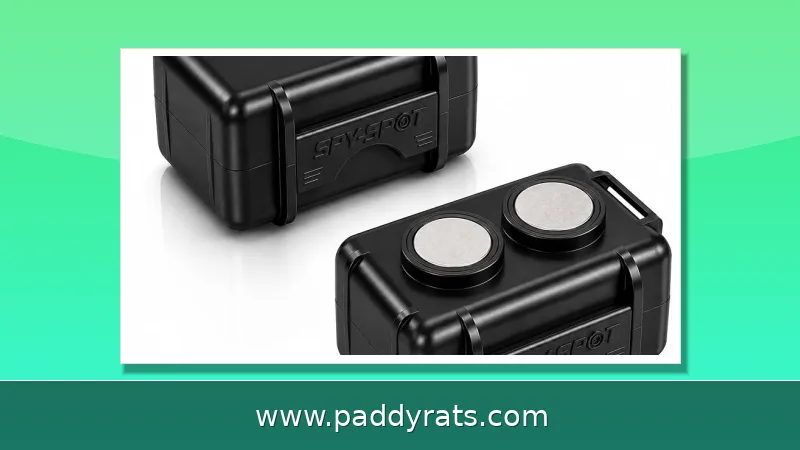
Phone alerts are another early sign. On an iPhone you might get an "Item Detected Near You" notification, and Android users will see an unknown tracker alert come through Google Play services. Then there's the physical evidence. Check under the dash and around the OBD-II port for fresh wiring, zip ties, or electrical tape that doesn't look like it belongs. Also keep an eye out for a small box with a magnet stuck in a wheel well or somewhere on the undercarriage. And if the device is hardwired, you may notice your dashboard battery draining faster than usual, or some kind of parasitic draw pulling on the 12V system.
Context matters just as much as the hardware itself. Investigators say certain situations tend to set this off: a recent breakup, selling the car or taking it in for service, falling behind on payments and risking repossession, or any stretch of time when the vehicle was in someone else's hands. If any of that applies to you, and you're also noticing a pattern, don't treat the search as a thought experiment. Treat it as urgent.
How to Run a 60-Second Phone Scan for Bluetooth Trackers
A phone scan only takes about a minute, and it'll catch most of the consumer trackers people actually use — AirTags, Samsung SmartTags, Tiles, Chipolos. If you're on an iPhone running iOS 14.5 or later, open Find My, tap Items, and scroll down to Items Detected Near You. (On older versions, that section shows up as Items That Can Track You.) Tap the entry, and your phone will play a sound and give you walking directions to wherever the device is hiding. And since iOS 17.5, this works for third-party trackers that piggyback on the Find My network too, not just Apple's own.
If you're on Android 6.0 or newer with Google Play services, the process is pretty straightforward. Head into Settings, then Safety & Emergency, then Unknown Tracker Alerts, and flip the switch on. Once that's done, tap Scan to run a manual Bluetooth sweep. It'll pick up AirTags, SmartTags, Tile, Chipolo, and really anything that follows the DULT standard—that's short for Detecting Unwanted Location Trackers.
Here's the catch, though: your phone can't pick up a cellular GPS tracker. Those devices send their location over 4G or 5G, not Bluetooth, so they'll never show up in a scan. A clean result doesn't mean you're in the clear. It just means it's time to get out of the car and start looking with your hands, which is how most hardwired and OBD-II trackers actually get discovered anyway.
Where Do Hidden GPS Trackers Actually Hide? Ranked Spots
There's a pretty predictable order to where these things get stashed, and it comes down to two factors: how quickly someone can install the device and how unlikely you are to look there. So go through the list from top to bottom instead of poking around at random. And for anything you can't get a direct look at, a mechanic's mirror on a telescoping rod is worth having on hand.
| Rank | Location | Why It Is Used |
|---|---|---|
| 1 | OBD-II port, driver's side under the dash | Plug-and-play, continuous power, roughly two feet from the steering column |
| 2 | Wheel wells | Top spot for magnetic battery trackers; feel along the inner lip of all four |
| 3 | Under bumpers and the undercarriage | Metal frame and crossmembers hide weatherproof boxes and unusually clean patches |
| 4 | Behind license plates | Attached with magnets or zip ties |
| 5 | Engine compartment | Near the battery, fuse box, and wiring harnesses |
| 6 | Interior and trunk | Under and behind seats, glove compartment, console, floor mats, 12V socket, trunk lining, spare-tire cavity, inside door panels |
The OBD-II port is worth checking first, every single time, because it's the quickest place to install a tracker on the whole car. One commonly cited figure says yanking a visible OBD tracker out of that port takes less than five seconds — which gives you a pretty good idea of how little time someone needs to plug one in. So make it your first stop.
Wheel wells come in at number two, and there's a good reason for that. Magnetic trackers need a clear view of the sky and a solid cell signal, so slapping one on the outside of the car takes care of both problems at once. While you're down there checking the undercarriage, keep an eye out for small weatherproof boxes, and pay attention to any patches that look noticeably cleaner than the metal around them. A magnet that was recently stuck there tends to leave exactly that kind of mark behind.
Active vs Passive Trackers: Why the Type Changes Your Search
Every tracker has two jobs: figure out where it is, then report that location back. To fix its position, it listens for satellite signals and triangulates by timing how long those transmissions take to arrive from at least four satellites. The reporting part is where things split, and that split matters a lot when you're trying to find one. Active trackers use a SIM card and a cellular network to push live updates to an app or dashboard, while passive trackers just log data on the device itself until someone physically retrieves it. That single difference changes where you should look and what tools will actually help.
Active trackers, also called real-time trackers, hold a SIM card and push live location over cellular networks such as 4G or 5G to an app or dashboard. They need a clear sky view and a decent cell signal, which is why they are often mounted outside the vehicle or near a window. Passive trackers, or GPS data loggers, store location on the device itself and must be physically retrieved to download the data.
That distinction matters because passive units do not constantly transmit, so an electronic bug sweeper may miss them entirely. Active units are easier to catch electronically but harder to spot physically once hardwired. Power source adds another layer: battery-powered trackers with strong magnets deploy in seconds and last days to a couple of months depending on ping frequency, hardwired units track indefinitely and are harder to find, and OBD-II devices get continuous power with no installation at all.
Tools That Help: BLE Scanners, RF Detectors and RSSI Readings
Free apps like nRF Connect or BLE Scanner list every Bluetooth device broadcasting nearby, which turns your phone into a usable direction-finding tool. The key reading is RSSI in dBm: stronger than about -50 dBm means the source is within roughly a meter. Walk around the vehicle and watch which device gets stronger as you approach.
Apple Find My devices broadcast manufacturer data tagged with Apple's Bluetooth company identifier 0x004C, which is 76 in decimal, and scanner apps label those entries as Apple. Your goal is not to catalog every signal in the neighborhood. It is to find the one device that is always present inside the car and absent when you walk a block away.
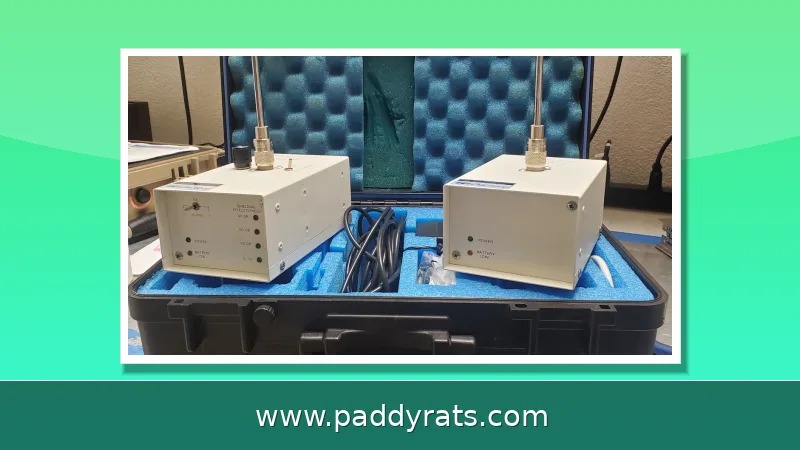
Beyond the phone, a basic kit covers most DIY searches: a handheld RF detector, a flashlight, and an inspection mirror. GPS tracker detectors exist for buyers who want a dedicated tool. Just remember that passive loggers are harder to find with electronic bug sweepers because they do not constantly transmit, so the physical pass still matters. A full DIY check typically takes under an hour.
What Do Popular Trackers Cost and How Do They Compare?
Pricing helps you recognize what you are looking at, because a found device usually matches a known product profile. The table below reflects published specs and rates at the time of writing.
| Product | Device Price | Subscription | Notes |
|---|---|---|---|
| Bouncie | $90 | $9.65/month | OBD-II, 15-second updates, reports only while ignition is on |
| Tracki | $15 | $19.99-$29.95/month | 1-min, 30-sec, or 15-sec plans; up to 30 days battery in save mode; up to 190 countries |
| Apple AirTag | $29 | None | Mostly limited to iOS |
| Piritiz | $19.95 | $9.95/month | No wires, no OBD port, up to 5-year replaceable battery, IP67, 1.75 x 2.75 x 1 inch |
The Piritiz unit illustrates the low end of the market: no wires, no OBD port, an internal battery rated up to five years, IP67 waterproofing, adhesive plus screw mounting, and installation in under two minutes. It ships in one to three business days with no contract and a 30-day money-back window. Tracki's annual pricing runs $167.40, $209.58, or $251.58 depending on ping frequency.
The market context explains why these devices are everywhere. Global GPS tracking device revenue surpassed $3.7 billion in 2024 and is projected to reach $13.7 billion by 2033 according to Global Market Insights, while a separate source put the market at USD 2.5 billion in 2023. Stolen-vehicle data from Piritiz adds urgency: more than 1 million cars are stolen in the US each year, and one in three stolen vehicles is never recovered.
When to Call a Professional TSCM Vehicle Sweep
There is a point where DIY stops being the right answer. If you have checked the OBD-II port, all four wheel wells, the bumpers, the undercarriage, the engine bay, and the interior, and you are still seeing tracking behavior, a professional sweep is the logical next step. Licensed investigators use technical surveillance countermeasures, or TSCM, equipment that goes well beyond a phone app and a flashlight.
The expertise behind that work matters. Matt Aubin, founder of SREcon and treasurer of the Florida Association of Licensed Investigators, represents the kind of background to look for: someone who understands both the hardware and the legal boundaries around vehicle searches. A professional sweep also produces documentation, which can matter if the situation escalates.
Legal context is worth stating plainly. Rules on tracking devices vary by state and jurisdiction, and the legality of what you find depends on who placed it and why. If you discover a device and the situation involves a stalker, a domestic dispute, or an active court case, contact law enforcement before you remove anything, and preserve the device rather than destroying it.
Finally, keep perspective on the odds. Most vehicles do not have a tracker, and a clean phone scan plus a careful physical pass resolves the question for the large majority of people. The goal is a confident answer, not an endless search.
Frequently Asked Questions
How can I check my car for a hidden GPS tracker using just my phone?
Run a free Bluetooth scan first. On iPhone, open Find My, tap Items, then Items Detected Near You. On Android, go to Settings, Safety & Emergency, Unknown Tracker Alerts, then Scan. This catches AirTags, SmartTags, Tile, and Chipolo, but a phone cannot detect a cellular GPS tracker, so follow up with a physical search.
Where are hidden GPS trackers most commonly placed on a car?
The OBD-II port under the driver's-side dash is the fastest plug-in spot and should be checked first. Wheel wells are the top location for magnetic battery trackers, followed by under bumpers and the undercarriage, the trunk, behind license plates, the engine compartment, and the 12V socket.
What are the warning signs that someone is tracking my vehicle?
Watch for someone repeatedly knowing where you have been, the same car appearing across different trips, an unfamiliar tracker alert on your phone, new wiring or zip ties near the OBD-II port, a small magnetic box in a wheel well, and faster dashboard battery drain from a hardwired device.
What is the difference between active and passive GPS trackers?
Active trackers hold a SIM card and send live location over cellular networks like 4G or 5G, so someone can watch the vehicle in real time. Passive trackers, also called data loggers, store location on the device itself and must be physically retrieved to download the data, making them harder to detect electronically.